Salesforce Admin

Feature Image of Salesforce Web Forms The Complete Guide to Collecting Data From Your Website 1
Business User, Integrating Salesforce, Salesforce Admin, Salesforce Basic, Salesforce Customization, Salesforce How-To Guides

Salesforce Web Forms: The Complete Guide to Collecting Data From Your Website

This ultimate guide covers everything you need to know about Salesforce web forms in 2023. Learn about the different types of web forms available, including Web to Lead, Web to Case, and custom object forms. We’ll also cover the pros and cons of using custom code or third-party apps to create your forms, and how to embed your Salesforce web form on your website. Whether you’re just getting started with Salesforce or you’re a seasoned pro, this guide has something for you.

Read →
Feature Image of Gravity Forms to Salesforce Integration
Business User, Integrating Salesforce, Salesforce Admin, Salesforce Customization, Salesforce How-To Guides

How to Connect Gravity Forms to Salesforce: Step-by-Step Integration Guide

Why This Gravity Forms Salesforce Integration Matters Every form submission on your WordPress site is a potential deal. But if those submissions sit in a WordPress database while your sales team works out of Salesforce, you’ve got a gap that costs you leads and revenue. Gravity Forms is the go-to form plugin for WordPress. Salesforce is where your … Read more

Read →
Feature Image of Salesforce Community vs. Plus License
Salesforce Customization, Improving Customer Experiences, Optimizing Salesforce, Salesforce Admin, Salesforce Admin Best Practices

Salesforce Customer Community vs. Customer Community Plus: Which License Is Right for You?

In Salesforce Experience Cloud (earlier called Community Cloud), portals and communities for external users are built using Customer Community and Customer Community Plus licenses. Salesforce renamed Community Cloud to Experience Cloud in 2021, but the license names didn’t change so you’ll still see the old terms used everywhere. Choosing between these two licenses is important. … Read more

Read →
Address Fields in Salesforce
Business User, Improving Customer Experiences, Quick Start, Salesforce Admin, Salesforce Customization, Salesforce How-To Guides

Address Fields in Salesforce – How to Create and Manage

Introduction In Salesforce, the standard address field is a compound field that allows you to store and manage address information for records. It is called the “Address” field type and is commonly used in various standard and custom objects. The Address field in Salesforce is a combination of multiple sub-fields that together represent a complete … Read more

Read →
Featured Image Web To Lead in Salesforce
Business User, Automating Salesforce, Improving Customer Experiences, Quick Start, Salesforce Admin, Salesforce Basic, Salesforce Customization

Web to Lead in Salesforce – DIY in 4 steps

If you want to capture leads from your website and automatically send them to Salesforce, Web-to-Lead is the feature you need. With Web-to-Lead, you can create a custom lead capture form that feeds lead data into Salesforce and generates new lead records instantly. In the following sections, we’ll explore how Web-to-Lead works, how to set … Read more

Read →
uploadCompanyLogo
Salesforce Basic, Business User, Quick Start, Salesforce Admin, Salesforce Admin Best Practices, Salesforce Customization, Salesforce How-To Guides

Change or Add Company Logo in Salesforce in 5 min

This tutorial will teach you how to add a company logo in Salesforce. A company logo is a visual representation of your business. It can be displayed on various pages in Salesforce, such as the login page and the top of the page header. By adding a company logo in Salesforce, you can personalize and … Read more

Read →
Featured Image Custom Object Tabs
Uncategorized, Improving Customer Experiences, Quick Start, Salesforce Admin, Salesforce Customization, Salesforce How-To Guides

How to Create Custom Object Tabs in Salesforce Lightning

Custom Object Tabs in Salesforce are like special buttons that help users quickly access and interact with custom data. Custom objects are created to store specific information that doesn’t fit into the standard Salesforce categories. The tabs make it easier to manage this information by providing a simple way to view, edit, and work with … Read more

Read →
Featured Image Salesforce Sandboxes
Salesforce Basic, Business User, Salesforce Admin, Salesforce Customization, Salesforce How-To Guides

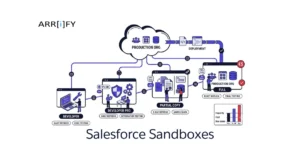
Salesforce Sandboxes 101: Everything about Pricing, Types & Features

When using Salesforce, it’s important to have a safe space to test and try out changes without affecting your real data. This is where sandboxes come in. It lets you experiment with new features or make changes without risking your business operations. In this guide, we’ll explain what Salesforce sandboxes are, how much they cost, … Read more

Read →
Featured Image Salesforce form The best available option
Business User, Improving Customer Experiences, Optimizing Salesforce, Salesforce Admin, Salesforce Basic

Salesforce form – The best available option

When it comes to form solutions for large businesses, Salesforce forms really stand out. Many form builders focus on being quick or easy to use, but Salesforce goes further. It doesn’t just collect information it connects that data directly into your CRM, helping teams build stronger customer relationships and make smarter business decisions. Salesforce offers … Read more

Read →