You set up your first Zap and it felt like magic. New form submission? Automatically creates a row in your spreadsheet, pings your Slack channel, adds a contact to your CRM. Fifteen minutes of setup. No developer needed.
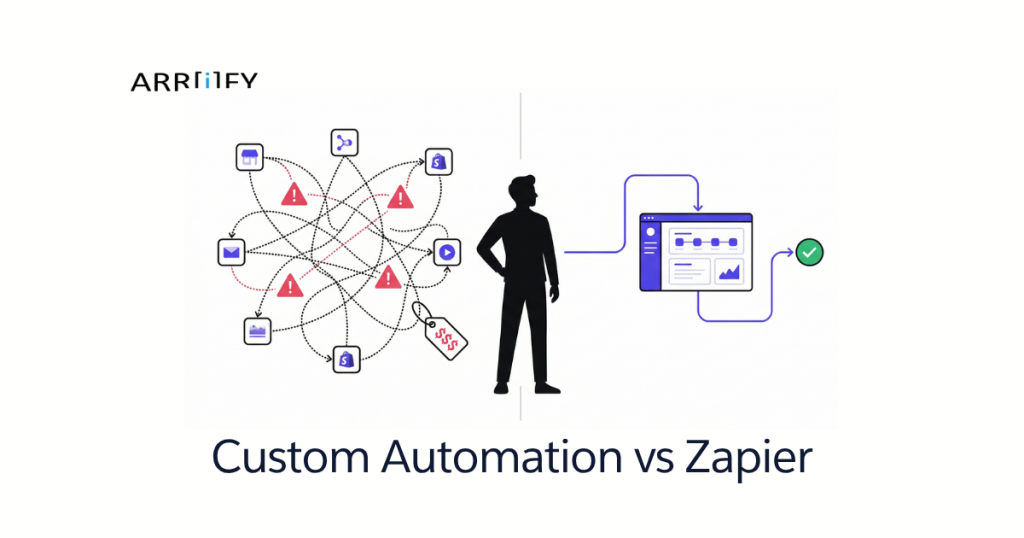
That was a year ago. Now you’ve got 30+ zaps, your monthly bill just crossed $300, three workflows broke last Tuesday and nobody noticed until a client followed up asking why they never got their onboarding email, and you’re spending more time debugging automation than the automation was supposed to save you.
Sound familiar? You’re not alone. And this isn’t a Zapier hit piece — Zapier is genuinely useful. The question is whether it’s still the right tool for where your business is now.
We build custom automation for small businesses. We also tell clients to keep using Zapier all the time. Here’s how to know which side of that line you’re on.
Zapier Is Great — Until It Isn’t
Credit where it’s due: Zapier solved a real problem. Before no-code automation platforms, connecting two apps meant hiring a developer or living with copy-paste. For a small team, Zapier’s value is real and immediate — connect your tools, automate the repetitive stuff, move on.
But Zapier was designed for simple, one-directional automations. Trigger happens, action fires. Maybe a filter or two in between. That’s its sweet spot and it handles it well.
The trouble starts when your business grows past simple triggers and actions. You need workflows with branching logic. You need data flowing in both directions. You need one automation that coordinates five different systems. Zapier can technically do some of this — with workarounds, webhook chains, and Code steps — but you’re now fighting the platform instead of using it.
Most businesses we talk to hit this wall 12-18 months after their first Zap. The signs are consistent enough that we can list them.
5 Signs You’ve Outgrown Zapier
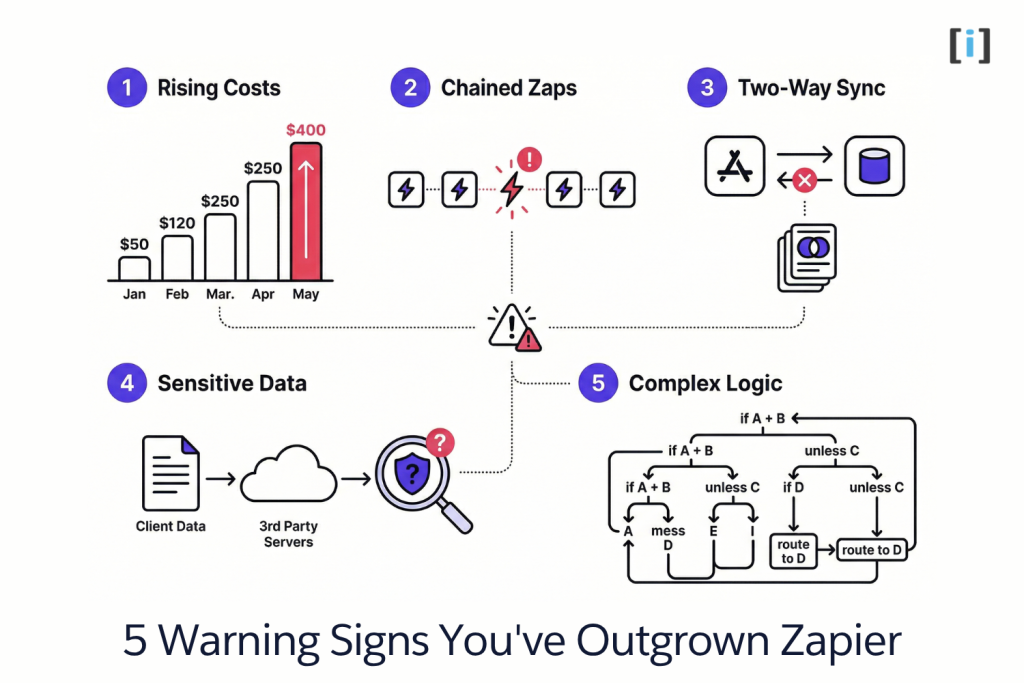
1. Your Monthly Bill Keeps Climbing
Zapier charges per task — every time an action step in your Zap runs, that’s a task. The free plan gives you 100 tasks/month. The Starter plan gives you 750 for $20/month. Sounds reasonable.
Then your business grows. More leads, more clients, more automations. Suddenly you’re on the Professional plan at $49/month, then the Team plan at $69/month, then adding task packs because you’re burning through your allotment mid-month. Premium app connections (Salesforce, HubSpot, Shopify) cost extra. We regularly talk to businesses spending $200-600/month on Zapier.
At that price, you’re paying rent on automation you don’t own. Stop paying, and every workflow stops with it.
2. You’re Chaining 5+ Zaps to Do One Thing
Zapier isn’t built for multi-step orchestration. When a single workflow needs to touch five systems with conditional logic in between, you end up splitting it across multiple Zaps connected by webhooks, delays, and Formatter steps.
This creates a chain — and chains break. When Zap #3 in a five-Zap sequence fails silently (which happens more than Zapier advertises), everything downstream stops. Debugging means opening five different Zap histories, cross-referencing timestamps, and figuring out which step ate your data.
You didn’t automate your workflow. You created a fragile Rube Goldberg machine.
3. You Need Two-Way Sync (and Zapier Can’t)
Zapier is one-directional by design. Data flows from trigger to action. If you need your CRM to sync with your project management tool and vice versa — where changes in either system update the other — you’re fighting the platform.
The workaround is building two separate Zaps (one for each direction), which creates loops, duplicate records, and data drift. You’ll spend more time maintaining the sync than the sync is saving you.
4. You’re Handling Sensitive Client Data
Every Zapier task routes your data through Zapier’s servers. Your client intake forms, patient information, financial records, legal documents — all passing through a third party.
For many small businesses, this is fine. But if you’re a law firm, medical practice, financial advisor, or any business in a regulated industry, this is a compliance question. Your clients expect their data to stay within systems you control. “We use Zapier” isn’t the answer your compliance officer wants to hear.
5. You Need Conditional Logic That Actually Works
Zapier Paths lets you add basic if/then branching. But real business logic — if the lead is in healthcare AND the deal size is over $10K BUT they haven’t responded in 7 days, THEN route to senior rep UNLESS they’re already in an active sequence — gets ugly fast.
You end up with nested Paths, multiple filter steps, and “Code by Zapier” steps that are sandboxed and can’t import libraries or maintain state between runs. It technically works until it doesn’t, and when it breaks, nobody can read the logic anymore.
Key Takeaway: These five signs share a common thread — you’ve moved past simple trigger-action automations into real workflow orchestration. That’s not what Zapier was built for.
The Real Cost: Zapier vs Custom (Let’s Do the Math)
This is the section nobody else writes — probably because it makes things uncomfortable. Let’s use real numbers.
Zapier: 3-Year Total Cost
Most growing businesses aren’t on the free or Starter plans. Here’s what a realistic Zapier stack looks like:
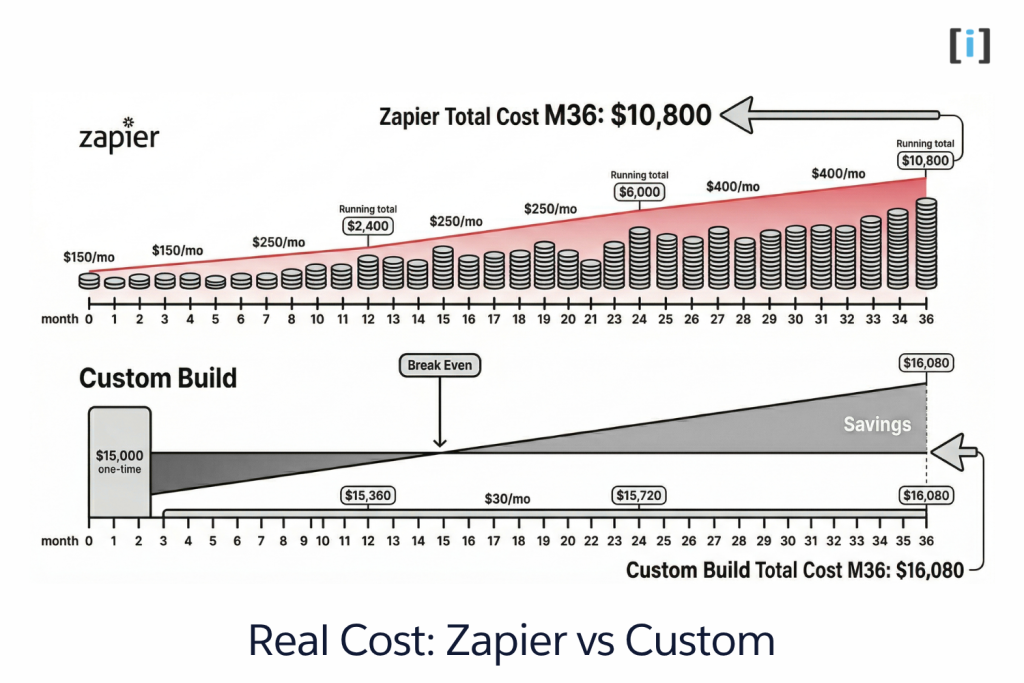
- Year 1: Team plan ($69/mo) + premium apps + task overages = ~$150/month average. Annual: $1,800.
- Year 2: More automations, more tasks, more team members. Monthly spend creeps to ~$300. Annual: $3,600.
- Year 3: You’re locked in. Usage keeps growing. ~$400/month. Annual: $4,800.
3-year total: $10,200. And you own nothing. Cancel the subscription, and every automation stops instantly.
That’s just the platform cost. Add the hidden cost: the 3-5 hours/week someone on your team spends managing broken zaps, building workarounds, and troubleshooting silent failures. At $50/hour, that’s another $7,500-$12,500/year in lost productivity.
Custom Build: 3-Year Total Cost
- Build cost: $8,000-$20,000 one-time, depending on complexity. Let’s use $15,000 as a midpoint.
- Hosting: $30/month for cloud infrastructure. Annual: $360.
- Maintenance: Periodic updates as your business evolves. ~$1,000-2,000/year.
3-year total: $15,000 + $1,080 + $4,500 = ~$20,580. You own the code. It runs on your infrastructure. It doesn’t stop if you stop paying a subscription.
The Comparison
| Factor | Zapier (3 yr) | Custom (3 yr) |
|---|---|---|
| Platform/build cost | $10,200 | $15,000 |
| Hidden ops cost | $22,500-$37,500 | Minimal |
| You own it? | No | Yes |
| Data stays on your servers? | No | Yes |
| Complexity ceiling | Low | None |
| Break-even vs Zapier | — | ~14-18 months |
After month 14-18, custom automation costs less every single month. And that gap widens as your business grows, because custom doesn’t charge per task, per user, or per premium connection.
Pro Tip: Before deciding, add up your actual Zapier spend for the last 6 months — including task overages and premium app fees. Most people underestimate by 40-60% because the costs are spread across multiple line items.
When Zapier Is Still the Right Call
We build custom automation for a living, and we’re going to tell you something most custom dev shops won’t: a lot of you should keep using Zapier.
Here’s when Zapier is genuinely the right answer:
You have fewer than 10 automations and they’re simple. Trigger fires, action happens. Form submitted, row added. Payment received, Slack notification sent. If your automations are truly one-step, Zapier handles this perfectly and cheaply.
Your monthly bill is under $100. If you’re spending $30-80/month and your automations work reliably, the cost of a custom build doesn’t make sense. Don’t fix what isn’t broken.
You’re prototyping a new workflow. Not sure if automating your follow-up sequence will actually improve close rates? Build it in Zapier first. Test for a month. If it works, then decide whether to keep it on Zapier or build it custom. Zapier is an excellent prototyping tool.
The integration is truly generic. “When someone fills out my Typeform, add them to my Mailchimp list.” That’s a solved problem. You don’t need custom code for that. You never will.
The Litmus Test: Can you describe your automation in one sentence without using the word “and”? If yes, Zapier is probably fine. If you need three sentences and a flowchart, it’s time to talk about custom.
What Custom Automation Actually Looks Like
“Custom automation” sounds expensive and abstract. Let’s make it concrete with three scenarios we’ve actually built.
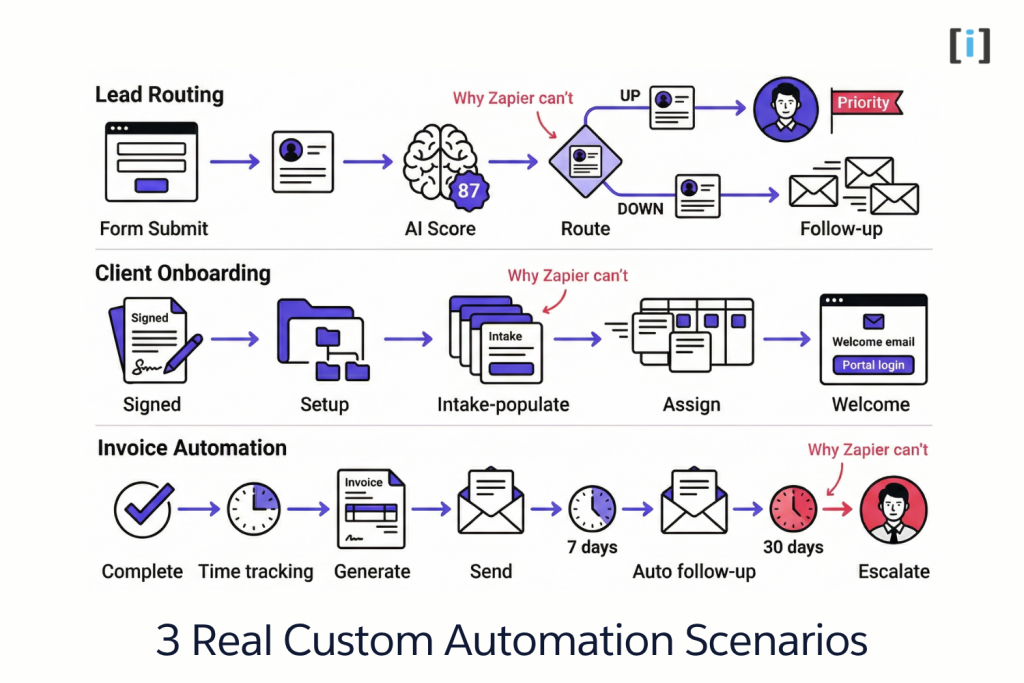
Lead Routing That Actually Works
The workflow: A lead fills out a form on your website. The system enriches the lead with company data, runs it through an AI scoring model based on your actual conversion history, and routes it to the right rep — high-priority leads go to senior sales immediately with a personalized follow-up drafted, lower-priority leads enter a nurture sequence that adapts based on their behavior.
Why Zapier can’t: The scoring logic requires accessing multiple data sources, running calculations, and making routing decisions that change as your model learns. Zapier’s Code steps can’t maintain state, can’t call your custom ML model, and can’t generate personalized content.
Client Onboarding Pipeline
The workflow: A client signs their contract. Automatically: a project folder structure gets created in your cloud storage, an intake form pre-filled with known client data gets sent, tasks populate in your PM tool assigned to the right team members, and a branded welcome email goes out with portal login credentials.
Why Zapier can’t: This requires orchestrating 4-5 systems in a specific sequence with conditional steps (different folder structures for different service types, different task templates based on project scope). If any step fails, the whole onboarding needs to roll back cleanly. Zapier doesn’t do rollbacks.
Invoice & Follow-Up Automation
The workflow: A project milestone is marked complete. The system pulls time tracking data, generates an invoice from your template, sends it to the client, waits 7 days — if unpaid, sends a friendly follow-up. Waits another 7 days. Still unpaid? Sends a firmer reminder and flags the account for your ops lead. At 30 days, escalates with full context.
Why Zapier can’t: Time-based conditional logic across weeks, data aggregation from time tracking into invoice templates, and multi-stage escalation with different messaging at each stage. This is orchestration, not a trigger-action sequence.
Real Talk: Not every business needs this level of automation. If you have 5 clients and send 5 invoices a month, do it manually. Custom automation makes sense when the volume or complexity justifies the investment.
How to Make the Switch (Without Burning Everything Down)
If you’ve read this far and recognized your business in the “5 Signs” section, here’s how to move from Zapier to custom without blowing up what’s already working.
Step 1: Audit your current Zapier stack. Open your Zapier dashboard and list every active Zap. For each one, note: what it does, how often it runs, when it last broke, and how critical it is. You’ll probably find a few zombie Zaps that haven’t run in months — turn those off.
Step 2: Identify the 2-3 workflows that hurt the most. Not the most automations — the most painful ones. The ones that break most often, cost the most in task overages, or handle the most sensitive data. Those are your first custom builds.
Step 3: Build custom for those, keep Zapier for the rest. This isn’t a rip-and-replace. Run your new custom workflows alongside Zapier for 2-4 weeks. Once they’re stable and proven, retire the corresponding Zaps.
Step 4: Migrate gradually. As each custom workflow proves itself, evaluate the next Zapier workflow that’s causing pain. Some Zaps will stay on Zapier forever — and that’s fine. The goal isn’t zero Zapier. It’s the right tool for each job.
Pro Tip: Keep a simple spreadsheet tracking each migrated workflow: before (Zapier cost, failure rate, ops hours) vs after (custom cost, failure rate, ops hours). This becomes your business case for migrating the next workflow.
FAQ
How much does custom automation cost vs Zapier?
Zapier runs $50-600+/month depending on your usage and plan. Custom automation is a one-time build — typically $8,000-$20,000 depending on complexity — plus minimal hosting ($30-50/month). Most businesses break even within 12-18 months.
Can I keep some workflows on Zapier and build others custom?
Yes, and that’s usually the smartest approach. Keep simple trigger-action automations on Zapier. Build custom for the workflows that are complex, fragile, data-sensitive, or expensive on Zapier’s per-task pricing.
How long does it take to build custom automation?
A single workflow goes from scoping to production in 2-4 weeks. Complex multi-system orchestration — like the client onboarding pipeline example above — might take 4-8 weeks. Either way, it’s not a six-month enterprise project.
What happens if my custom automation breaks?
Unlike Zapier — which can fail silently for hours before anyone notices — custom builds include real error handling from day one. Automatic retries, alert notifications, detailed logging. You know immediately when something needs attention, and you have the context to fix it.
Do I need a developer on staff to maintain custom automation?
No. Custom automation is built to run independently. The team that builds it handles ongoing maintenance and updates as your business evolves. You don’t need a full-time hire — just a relationship with the right dev team.