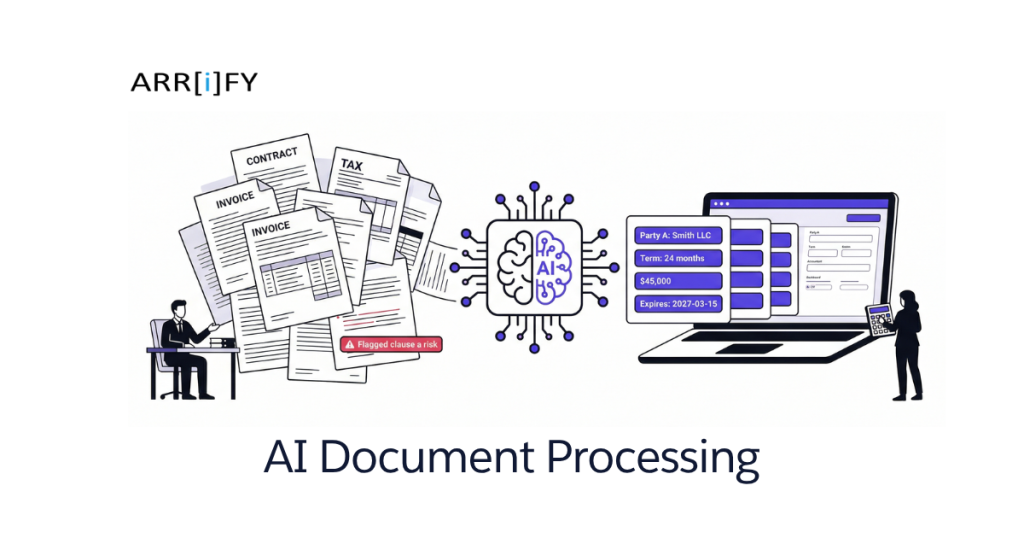
Every law firm paralegal knows the drill. A 40-page lease agreement lands in their inbox. They open it, start reading, highlighting key terms, typing dates and dollar amounts into the case management system. Three hours later, they’ve extracted what the attorney needs — and they still have four more documents in the queue.
Accountants have their own version: tax season hits, and suddenly 200 clients are dropping off folders of W-2s, 1099s, bank statements, and receipts. Each one gets manually keyed into the tax software. Each one takes 45 minutes. Multiply that out and you’re looking at 150+ hours of pure data entry over a few months.
This is the unglamorous reality for small professional firms. You adopted cloud storage, case management software, e-signatures — all the modern tools. But the actual document content? Still processed by human eyeballs and manual keystrokes.
AI document processing changes that. And it’s not some enterprise-only technology that requires a six-figure budget. It’s available, practical, and within reach for firms your size right now.
Your Team Is Drowning in Documents
Here’s what document processing looks like at a typical small firm:
A law firm paralegal spends 6-8 hours per week reviewing contracts, leases, and agreements. They’re reading 30-50 pages, pulling out key terms — party names, dates, dollar amounts, clause types, renewal conditions — and entering everything into the case management system. It’s skilled work done in a low-value way: the paralegal’s time is worth $50-80/hour, and they’re spending it on data entry.
An accounting practice faces a seasonal tsunami. During filing season, staff manually processes hundreds of tax documents per week. W-2 data, 1099 amounts, bank statement totals, receipt categorization — each document touched by hand, each number typed into software that could have received it automatically.
An insurance agent re-types claim information from submitted forms into their management system. Policy numbers, incident dates, claim amounts, coverage types — all manually transferred from one format to another.
At a firm billing $200-400/hour, every hour spent on manual document work is either unbillable time you’re eating or billable time you’re wasting on the lowest-value tasks your team does. And the error rate? Manual data entry sits at about 1-3% — which sounds small until a missed contract renewal date costs your client real money.
What AI Document Processing Actually Does
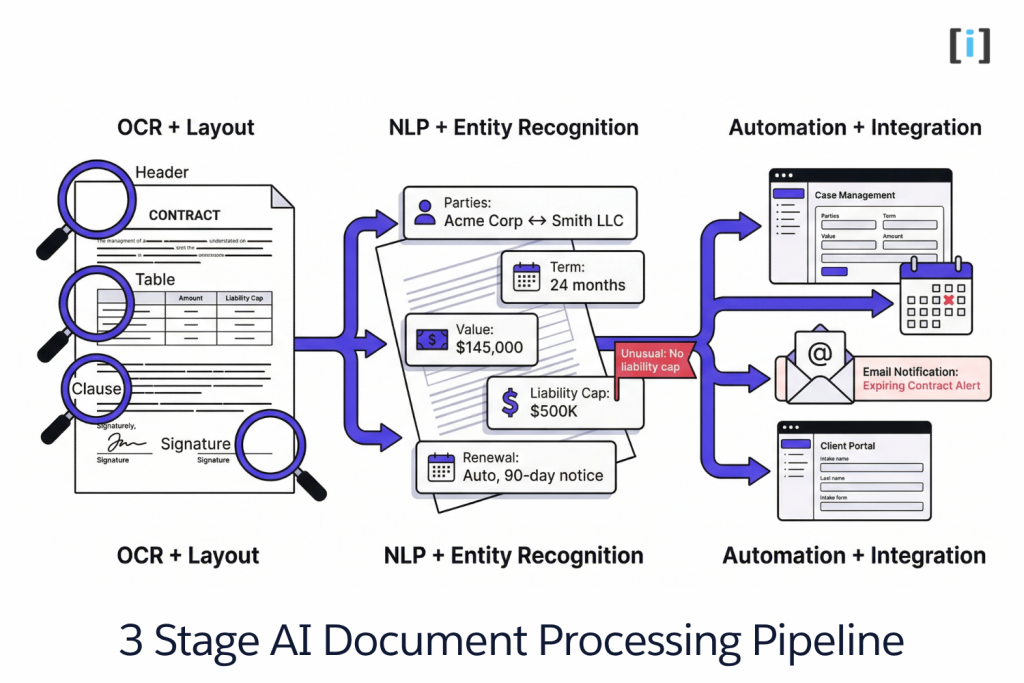
Forget “intelligent document processing platform” and the rest of the jargon. Here’s what the AI actually does, in three steps.
Reading the Document (OCR + Layout Understanding)
AI doesn’t just scan text off a page. It understands document structure — headers, tables, signature blocks, clauses, line items. It knows that “Total Due” on an invoice means something different than “Total Due” in a lease termination clause.
Modern AI goes beyond basic OCR. It handles PDFs, scanned images, photos of paper documents, and even handwritten notes (with varying accuracy). It recognizes that a table on page 12 relates to the clause on page 3. It sees the document as a structured object, not just a wall of text.
Extracting What Matters (NLP + Entity Recognition)
Once the AI “reads” the document, it pulls out the specific data points you care about:
For a law firm: Contract expiration dates, indemnification clauses, liability caps, renewal terms, party names, governing law, termination conditions.
For an accountant: Income figures, deduction categories, W-2 data (employer ID, wages, withholdings), 1099 amounts, bank statement totals.
For insurance: Claim amounts, policy numbers, incident dates, coverage types, adjuster assignments, repair estimates.
The AI doesn’t just find keywords — it understands context. It knows that “$50,000” in a liability cap clause means something different than “$50,000” in an annual rent provision, even though they’re the same number.
Doing Something With It (Automation + Integration)
This is where the real value lives. Extracted data doesn’t sit in a report — it flows directly into your existing systems.
Auto-populate case management fields. Flag contracts expiring in 90 days. Route invoices to the right approval queue. Pre-fill tax return templates. Send an alert when a document contains an unusual clause that needs attorney review.
This is where document processing becomes document automation — and where those 6 hours of paralegal time become 20 minutes of review.
What This Looks Like for a Law Firm
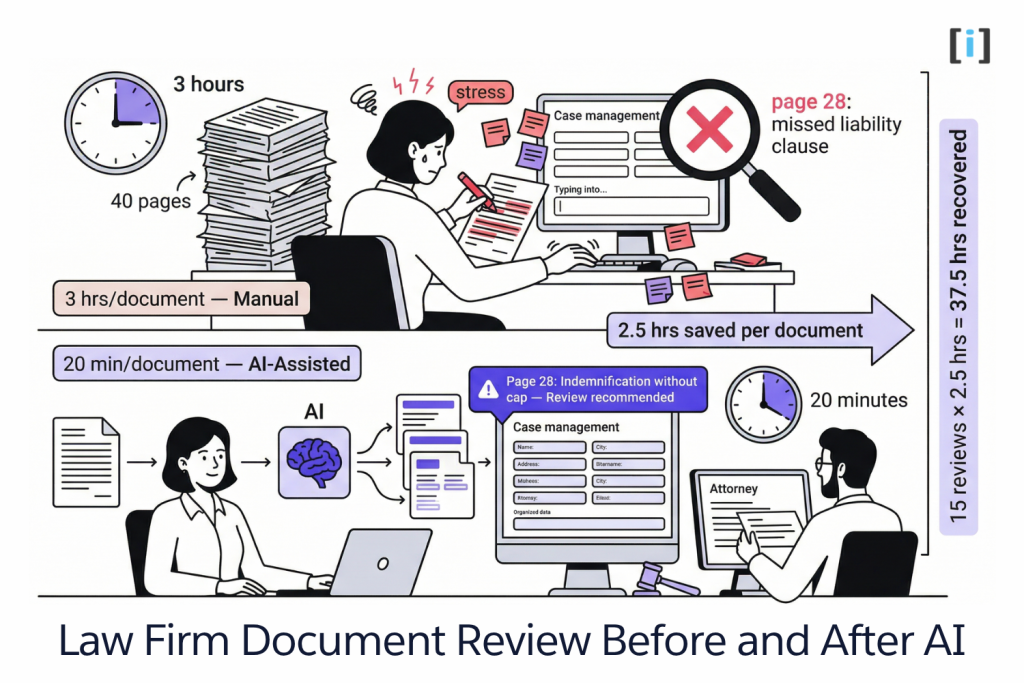
Abstract explanations don’t help. Let’s walk through a real scenario.
The Before (Manual)
A new commercial lease agreement arrives for review. Here’s what happens:
- Paralegal opens the 40-page PDF
- Reads through the entire document, highlighting key terms
- Manually enters into case management: parties, term dates, rent amounts, escalation schedules, renewal options, termination conditions
- Summarizes key provisions for the attorney
- Attorney reviews the paralegal’s summary
- Misses a liability clause buried on page 28 — indemnification without a cap that the paralegal skimmed past on hour two
Time spent: 3 hours of paralegal time + 30 minutes of attorney review. And a potential liability issue got missed.
The After (AI-Assisted)
Same lease agreement, different workflow:
- Document uploaded to the AI system (drag and drop)
- AI extracts in under 2 minutes: all parties, term dates (start, end, renewal windows), rent amounts and escalation schedules, termination conditions, insurance requirements, and every liability/indemnification provision
- AI flags unusual items: “Page 28: Indemnification clause without liability cap — review recommended”
- Case management record auto-populates with extracted data
- Attorney reviews AI summary and flagged items in 20 minutes
Time spent: 20 minutes of attorney review. The liability clause on page 28? Flagged automatically.
Net savings: 2.5 hours per document. At 15 lease reviews per month, that’s 37.5 hours recovered — nearly a full workweek.
The attorney still reviews. AI doesn’t replace legal judgment — it replaces the data entry and first-pass extraction that paralegals spend most of their time on. The paralegal’s time shifts from typing into spreadsheets to work that actually uses their training.
Key Takeaway: AI doesn’t replace your team. It replaces the lowest-value work your team does — and catches things humans miss (like the clause on page 28).
What This Looks Like for an Accountant
Tax Season Without AI
Client drops off a folder: three W-2s, four 1099s, bank statements, a stack of receipts, and a handwritten note that says “I think I can deduct my home office?”
Your staff opens the tax software and starts typing. W-2 box by box. 1099 line by line. Bank statement totals reconciled manually. Receipts categorized by hand.
Time per client: 45 minutes of data entry + 15 minutes of review. 200 clients during filing season: 200 hours of pure data entry. That’s five weeks of full-time work — just entering numbers.
And the errors. After two hours of keying in data, a transposed number turns a $12,500 deduction into $21,500. Nobody catches it until the IRS does.
Tax Season With AI
Same client, same folder. Documents uploaded — scanned, photographed, or PDF’d.
AI extracts: employer info from W-2s, income and withholding amounts, 1099 types and amounts, bank statement totals by month. Auto-maps each data point to the correct tax form field. Flags discrepancies — “W-2 total withholding ($8,200) doesn’t match sum of quarterly estimates ($7,400). Review recommended.”
Time per client: 10 minutes of review and confirmation. 200 clients: 33 hours — down from 200.
That’s 167 hours recovered. Enough to take on 50 more clients, invest in advisory services, or let your team go home at a reasonable hour in April.
Pro Tip: Start with your highest-volume document type first. If 60% of your processing time goes to W-2s and 1099s, get AI handling those before you tackle the messier documents like bank statements and receipts.
Off-the-Shelf vs Custom: What Makes Sense for Your Firm
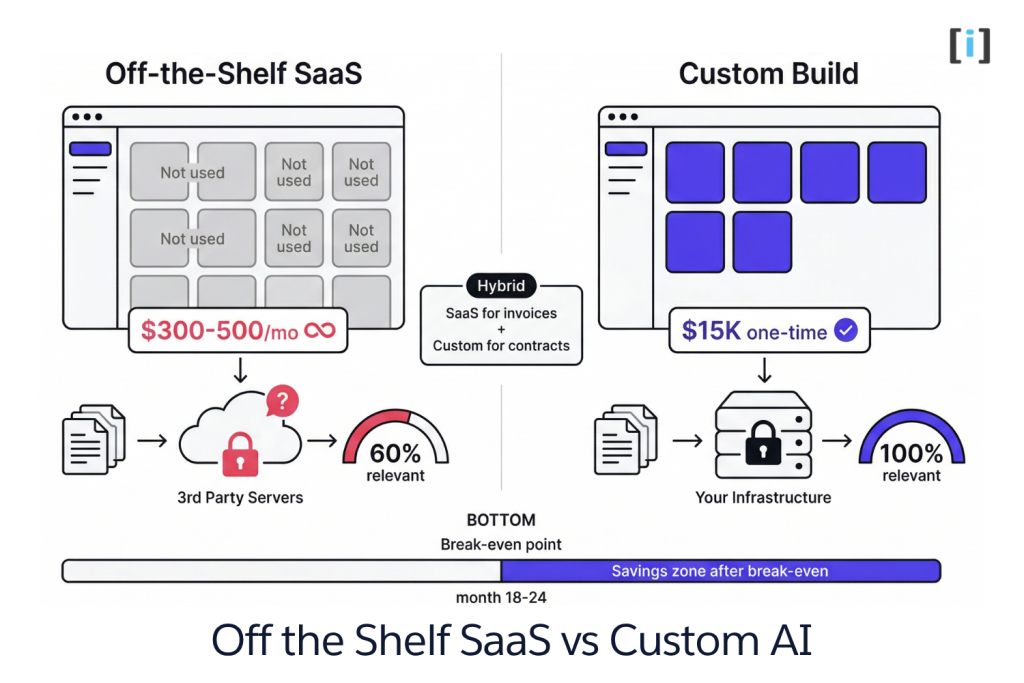
When a SaaS Tool Works
Off-the-shelf AI document processing tools (Nanonets, Rossum, ABBYY, DocuSign Insight) make sense when:
- Your documents are standard formats — invoices, receipts, common forms with predictable layouts
- You process fewer than 500 documents per month
- You don’t need extracted data flowing into custom or niche systems
- Your budget is $200-500/month for a platform subscription
The trade-off: you’re paying for a general-purpose tool. It handles your document types, but also 50 others you’ll never use. And your documents pass through their servers — which may or may not align with your compliance requirements.
When Custom Makes More Sense
Custom AI document processing makes sense when:
- Your documents are industry-specific. Legal contracts with firm-specific clause structures. Tax documents with unusual entity types. Insurance claims with custom fields. Generic AI models work “pretty well” on these — but “pretty well” means your staff still spends time correcting extraction errors.
- You need data flowing into specific systems. Your case management tool, your practice management software, your client portal — not just a CSV export.
- You handle sensitive client data. Attorney-client privilege, financial records, medical information, insurance claims. With a SaaS tool, that data passes through third-party serCopy of Three Stage AI Document Processing Pipelinevers. With custom, the AI runs on your infrastructure.
- You need the AI trained on your documents. A custom model trained on your firm’s specific contract templates hits 95%+ accuracy. A generic model might hit 85%. That 10% gap is 10% of your staff’s time spent correcting errors.
Cost: $10,000-$25,000 one-time build plus $30-50/month hosting. Compared to $200-500/month SaaS over 3 years ($7,200-$18,000), custom breaks even in 18-24 months — and you own the system.
The Hybrid Approach
Most firms we work with land here — and it’s the smartest path:
- Use a SaaS tool for standard, high-volume documents (invoices, receipts, basic forms)
- Build custom for the high-value, firm-specific documents where accuracy matters most (contracts, claims, complex tax documents)
- The SaaS tool handles the commodity work. The custom build handles the work that actually differentiates your firm.
The Litmus Test: If a general-purpose tool gets your document extraction 90% right, is that good enough? For invoices, probably yes. For a contract where a missed clause means liability? Probably not.
What AI Gets Wrong (and Why That’s Fine)
Every vendor in this space promises 99% accuracy. Let’s be honest about what AI actually struggles with.
Handwritten documents. AI accuracy drops significantly on handwriting — expect 70-85% vs 95%+ for typed text. That client note scrawled on a legal pad? AI will catch most of it, but a human needs to verify.
Non-standard layouts. A contract drafted by a solo attorney with creative formatting will confuse most generic AI models. This is where custom-trained models earn their cost — they learn your document formats specifically.
Context and judgment. AI can extract that a liability cap is $500K. It can’t tell you whether that’s reasonable for this deal. AI can flag that a deduction seems unusually large. It can’t determine whether it’s legitimate. Legal and accounting judgment stays human — AI just makes sure the humans have accurate data faster.
The 80/20 reality. AI handles 80% of your document processing perfectly on day one. The remaining 20% needs human review. That’s not a failure — that’s still a massive time savings. Your team shifts from processing every document to reviewing the ones the AI flagged as uncertain.
Here’s the underrated part: AI + human review is more accurate than either alone. The AI catches things humans miss (the clause buried on page 28 after three hours of reading). Humans catch things AI misses (context, judgment, “this number looks right but feels wrong”). Together, they’re better than a paralegal working alone and better than AI working alone.
Real Talk: If someone promises you 99.9% accuracy on AI document processing for any document type, they’re selling you something. Accuracy depends on document type, quality, and how well the model is trained on your specific formats. Ask for accuracy numbers on your document types, not on their demo dataset.
FAQ
How accurate is AI document processing?
For typed, structured documents — invoices, tax forms, standard contracts — expect 90-98% accuracy on data extraction. Handwritten or non-standard documents drop to 70-85%. Custom models trained on your specific document types push accuracy to the high end. The key metric isn’t raw accuracy — it’s time saved even accounting for the corrections.
Will AI replace paralegals or accounting staff?
No. AI replaces the data entry and first-pass extraction — the lowest-value tasks your team does. Your staff shifts from “typing numbers into boxes” to “reviewing AI output and applying professional judgment.” It’s an upgrade for their role, not a replacement.
How long does it take to set up AI document processing?
A SaaS tool can be configured in 1-2 weeks for standard document types. A custom build — trained on your specific documents and integrated with your existing systems — typically takes 4-8 weeks from scoping to production. Not a six-month enterprise project.
Is it safe to process client documents with AI?
With a SaaS tool, your documents pass through their servers — check their SOC 2 certification and data handling policies. With a custom build, the AI runs on your infrastructure and client data never leaves your control. For firms handling privileged or regulated documents, custom is the safer option.
What document types work best with AI?
Structured documents with consistent layouts (invoices, tax forms, insurance claim forms) work best out of the box. Semi-structured documents (contracts, leases, engagement letters) work well with custom training. Fully unstructured documents (handwritten notes, freeform correspondence) are the hardest but still significantly faster than fully manual processing.