You started with Zapier. It worked great — new lead from your website, automatically added to your CRM, Slack notification to the sales team. Took 10 minutes to set up. Magic.
Eighteen months later, you’ve got 35 zaps, a $350/month bill, and a workflow that spans six tools connected by webhooks and workarounds. Last week, three automations broke silently and a client’s onboarding email never went out. Your ops lead spent half a day untangling which zap failed and why.
Now someone says “we should hire a developer to fix this.” But you’ve never hired an automation developer before. You don’t know what it costs, what the process looks like, or whether you actually need one — or if there’s a better option.
This post is the guide you need before that conversation.
Do You Actually Need an Automation Developer?
Most businesses don’t start with a developer — and they shouldn’t. No-code tools like Zapier, Make, and Power Automate are the right first step. They’re fast, cheap, and good enough for simple workflows.
But there’s a point where “good enough” starts costing you more than the alternative. Here are five signs you’ve hit that point:
1. You’re spending more time debugging automations than they save you. If your team loses 3-5 hours/week troubleshooting broken workflows, that’s not automation — that’s a new full-time job.
2. Your workflow needs conditional logic that no-code can’t handle. “If the lead is in healthcare AND deal size is over $10K BUT they haven’t responded in 7 days, route to senior rep.” Try building that in Zapier Paths. Now try maintaining it.
3. You need systems talking to each other in real-time. No-code tools poll every 1-15 minutes. If a customer submits a form and needs an instant response — a custom quote, a portal login, a routed notification — polling delays kill the experience.
4. You’re handling sensitive data that can’t route through third-party platforms. Client data, patient records, financial information — every Zapier task passes through their servers. For regulated industries, that’s a compliance conversation you don’t want to have.
5. You’ve outgrown your no-code tool’s pricing. If you’re spending $200-600/month on platform subscriptions and still hitting limitations, that money could fund a custom build that you own outright.
Quick diagnostic: If 2+ of these are true, you probably need a developer. If zero, stick with no-code — it’s working fine and there’s no reason to fix what isn’t broken.
What an Automation Developer Actually Does
If you Google “automation developer,” you’ll get confused fast. Let’s clear it up.
They’re Not QA Automation Engineers
Most search results for “automation developer” are about test automation — people who write Selenium or Cypress scripts to test whether software works correctly. That’s a completely different role.
A business automation developer builds the actual workflows that run your business. Not the tests that verify software — the systems that move data, trigger actions, and connect your tools.
They’re Not Platform Consultants
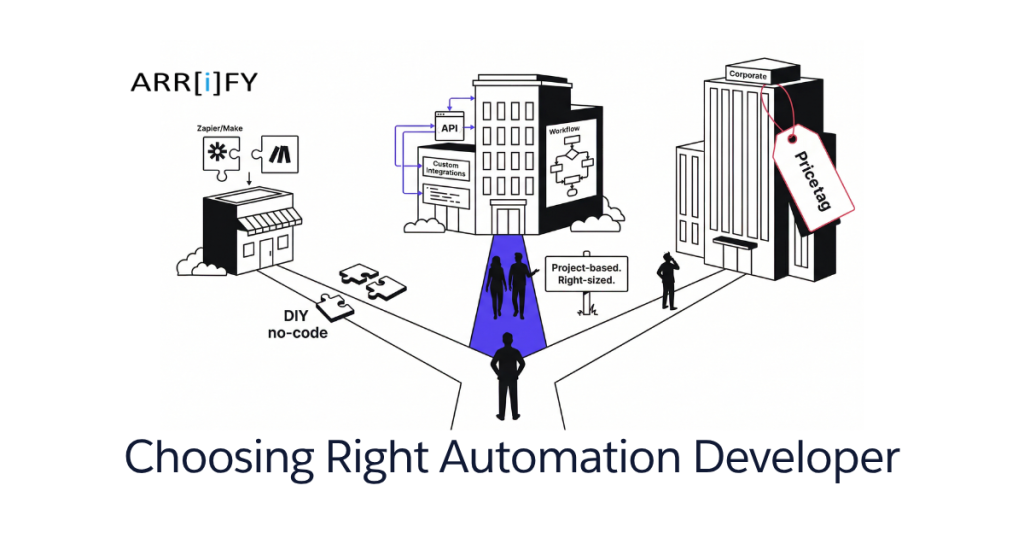
A Salesforce consultant configures Salesforce. A Zapier expert builds within Zapier’s constraints. These are valuable roles, but they’re limited to what the platform allows.
An automation developer writes custom code. They can connect any system with an API, build logic that no platform supports, handle edge cases that would require 15 chained zaps, and create workflows that run on your infrastructure — not a third party’s.
What They Actually Build
Here’s what a business automation developer delivers:
- Custom integrations between your existing tools — CRM syncs with project management syncs with billing, in real-time, with error handling
- Workflow engines with real conditional logic, branching, retry mechanisms, and logging. Not “Zapier Paths” with three branches — actual decision trees that handle your business rules
- AI-powered automation — document processing that extracts data from contracts, lead scoring that routes prospects intelligently, content workflows that classify and tag automatically
- Data pipelines that aggregate information from five sources, transform it, and route it to the right systems and people
- Scheduled jobs — reports generated nightly, data synced hourly, notifications triggered by calendar events — running reliably on your infrastructure without platform dependencies
Full-Time Hire vs Dev Team vs Freelancer
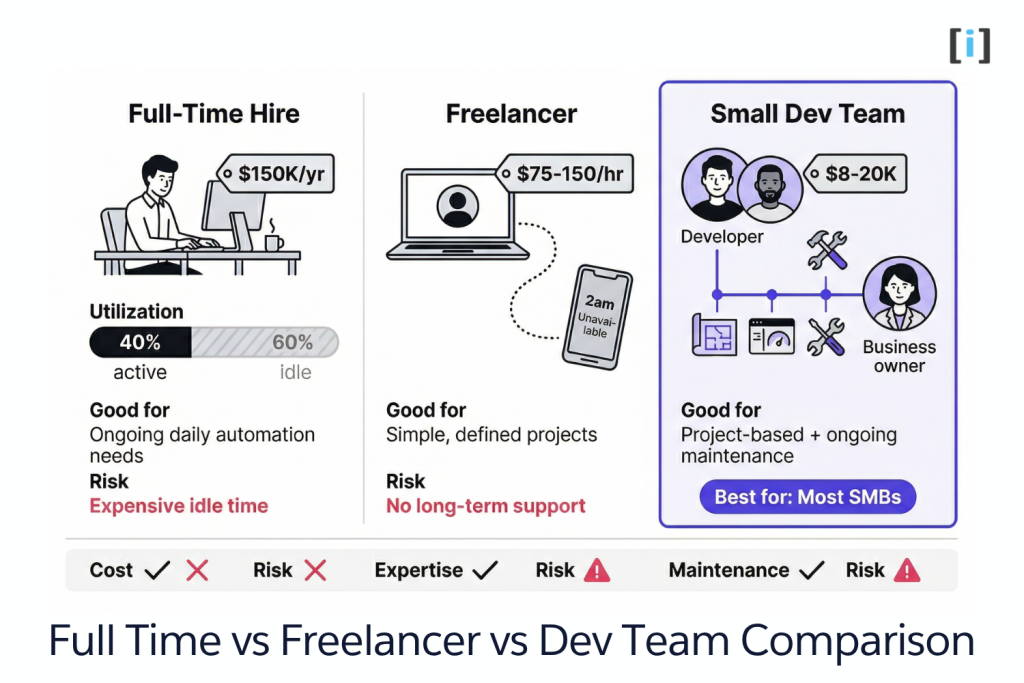
This is the decision most articles skip. You know you need automation development — but what engagement model makes sense?
Full-Time Hire ($120-180K/year)
Makes sense if: You have ongoing, continuous automation work — 20+ hours per week, every week. You need someone who deeply understands your systems and evolves them over years. You’re large enough (100+ employees) to keep a full-time automation engineer busy.
Doesn’t make sense if: You have a specific project or a handful of projects to complete. Your automation needs are periodic — quarterly sprints, not daily work. You’re a 5-50 person company. At $150K/year, a full-time hire who’s busy 40% of the time costs you $375K per productive hour. That math doesn’t work.
Freelancer ($50-150/hour)
Makes sense if: Your project is simple and well-defined — connect A to B, run this report weekly, sync these two databases. Budget is tight and scope is narrow.
Doesn’t make sense if: You need architecture decisions. Freelancers build what you spec — but if you don’t know exactly what to spec, you’ll get exactly what you asked for instead of what you actually need. Also: freelancers move on. When your automation breaks on a Saturday night, who do you call?
The risk nobody mentions: Freelancer availability is unpredictable. They’re juggling multiple clients. Your “urgent fix” might be their “I’ll get to it Thursday.”
Small Dev Team ($8,000-25,000/project)
Makes sense if: You have specific automation projects with defined outcomes. You want the same team that architects the solution to build it and maintain it. You need someone who thinks holistically about how your systems fit together — not just “connect A to B.”
This is the sweet spot for most small businesses. You get senior-level architecture thinking, purpose-built code, and an ongoing relationship — without a six-figure salary. The team scopes the project, builds it, tests it, hands it off, and stays available for maintenance.
| Factor | Full-Time | Freelancer | Dev Team |
|---|---|---|---|
| Cost | $120-180K/year | $50-150/hr | $8-25K/project |
| Best for | Ongoing daily work | Simple, defined tasks | Project-based + maintenance |
| Architecture | Yes | Rarely | Yes |
| Maintenance | Built-in | Unreliable | Retainer option |
| Risk | Expensive idle time | Disappearing act | Scope creep (mitigated by fixed pricing) |
Key Takeaway: If you need automation built, maintained, and evolved — but don’t have enough work for a full-time hire — a project-based engagement with a small dev team gives you the best of both worlds.
What It Actually Costs (Real Numbers)
Every “how much does automation cost” article gives you a range so wide it’s useless. Here’s what projects actually look like:
Simple single-workflow automation — one trigger, 2-3 systems connected, basic conditional logic. Example: new lead from form → enrich with company data → add to CRM → notify sales rep.
- Cost: $3,000-$8,000
- Timeline: 1-2 weeks
Multi-system orchestration — complex logic, error handling, multiple integrations, maybe a simple dashboard. Example: client onboarding pipeline that creates project folders, assigns tasks, sends welcome emails, and tracks completion.
- Cost: $8,000-$20,000
- Timeline: 3-6 weeks
AI-powered automation — document processing, lead scoring, intelligent routing, or content workflows integrated into your systems. Example: AI document processing that extracts contract data and populates your case management system.
- Cost: $15,000-$30,000
- Timeline: 4-8 weeks
Ongoing maintenance: $500-2,000/month for monitoring, updates, and iteration. Optional but recommended — your business changes, and your automations should evolve with it.
The Break-Even Math
Let’s compare a $15K custom build to the alternative: $400/month in no-code platform costs + 5 hours/week of staff time managing and debugging workflows.
At $50/hour staff cost, your current setup costs $1,400/month ($400 platform + $1,000 labor). A $15K custom build with $500/month maintenance breaks even in ~11 months. After that, you’re saving $900/month — and you own the system.
Pro Tip: Before any engagement, calculate your current “automation cost” — platform subscriptions + staff time spent managing, debugging, and working around limitations. Most businesses underestimate this by 50% because the costs are invisible (buried in someone’s Wednesday afternoon).
What the Engagement Actually Looks Like
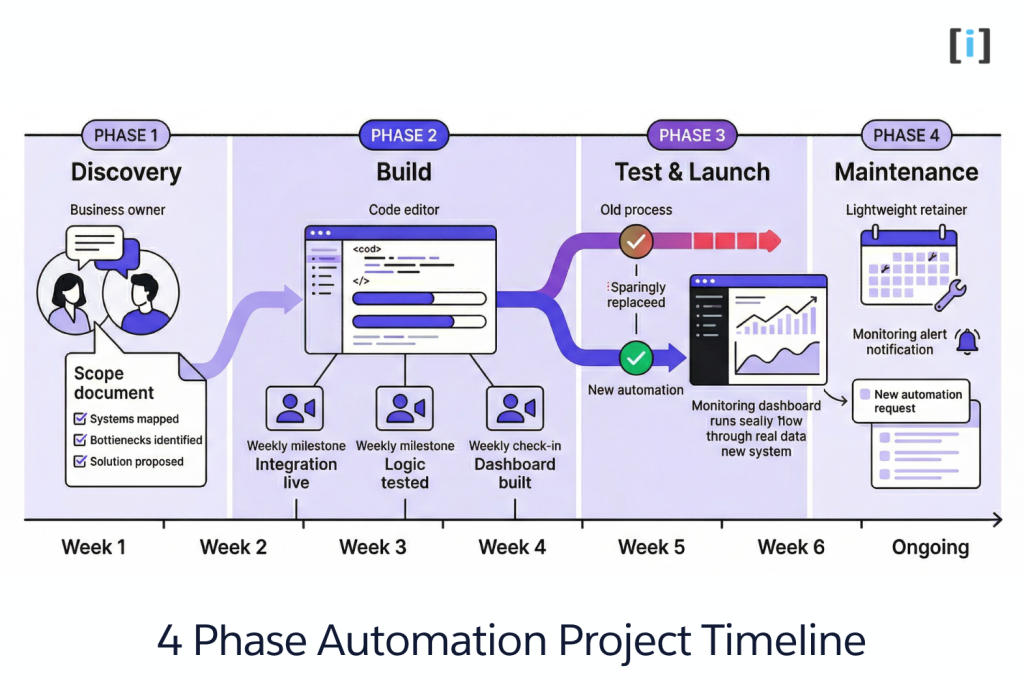
If you’ve never hired a dev team for automation work, the process can feel opaque. Here’s what a typical 4-6 week project looks like, step by step.
Step 1 — Discovery (Week 1)
You explain what’s painful. The dev team listens, asks questions, and maps your current workflows — not just the automated ones, but the manual steps and workarounds too.
What you get: A scope document that describes exactly what they’ll build, which systems it connects, what the logic looks like, and what “done” means. You approve this before any code gets written. No surprises.
This isn’t a $10K paid audit. It’s a 2-3 conversation process that a good team does as part of the engagement.
Step 2 — Build (Weeks 2-5)
The team builds iteratively. Not “disappear for a month and come back with a big reveal.”
You get weekly check-ins showing working pieces of the automation. “Here’s the CRM integration — data is flowing. Next week we’re adding the routing logic.” You see progress, ask questions, and flag issues early — before they become expensive changes.
Step 3 — Test & Launch (Week 5-6)
The automation runs alongside your current process for 1-2 weeks. Real data, real scenarios, real edge cases. Not a demo with sample data — actual business transactions flowing through the new system.
The team monitors everything, fixes issues as they surface, and tunes performance. When it’s stable and proven, the old process retires.
Step 4 — Handoff & Maintenance
You get documentation: what the system does, how it connects to your tools, where to look when something seems off, and how to request changes.
Ongoing maintenance is typically a lightweight monthly retainer. The team monitors the system, updates integrations when your tools change their APIs, and builds new automations as your needs evolve. Think of it as having a dev team on call without the full-time salary.
Red Flags When Hiring
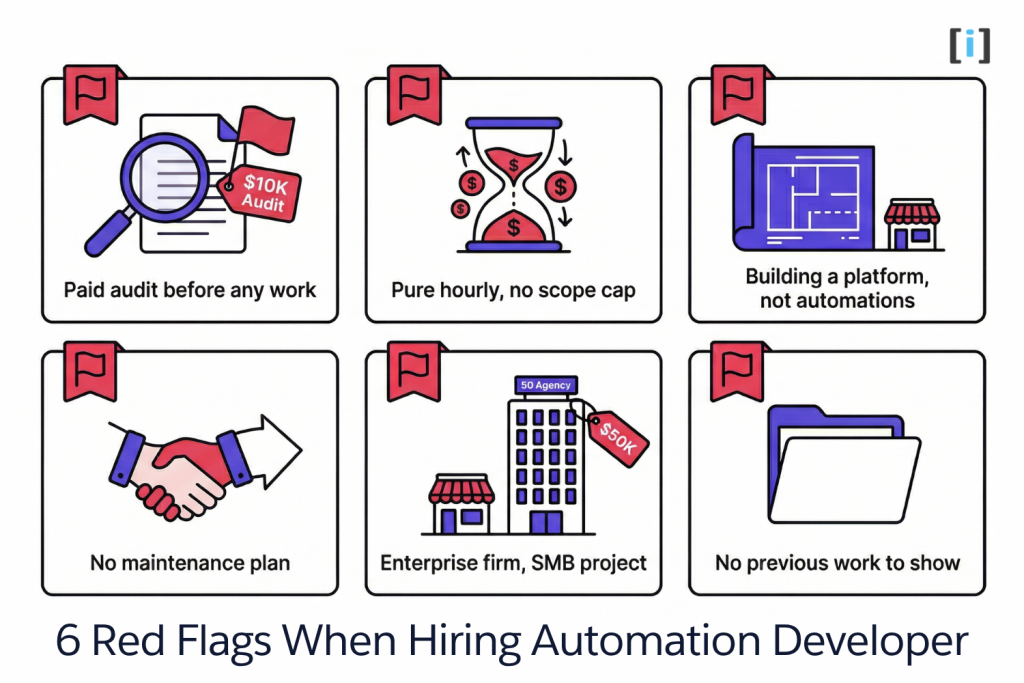
Not all automation developers are the right fit. Watch for these:
“We need to do a full audit first” ($5-10K before any work starts). A competent dev team can scope your automation project in 2-3 conversations. If they need a multi-week paid discovery phase before they can even tell you what they’ll build, they’re either over-engineering or padding revenue. Discovery should be part of the engagement, not a separate line item.
No fixed-price option. Pure hourly billing with no scope cap means the team has no incentive to be efficient. A $75/hour rate sounds reasonable until the project takes twice as long as expected. Look for fixed-price or capped-hourly with clear deliverables.
“We’ll build a custom platform.” You need automations, not a platform. If someone pitches building you a proprietary automation framework from scratch — with a custom admin dashboard, user management, and “future-proof architecture” — they’re building their portfolio on your budget. You need workflows that work, not software you have to manage.
No maintenance conversation. If the team only talks about building and never mentions what happens after launch, ask directly: “When this breaks at midnight, who fixes it?” If the answer is “you,” keep looking.
Enterprise firm for a small-business project. A 50-person agency with a downtown office and a project manager, account manager, and three layers of oversight will charge $50K+ for what a focused 2-person team delivers for $15K. Their overhead is real — but it’s not your value.
Won’t show you previous work. “We’ve built lots of automations” isn’t a portfolio. Ask for specific examples of automation projects they’ve built for businesses your size. If they can’t show you, they either haven’t done it or can’t talk about it — neither is a great sign.
When You Don’t Need a Developer (Be Honest)
We build custom automation for a living, so here’s the part where we tell you when not to hire someone like us.
Your automations work and your bill is under $100/month. If Zapier or Make is handling your workflows reliably and cheaply, a custom build doesn’t make financial sense. Don’t fix what isn’t broken.
Your workflows are simple trigger → action sequences. “Form submitted → add to spreadsheet → send Slack notification.” That’s Zapier’s sweet spot. You’ll never outgrow it for workflows this simple.
You’re not sure what to automate yet. Don’t hire a developer to figure out your processes for you. Prototype on no-code first. Run the workflow for a month. See what works, what breaks, what you actually need. Then bring in a developer with a clear picture of what to build.
You need a one-time data migration, not ongoing automation. Moving 5,000 records from one CRM to another isn’t automation — it’s a migration. A different skill set and a different engagement model.
Real Talk: The best time to hire an automation developer is when you’ve already tried no-code and hit a specific wall. The worst time is before you know what you need automated. No-code tools are excellent discovery tools — use them first.
FAQ
How much does an automation developer cost?
Project-based: $3,000-$30,000 depending on complexity and number of systems involved. Full-time hire: $120-180K/year. For most small businesses, a project-based engagement with a small dev team — $8,000-$20,000 per project — delivers the best value without the overhead of a salary.
How long does a typical automation project take?
Simple single-workflow automations: 1-2 weeks. Multi-system orchestration with complex logic: 3-6 weeks. AI-powered automation with custom model training: 4-8 weeks. These are calendar weeks with a working system at the end — not a prototype or a demo.
Do I need to give a developer access to all my systems?
Only the systems being connected — typically via API keys, OAuth tokens, or limited admin access to specific tools. A good team will tell you exactly what access they need and why. Grant minimum required access, and revoke anything unnecessary after the build.
What if my business processes change after the automation is built?
Custom automation is code you own. It can be modified, extended, or restructured as your business evolves. This is actually a major advantage over no-code platforms, where changing one workflow can cascade breakage through connected automations.
Can I hire an automation developer part-time?
A better model: hire a team for a defined project, then transition to a lightweight maintenance retainer ($500-2,000/month). You get senior-level expertise available when you need it — without paying a salary for the 60% of the time you don’t.