
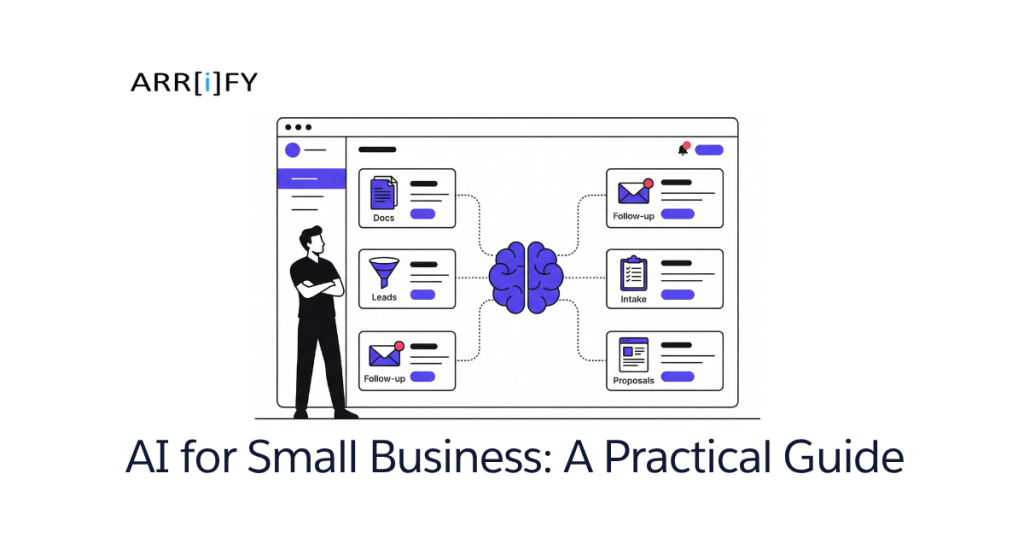
You run a business with 10, maybe 30 people. You’re handling proposals, chasing leads, onboarding clients, and sorting through documents — all while every software vendor on Earth is telling you that AI will change everything.
Here’s the problem: most of what you’re reading about AI was written by enterprise software companies. Their advice assumes you have a data team, a six-figure software budget, and months to experiment. You have none of that. You need things that work now, for your size, without becoming another subscription you forget to cancel.
We build AI tools for small businesses. Not resell them — build them. This guide is what we’d tell you over coffee: what’s real, what’s hype, and where to start.
The AI Problem for Small Business Owners
AI isn’t robots. It isn’t chatbots quoting Shakespeare. For a small business, AI is two things:
- Pattern recognition — looking at data and spotting things a human would catch eventually, but faster. Which leads are most likely to close? Which documents are missing fields? Which customers are about to churn?
- Task automation with judgment — not just “if X then Y” automation (you already have that with Zapier), but automation that can handle messy inputs. Unstructured emails, inconsistent documents, varied customer requests.
The reason most AI advice doesn’t apply to you is simple: enterprise AI projects cost $500K+ and take six months. Small business AI should cost a fraction of that and deliver value in weeks. Different budget, different approach, different tools.
Most “AI for small business” articles hand you a list of 20+ SaaS tools and say “pick some.” That’s not a strategy. That’s a shopping list. You don’t need more subscriptions — you need to know which of your workflows would actually benefit from AI, and whether to buy a tool or build something custom.
Let’s get specific.
Key Takeaway: AI for small business = pattern recognition + automation with judgment. If an article hands you a list of 20 SaaS tools and calls it a strategy, close the tab.
5 Ways Small Businesses Are Actually Using AI Right Now
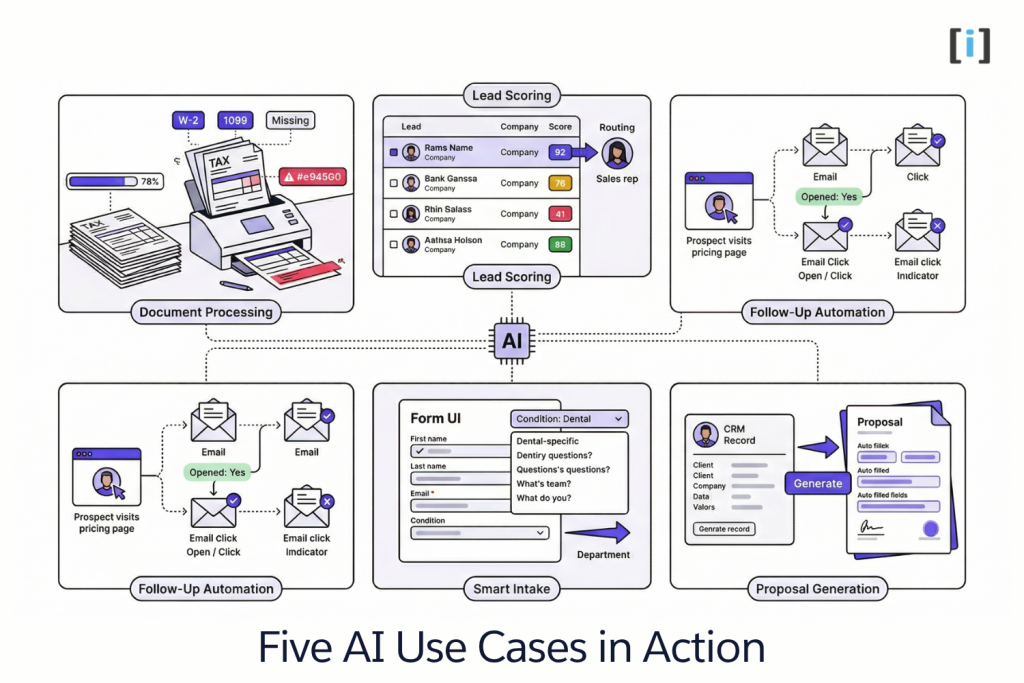
These aren’t hypotheticals. These are workflows we’ve seen (and built) for real businesses with small teams.
1. Document Processing & Data Extraction
What it does: Automatically classifies uploaded documents, pulls out key data fields, and flags what’s missing — without anyone reading through every page.
Who it’s for: Law firms, accounting firms, insurance agencies — anyone who processes high volumes of client documents.
Real example: A small accounting firm gets tax documents from clients in every format imaginable — PDFs, photos of receipts, scanned W-2s, random spreadsheets. Instead of a staff member manually sorting and entering data, an AI workflow classifies each document by type, extracts key fields (income, deductions, employer info), and flags missing items back to the client automatically.
Cost/effort: Off-the-shelf OCR tools start free but hit limits fast with messy documents. A custom pipeline using AI document extraction can be built in 2-4 weeks and handles the edge cases that generic tools choke on.
Pro Tip: Start by tracking how many hours/week your team spends manually sorting documents. That number is your ROI baseline.
2. Lead Scoring & Qualification
What it does: Ranks incoming leads based on fit signals — company size, industry, behavior on your site, form responses — so your sales team talks to the right people first.
Who it’s for: Staffing agencies, financial advisors, SaaS startups, anyone with more inbound leads than they can manually qualify.
Real example: A staffing agency receives 50+ inquiries per week through their website. Before AI scoring, a coordinator spent hours reading each submission and deciding who to call first. Now, each form submission gets scored automatically based on company size, role type, urgency signals in the message, and past conversion patterns. High-scoring leads go straight to a senior recruiter. Low-scoring ones get a nurture sequence.
Cost/effort: Basic lead scoring exists in most CRMs, but it’s rule-based (not AI). Custom AI scoring that learns from your actual conversion data is a build project — typically 2-3 weeks to get a working model, then it improves over time.
Real Talk: If you’re getting fewer than 20 leads/month, you don’t need AI scoring — you need more leads. AI scoring shines at volume.
3. Customer Follow-Up Automation
What it does: Sends follow-up emails and messages that adapt based on what the prospect actually did — not just a static drip sequence everyone gets.
Who it’s for: Real estate agencies, business coaches, consultants — anyone where the follow-up timing and message matter more than volume.
Real example: A real estate team notices that prospects who view the pricing page but don’t book a call are their highest-converting segment — if someone follows up within 2 hours with a relevant message. AI monitors site behavior, drafts a personalized follow-up referencing the specific listings or pages viewed, and sends it through the agent’s email. Not a generic “just checking in” — a message that actually references what the prospect looked at.
Cost/effort: Email platforms like ActiveCampaign or HubSpot offer behavior-triggered sequences, but the messages are templates. Adding AI-generated personalization on top is a lightweight custom build — often just an API layer between your CRM and email tool.
4. Smart Intake Forms & Client Portals
What it does: Forms that adapt their questions based on previous answers, pre-fill known information, and route submissions to the right person or workflow automatically.
Who it’s for: Medical and dental practices, nonprofits, property management companies — anyone with intake processes that currently involve paper, PDFs, or clunky web forms.
Real example: A dental office replaces their paper intake forms with a smart digital form. When a new patient selects “tooth pain” as their primary concern, the form dynamically adds follow-up questions about pain duration, location, and sensitivity triggers — then routes the submission to the right hygienist or specialist before the patient arrives. Returning patients see pre-filled forms with only new or changed information needed.
Cost/effort: Form builders like Typeform offer basic conditional logic. Truly smart intake — with pre-fill from existing records, AI-powered routing, and portal access — is a custom build, usually 3-4 weeks for a first version.
5. Content & Proposal Generation
What it does: Drafts proposals, reports, summaries, or client-facing documents from your existing structured data — CRM records, project specs, intake forms.
Who it’s for: Consulting firms, marketing agencies, any service business that writes custom proposals for every deal.
Real example: A marketing agency spends 3-4 hours writing each client proposal from scratch. With an AI workflow, the team fills out a structured brief (client goals, budget range, services requested), and the system generates a first-draft proposal pulling from past winning proposals, case study data, and pricing templates. The strategist reviews and edits for 30 minutes instead of writing from zero.
Cost/effort: ChatGPT can draft generic proposals, but it doesn’t know your pricing, your case studies, or your voice. A custom proposal generator connected to your CRM and document templates is a 2-4 week build that saves hours per deal.
Key Takeaway: The best AI use cases for small business share three traits — they’re high volume, repeatable, and currently eating hours of manual work. If a task doesn’t match all three, it’s probably not worth automating yet.
What AI Can’t Do for Your Business (Yet)
We build AI tools for a living, and we’ll be the first to tell you where AI falls short. If someone tells you AI can do everything, they’re selling you something.
AI won’t replace your sales team. It can score leads and draft follow-ups, but closing deals still requires human judgment, relationship-building, and the ability to read a room. AI is the assistant, not the closer.
AI won’t fix bad processes. If your intake workflow is a mess with no clear steps, adding AI just automates the mess faster. Clean up the process first, then layer in AI. Garbage in, garbage out is still the law of the land.
AI won’t work without decent data. If your CRM is full of duplicate contacts, missing fields, and notes from 2019, AI has nothing useful to learn from. You don’t need perfect data, but you need consistent data.
AI won’t be “set and forget.” Every AI workflow needs monitoring, especially in the first few months. Models drift. Edge cases appear. Customer behavior changes. Plan for someone to review outputs regularly — not daily, but consistently.
AI won’t make decisions for you. It can surface patterns and recommendations, but the judgment call — who to hire, which market to enter, when to pivot — is still yours. And it should be.
Being honest about these limits isn’t pessimism. It’s how you avoid wasting money on AI projects that were never going to work.
The Litmus Test: Before starting any AI project, ask: “Is my current process clearly defined and working — just slow?” If yes, AI can help. If your process is broken, fix that first.
Build vs Buy: Should You Use Off-the-Shelf AI Tools or Build Custom?
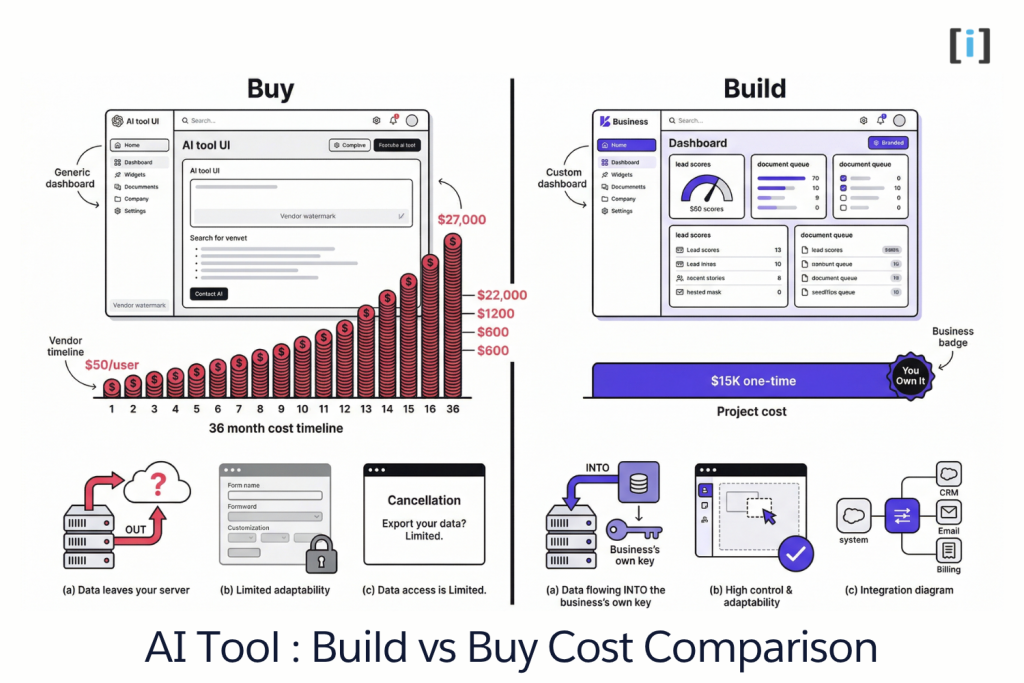
This is the question nobody else is asking, and it’s the most important one for your budget.
When off-the-shelf makes sense
- The use case is generic. Email marketing, basic chatbots, grammar checking, social media scheduling — these are solved problems. Use the existing tools.
- You’re testing an idea. Before committing to a custom build, use a cheap or free tool to validate that AI actually helps this workflow.
- Volume is low. If you process 10 documents a month, you don’t need a custom pipeline. Upload them to ChatGPT manually.
When custom makes sense
- Your workflow is industry-specific. Off-the-shelf tools are built for everyone, which means they’re optimized for no one. If your process has domain-specific logic (legal document types, medical intake rules, real estate compliance), custom wins.
- You want to own your data. SaaS tools send your data through third-party servers. Custom-built keeps everything on your infrastructure.
- Per-seat pricing is killing you. SaaS tools charge per user per month. A custom build is a one-time project cost with hosting fees — no per-seat scaling tax as your team grows.
- You need integrations that don’t exist. Your specific combination of CRM + document management + billing system probably doesn’t have a pre-built connector. Custom makes it work.
Quick decision framework
| Factor | Buy | Build |
|---|---|---|
| Use case | Generic | Industry-specific |
| Data sensitivity | Low | High |
| Team size scaling | Small, stable | Growing |
| Budget | Monthly subscription OK | Prefer one-time cost |
| Timeline | Need it today | Can wait 2-4 weeks |
Most small businesses should start with off-the-shelf tools for simple tasks and build custom for the one or two workflows that actually drive revenue. You don’t need to pick one approach — use both strategically.
Key Takeaway: Buy for generic. Build for revenue-critical. Most small businesses need both — just not at the same time.
How to Start: A 3-Step Framework
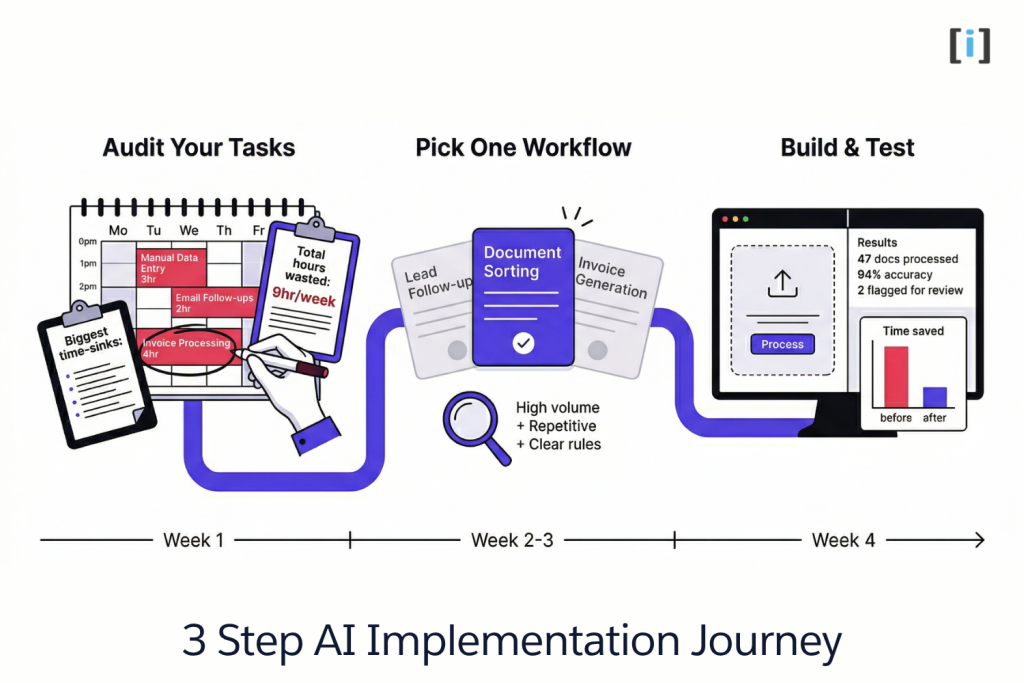
Don’t try to “AI everything.” That’s how you end up with five half-finished projects and nothing in production. Here’s the approach that actually works:
Step 1: Audit Your Manual Tasks
Spend one week tracking where your team’s time goes. You’re looking for tasks that are:
- High volume — happens dozens or hundreds of times per month
- Low judgment — doesn’t require senior-level decision making
- Repeatable — follows roughly the same pattern each time
- Data-rich — involves documents, forms, or records (not phone calls or handshake deals)
Common winners: document sorting, lead qualification, data entry from forms, follow-up emails, report generation.
Step 2: Pick One Workflow
Just one. The workflow with the highest combination of time spent and frustration level. Resist the urge to tackle three things at once. One successful AI implementation teaches you more than three half-started ones.
Step 3: Build a Prototype and Test With Real Data
Don’t plan for six months. Build a working version in 2-4 weeks, feed it real data (not test data), and measure the results. Did it save time? Did accuracy hold up? Did your team actually use it?
If yes, expand. If no, you learned something valuable for a small investment.
The businesses that get real value from AI aren’t the ones with the biggest budgets. They’re the ones that pick one thing, prove it works, and then build from there.
Pro Tip: Track one metric before and after: time spent, error rate, or response time. “It feels faster” isn’t enough — you need a number to justify expanding.
FAQ
How much does AI cost for a small business?
It ranges widely. Off-the-shelf tools run $0-$200/month. Custom AI workflows are project-based — typically a few thousand dollars depending on complexity, not ongoing per-seat pricing. The right answer depends on whether you’re buying a tool or building a workflow.
Can a small business use AI without a tech team?
Yes. Off-the-shelf tools require zero technical skill. For custom builds, you hire a dev team to build it — you don’t need to understand the technology, just your workflow and what outcome you want.
What’s the difference between AI and automation?
Automation follows exact rules you define: “if form submitted, send email.” AI adds judgment: it can read an unstructured email, figure out what the customer wants, and route it to the right person. Most useful small business AI combines both — automation for the structure, AI for the messy parts.
How long does it take to implement AI in a small business?
A single workflow — like lead scoring or document processing — can go from concept to production in 2-4 weeks with a focused build. Start with one workflow, get it working, then expand.
Is my business data safe with AI tools?
It depends entirely on the tool. Off-the-shelf SaaS products process your data on their servers — read the privacy policy. Custom-built solutions keep data on your own infrastructure, giving you full control over security and compliance.
