
You just spent 15 minutes looking for a document a client swears they sent you. You check your inbox, search two different threads, scroll through a shared Google Drive folder, and finally find it — attached to a reply-all on a thread from three weeks ago with the subject line “Re: Re: Re: Updated docs.”
Meanwhile, another client calls to ask if you received their file. You did. You think. Hold on, let me check.
This is the daily reality for small businesses that manage client relationships over email. It works until it doesn’t. And at some point — 20 clients, 50 clients, 100 clients — it stops working entirely.
A client portal fixes this. Not with magic, not with AI, not with a complicated platform — just by giving your clients one place to log in and see their stuff.
But if you Google “what is a client portal,” every result on the first page is written by a company that sells portal software. ShareFile wants you to use ShareFile. Softr wants you to use Softr. Moxo wants you to use Moxo. Useful definitions, sure — but the advice is always the same: subscribe to our product.
This guide is different. We build custom client portals for small businesses. We don’t sell portal software. So we’ll tell you what a portal actually does, when you need one, and when it makes sense to build your own instead of renting someone else’s.
What a Client Portal Actually Does (and Doesn’t Do)
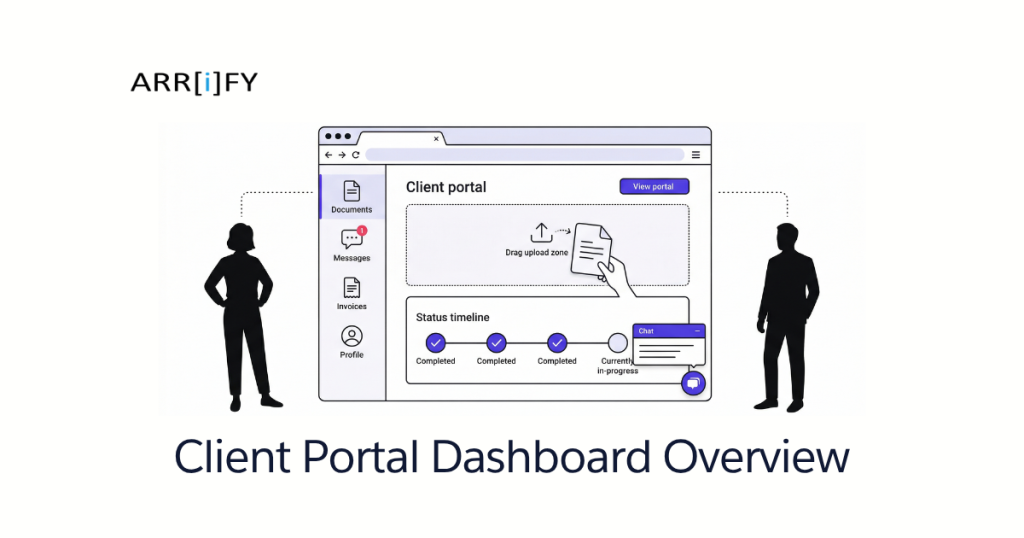
Let’s strip away the marketing language. A client portal is a private, branded web page where your clients log in to:
- See their stuff — documents, invoices, project status, communications
- Upload their stuff — files, signed contracts, intake forms, tax documents
- Communicate with you — messages, approvals, feedback — all in one thread instead of scattered across email
That’s the core. Everything else — payments, e-signatures, scheduling, AI chatbots — is extra. Some portals include those features. Many don’t need to.
What a portal does
- Replaces email back-and-forth for document exchange. Client uploads a file, you see it instantly. No “did you get my attachment?” conversations.
- Gives clients 24/7 access to their project status. Instead of emailing you to ask “where are we at?”, they log in and check. At midnight if they want to.
- Centralizes communication in one place. One thread per client, per project. Not email thread #1 about the contract, email thread #2 about the invoice, and a text message about the deadline.
- Creates an audit trail automatically. Who uploaded what, when, who viewed it. Critical for compliance-heavy industries and useful for everyone else.
What a portal doesn’t do
- Replace your CRM. A CRM is your internal view of the client relationship — pipeline stages, notes, revenue tracking. A portal is the client-facing side. They’re complementary, not interchangeable.
- Automate your internal workflows. A portal is a communication and access layer. If your internal process is broken — approvals stuck in email, tasks falling through cracks — that’s an automation problem, not a portal problem.
- Magically organize a disorganized operation. If you don’t know which documents you need from clients, a portal just gives them a prettier place to send the wrong files. Define your process first, then build the portal around it.
Key Takeaway: A client portal does one thing well — it gives clients a single, secure place to interact with your business. If someone tells you a portal will transform your operations, they’re upselling you. A portal transforms your client communication. That’s valuable enough on its own.
5 Industries Where Client Portals Change Everything
The best way to understand what a portal does is to see what it replaces. Here’s how five industries use client portals — and what they’re currently stuck with instead.
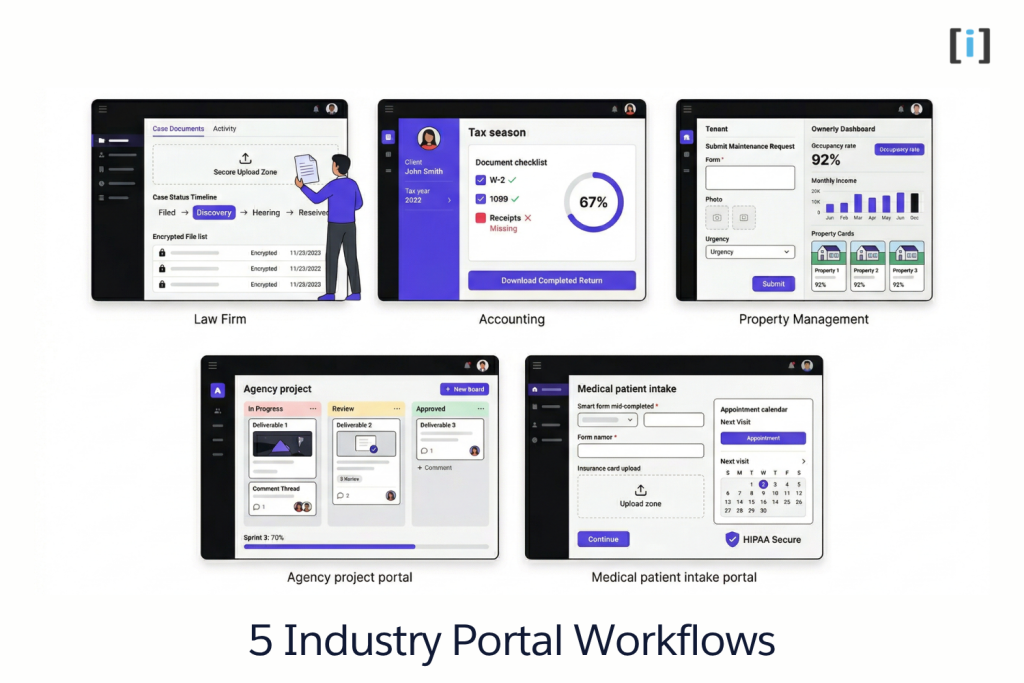
Law Firms — Secure Document Exchange
A client needs to send you a copy of a signed lease, medical records, and three months of bank statements. Right now, they email those as PDF attachments — sensitive personal and financial data bouncing through inboxes with zero encryption.
With a portal, the client logs in, drags their files into a secure upload zone, and you get notified instantly. The portal logs who uploaded what, when it was accessed, and by whom. Documents live in an encrypted environment with role-based access — your paralegal can see case files, but your bookkeeper can’t.
The client checks their portal to see case status, upcoming deadlines, and shared documents — instead of calling the office to ask “where’s my case at?” for the third time.
What law firms use now: Email attachments, Dropbox links with no access controls, phone calls, and the occasional fax from a client who hasn’t updated their workflow since 2008.
Why a portal wins: Compliance. Encrypted uploads, access logs, and document retention policies aren’t nice-to-haves in legal — they’re requirements. A portal bakes them in by default.
Accounting & Tax Practices — Seasonal Document Collection
Tax season is a document management nightmare. Every client needs to send you W-2s, 1099s, receipts, prior-year returns, and a half-dozen other forms. Multiply that by 200 clients and you’ve got a tsunami of email attachments, many of them mislabeled, some of them for the wrong tax year.
A client portal gives each client a checklist: here’s what we need from you, here’s where to upload it, here’s what we’ve received and what’s still missing. Clients see their own progress. You see a dashboard of who’s complete and who’s holding things up.
Year-round, clients log in to check invoice status, download their completed returns, or pull up a document they need for a loan application — without calling your office.
What accounting firms use now: ShareFile, SmartVault, or similar document-sharing tools. They work, but per-seat pricing adds up fast when you bring on seasonal staff. A firm with 5 full-time and 10 seasonal preparers is paying for 15 seats year-round — or dealing with the hassle of adding and removing users every January and April.
Why a portal wins: Seasonal cost control and the checklist workflow. Generic file-sharing tools let clients upload documents, but they don’t show clients what’s still missing or let you track completion across your entire client base from one screen.
Property Management — Tenant & Owner Self-Service
Property management is a two-sided portal problem. Tenants need one set of features. Property owners need a completely different set.
Tenant portal: Submit maintenance requests (with photos), pay rent online, access their lease, see payment history, and get updates on open requests — all without calling the office or sending a text to their property manager’s personal phone at 11pm.
Owner portal: View property performance, monthly income statements, vacancy status, and maintenance spend. Owners want transparency without having to ask for a report every month. A portal gives them a live dashboard.
What property managers use now: AppFolio, Buildium, or Rent Manager — established platforms with built-in portals. They work well for the basics, but customization is limited. If your workflow doesn’t match the software’s assumptions, you adapt your business to the tool instead of the other way around. And pricing is per-unit, so a portfolio of 200 units at $1.50/unit/month adds up.
Why a portal wins (custom specifically): Two audiences, two experiences, one system. Off-the-shelf tools offer tenant portals, but owner reporting is usually an afterthought. A custom portal lets you build exactly what each audience needs.
Agencies & Consultancies — Project Visibility
You know those weekly status update emails? The ones you spend 30 minutes writing and your client skims for 15 seconds? A portal eliminates them.
Clients log in and see project progress in real time — what’s done, what’s in progress, what’s waiting on their approval. They leave feedback directly on deliverables instead of sending a separate email that gets lost in a thread. They approve work with one click instead of a “looks good, let’s proceed” reply buried in their inbox.
What agencies use now: Notion shared spaces, Google Drive folders, Basecamp, or nothing — just email threads and the occasional Zoom call to “sync up.” Some use Asana or Monday.com and share a limited client view, but those tools are designed for internal project management, not client-facing communication.
Why a portal wins: It’s the client’s view, purpose-built. Instead of giving clients a filtered version of your internal project management tool, you give them exactly what they need: status, deliverables, approvals, and a way to communicate — nothing more, nothing less.
Medical & Dental Practices — Patient Intake & Records
A new patient walks into your office, fills out four pages of paperwork on a clipboard, and hands it to the front desk, who manually enters it into the EHR. The patient left two fields blank and wrote their phone number illegibly. Sound familiar?
A patient portal moves intake online. Patients fill out forms before their appointment on their phone or laptop. The form validates fields in real time — no missing data, no illegible handwriting. Returning patients see pre-filled forms with only changed information needed.
After the visit, patients access visit summaries, upcoming appointments, and billing information through the same portal. They upload insurance documents or referral paperwork without calling the office.
What practices use now: Paper forms (still shockingly common), the patient portal built into their EHR system (functional but often clunky and slow), or third-party intake tools that don’t connect to anything else.
Why a portal wins: HIPAA-compliant access with audit trails, plus a patient experience that doesn’t feel like it was designed in 2005. The bar is low in healthcare UX — a clean, fast, mobile-friendly portal is a competitive advantage for patient retention.
Key Takeaway: Every industry has the same underlying problem — clients need to share information, check status, and communicate with you. The specifics change, but the portal concept is the same. If your clients are emailing you things that belong in a structured system, you need a portal.
SaaS Portal vs Custom-Built: What Actually Makes Sense?
This is the section that every other “what is a client portal” article skips — because every other article is written by a SaaS company.
When a SaaS portal works fine
- Your needs are generic. File sharing, basic messaging, document storage. Nothing industry-specific, no complex workflows.
- Small client base. Under 50 clients, per-seat pricing hasn’t started hurting yet.
- No integration requirements. The portal operates standalone — you don’t need it talking to your CRM, billing system, or project management tools.
- You need it yesterday. SaaS tools get you running in hours, not weeks. If speed matters more than fit, buy.
When custom is the smarter investment
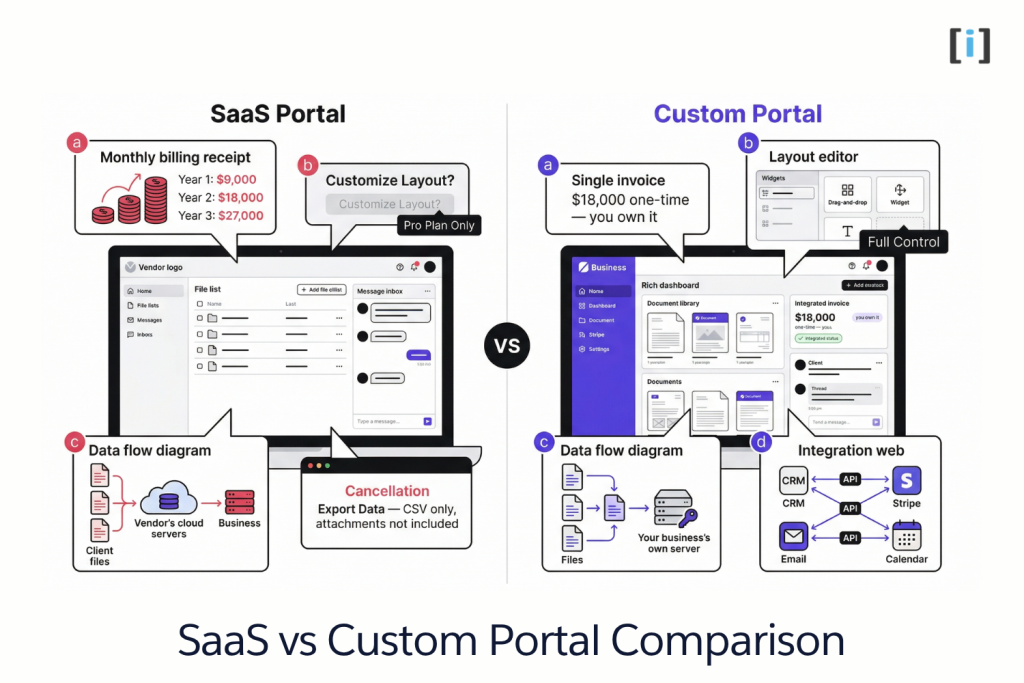
- Industry-specific workflows. You need document checklists for tax season, maintenance request routing for property management, or HIPAA-compliant intake forms. Generic tools force you to build workarounds for workflows that should be native.
- Deep integration with your existing tools. Your portal needs to pull data from your CRM, push updates to your billing system, and sync with your project management tool. Most SaaS portals offer a few pre-built integrations. Your specific combination of tools probably isn’t one of them.
- Data stays on your infrastructure. You control where client data lives, how it’s backed up, and who has access. No third-party servers, no vendor data policies to read, no surprises.
- No per-seat pricing. Your team grows from 10 to 30? A SaaS portal just tripled your monthly cost. A custom portal costs the same whether you have 5 users or 50.
- Branded experience. Your portal looks like your business — your domain, your design, your workflows. Not a white-labeled version of someone else’s product with your logo pasted in the corner.
The math most people skip
Here’s a calculation that SaaS vendors hope you never do:
SaaS: $50/user/month x 15 users x 36 months = $27,000 renting a portal for 3 years.
Custom: One-time build cost of $10,000-25,000 (depending on complexity) + ~$50-100/month hosting = $11,800-26,800 owning a portal for 3 years. And you still own it in year 4, 5, and beyond — with no additional licensing fees.
The SaaS option costs about the same over 3 years. But at the end of those 3 years, you own nothing. Cancel and you’re starting from scratch. Your client communication history, uploaded documents, and workflow data live on someone else’s servers, governed by someone else’s data retention policy.
Data ownership matters more than you think
When you cancel a SaaS portal, what happens to three years of client documents and communication history? Read the terms of service — most give you 30-90 days to export your data, and exports are often incomplete (you get the files, but lose the context, thread history, and metadata).
With a custom build, the data never leaves your server. There’s no cancellation scenario. The portal runs until you decide to change it.
This same build-vs-buy logic applies beyond portals. If you’re evaluating automation tools, the same questions matter — we break down that comparison in Custom Automation vs Zapier.
Key Takeaway: SaaS portals are great for getting started fast with generic needs. Custom portals make sense when the portal is core to how you serve clients — and when you do the 3-year math instead of looking at monthly pricing.
What to Look for in a Client Portal (Whether You Buy or Build)
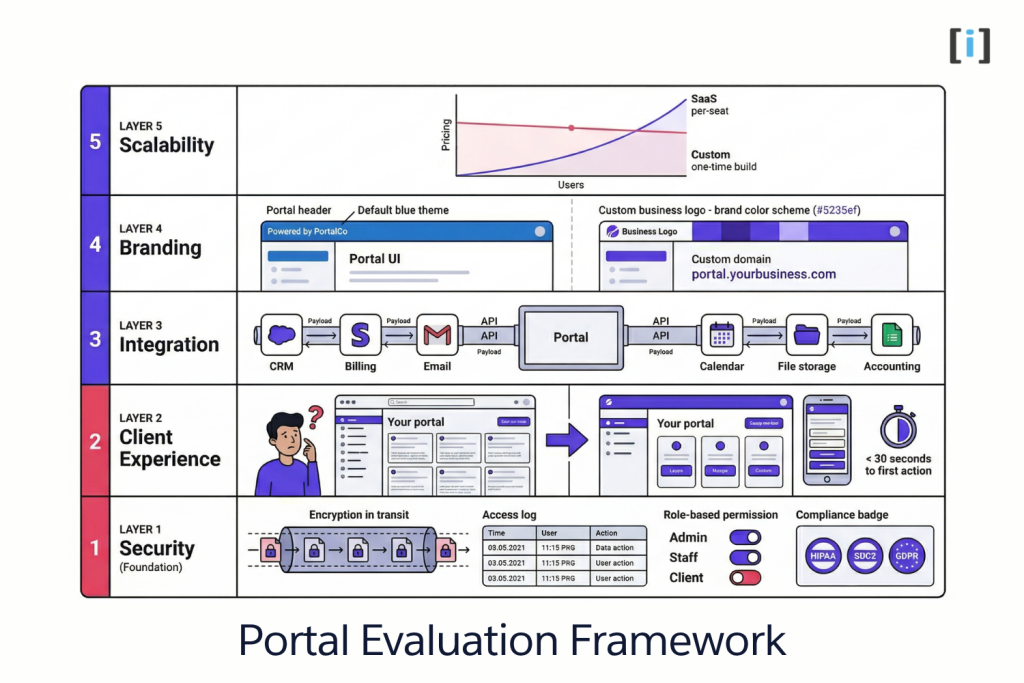
Whether you subscribe to a SaaS tool or hire someone to build custom, these are the five things that matter most — in priority order.
1. Security First
Non-negotiable. Everything else is irrelevant if client data isn’t protected.
- Encryption at rest and in transit. Data should be encrypted when stored and when moving between the client’s browser and your server.
- Role-based access control. Your accountant sees financial documents. Your project manager sees project files. Nobody sees everything unless they need to.
- Audit logs. Who accessed what, when. Not just for compliance — for your own sanity when a client asks “who changed this document?”
- Two-factor authentication. For your team and (optionally) for clients. Especially important for regulated industries: legal, medical, financial.
If a portal vendor can’t clearly explain their security model, walk away.
2. Client Experience
The best portal in the world is worthless if your clients won’t use it. And clients won’t use it if it’s confusing.
- Simple login. Email and password, magic link, or SSO. No “download our app and create an account with a 12-step verification process.”
- Clear navigation. Clients should find what they need within 30 seconds of logging in. If they have to click through 4 menus to upload a document, they’ll email it to you instead.
- Mobile-friendly. Your clients will use this on their phones. If it doesn’t work on mobile, it doesn’t work.
Test with a real client before you launch. If they need a tutorial, the UX needs work.
3. Integration With Your Stack
A portal that doesn’t connect to your existing tools is just another silo — another place to check, another system to update manually.
- CRM integration — client records sync between your portal and your CRM so you’re not maintaining data in two places.
- Billing and payments — invoices generated in your accounting tool surface in the portal. Clients pay from the same place they check project status.
- Project management — status updates in your PM tool reflect in the portal automatically. No one manually updating two systems.
If a SaaS portal doesn’t integrate with your specific tools, you’ll spend more time on workarounds than you saved by buying off-the-shelf.
4. Branding
Your portal is a client touchpoint — it should feel like part of your business, not like a third-party tool your clients are borrowing.
- Your domain —
portal.yourbusiness.com, notyourbusiness.vendorname.com - Your design — colors, logo, typography that match your brand, not a template with a logo swap
- Your language — custom labels, section names, and copy that match how your business talks to clients
This matters more than most people think. A portal that looks and feels like your business builds trust. A portal that clearly belongs to another company raises questions.
5. Scalability Without Per-Seat Traps
Watch out for pricing models that punish you for growing.
- Per-seat pricing scales linearly — add 10 people, pay 10x more. Fine for stable teams, dangerous for growing ones.
- Per-client pricing sounds small ($2/client/month!) until you multiply by your actual client count.
- Usage-based pricing (storage, API calls) can surprise you when clients actually start using the portal.
The best pricing model — whether SaaS or custom — is one where costs grow slower than your revenue. A portal should get cheaper per client over time, not more expensive.
Key Takeaway: Evaluate in order: security, client UX, integrations, branding, scalability. A portal that nails security but has terrible UX won’t get used. A portal with great UX but no integrations becomes another silo. Get the order right.
How much does a client portal cost?
SaaS portals range from $20-100/user/month depending on features and vendor. Custom-built portals are a one-time project cost — typically $5,000-25,000 depending on complexity — with minimal ongoing hosting costs and no per-seat fees. The right choice depends on your team size, client volume, and how long you plan to use it.
Can I build a client portal without coding?
Yes — tools like Softr, Notion, and Airtable-based setups can handle basic needs like file sharing and simple dashboards. But no-code portals hit limits fast when you need custom workflows, role-based access controls, compliance features, or deep integration with your existing systems. They’re good for testing the concept, less good for running your business long-term.
Is a client portal the same as a CRM?
No. A CRM manages your internal view of client relationships — pipeline stages, contact info, revenue tracking, internal notes. A portal is the client-facing side — what your clients see and interact with. Most businesses need both, and they should be connected so data flows between them automatically.
How long does it take to set up a client portal?
SaaS: hours to a few days for basic configuration. Custom-built: 4-8 weeks for a portal tailored to your specific workflows and integrated with your existing tools. The custom timeline is longer upfront, but it eliminates the months of workarounds you’d spend bending a generic SaaS tool to fit your process.
Do my clients need to install anything?
No. Client portals are web-based — clients open a browser, go to your portal URL, and log in. No app downloads, no software installs, no system requirements beyond a modern web browser. This is one of the reasons portals beat shared drives and email — zero friction for the client.
