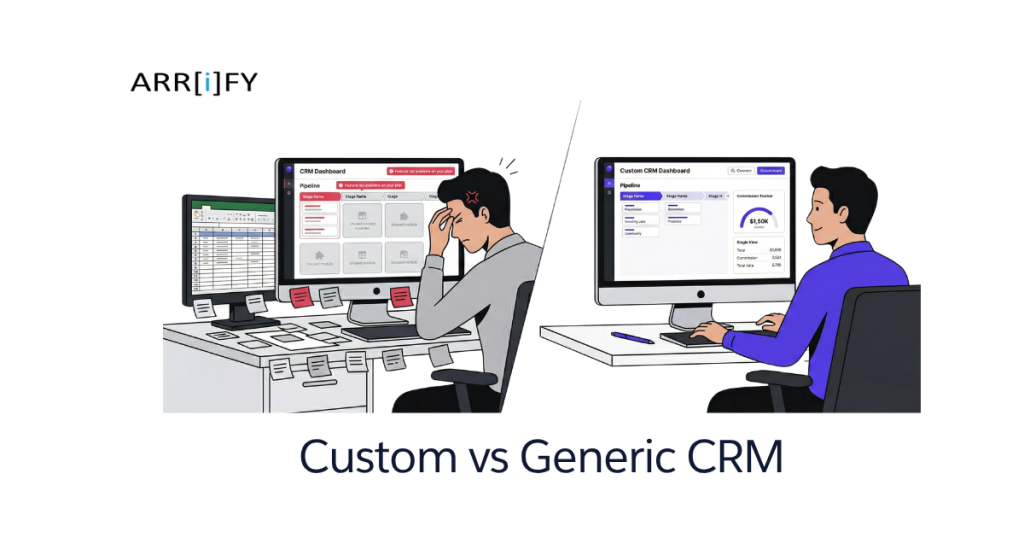
You’re paying $50 per user per month for a CRM your team hates.
Half the fields don’t apply to your business. The pipeline stages don’t match your actual sales process. The reports show you everything except the one metric you care about. And somewhere on your team’s desktop, there’s a spreadsheet that’s become the real system of record — because the CRM can’t do what they need it to do.
You’ve tried customizing it. You renamed fields, added stages, watched YouTube tutorials about workflows. But the underlying structure — the way the CRM thinks about your data, your relationships, your process — doesn’t match how your business actually works. And no amount of renaming “Lead” to “Prospect” fixes that.
This is the CRM problem nobody talks about: most CRMs are built for a generic B2B sales funnel. Lead comes in, gets qualified, moves through stages, closes. If your business works like that, great — HubSpot, Pipedrive, or Zoho will serve you fine for $30-50/user/month.
But if you’re a real estate team tracking commission splits and listing lifecycles, a staffing agency managing both client and candidate relationships simultaneously, or a financial advisory firm that needs household-level views with compliance workflows — generic falls apart fast.
This guide walks through your actual options, what each costs, and how to figure out which one fits. We build custom CRMs and implement Salesforce, so the advice here isn’t biased toward one answer. Sometimes the right answer is a $0/month HubSpot Free account.
Signs Your Current CRM Isn’t Working
Before jumping to “build custom,” figure out whether your problem is the tool, your process, or both. Custom software fixes tool problems. It doesn’t fix process problems — it just makes bad processes run faster.
You’re Working Around It, Not With It
The clearest sign: your team maintains systems outside the CRM that track things the CRM can’t.
A spreadsheet for commission calculations. A shared doc for tracking client onboarding steps. A whiteboard for showing schedules. Email threads as the actual record of client communication because logging them in the CRM takes too many clicks.
These aren’t laziness — they’re symptoms. Your team found that the CRM can’t model their actual workflow, so they built shadow systems that can. Every shadow system is a data silo, a sync risk, and a training burden for new hires.
If you walked into your office tomorrow and deleted every workaround spreadsheet, would your team panic? If yes, your CRM isn’t doing its job.
You’re Paying for Features You Don’t Use
Enterprise CRMs bundle 200+ features. Marketing automation suites, AI-powered forecasting, territory management, CPQ modules. Most small businesses use 15-20 of them.
Per-seat pricing doesn’t care. You pay the same whether you use 10 features or 200. And as vendors push upmarket, the plans that include the features you do need get more expensive — bundled with features you never asked for.
But the hidden cost isn’t the subscription. It’s complexity. More features mean more menus, more configuration options, more “where do I put this?” moments for your team. A CRM that does 200 things averagely is worse than one that does 15 things exactly right for your workflow.
Real Talk: If your team avoids the CRM because it’s confusing, the problem isn’t training. It’s that the tool is doing too much and none of it well enough for your specific use case.
Your Industry Has Workflows That Generic CRMs Can’t Model
This is where off-the-shelf breaks down hardest. Generic CRMs model one relationship type: company contacts a vendor, deal moves through stages, deal closes. But many industries have fundamentally different relationship structures.
Real estate: Commission splits with co-listing agents and referral fees. Listing lifecycles (coming soon, active, under contract, closed) that don’t map to a sales pipeline. Showing schedules tied to properties, not contacts. Agent-to-agent referral tracking.
Staffing and recruiting: Two simultaneous pipelines — client relationships (job orders) and candidate relationships (sourcing through placement). A placement connects both, and the CRM needs to track which candidates matched which jobs, not just which deals closed.
Financial advisory: Household grouping — husband, wife, trust, LLC, IRA all as one “client.” AUM tracking tied to portfolio management systems. Compliance documentation requirements that need to be embedded in every client review workflow, not bolted on as an afterthought.
Healthcare practices: Patient referral networks, provider relationship tracking, insurance verification workflows, and compliance documentation that changes by specialty.
If your team spends more time explaining their CRM workarounds than actually using the CRM, that’s the signal.
Key Takeaway: A CRM that forces your team to maintain shadow systems isn’t saving time — it’s doubling the work. The question isn’t whether your current CRM is bad, it’s whether ANY generic CRM can model your actual workflow.
Your Three Options (It’s Not Just “Build or Buy”)
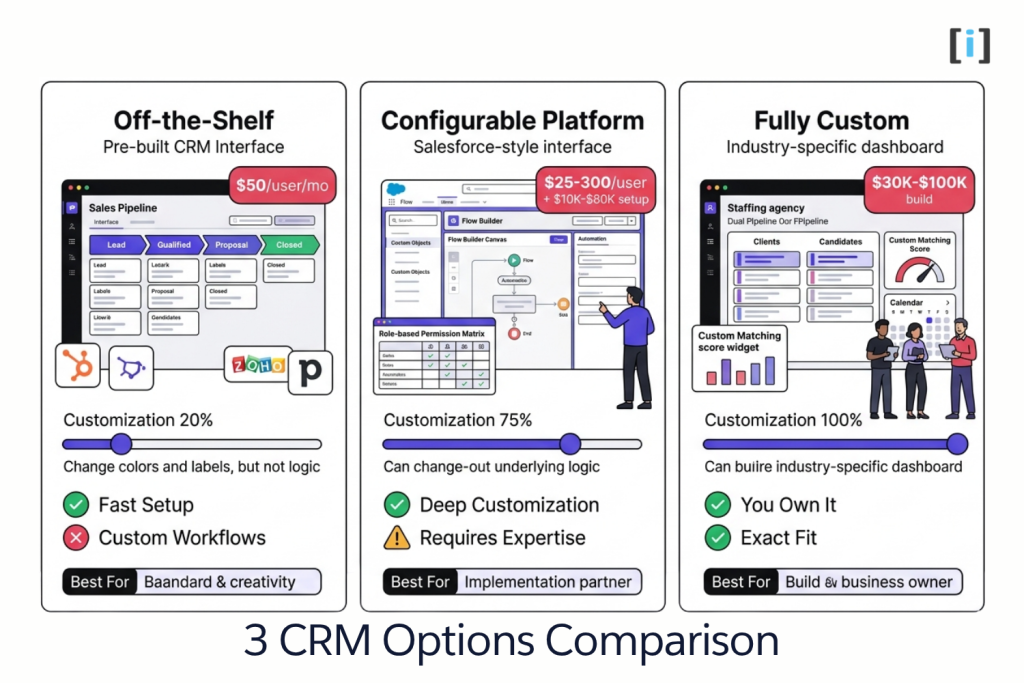
Most articles frame this as binary: use off-the-shelf or build custom. Reality has a middle ground that’s often the best answer.
Option 1 — Off-the-Shelf CRM
Tools: HubSpot, Pipedrive, Zoho CRM, Monday CRM, Freshsales
Best for: Standard B2B or B2C sales processes. Small teams under 10 people. Limited budget. No complex integrations or industry-specific logic.
Cost: $0–$100/user/month.
What you can customize: Field labels, pipeline stage names, basic automation triggers (“when deal moves to stage 3, send this email”), report filters.
What you can’t customize: The underlying data model. How records relate to each other. Complex conditional logic. Multi-entity relationships. Industry-specific workflows that don’t map to “lead → deal → close.”
When it works: Your sales process genuinely looks like the CRM’s default pipeline. Your team needs contact management, deal tracking, and basic email integration — and that’s it. HubSpot Free, in particular, is genuinely excellent for teams that fit this mold. Don’t spend money solving a problem you don’t have.
Option 2 — Configurable Platform
Tools: Salesforce, Microsoft Dynamics, Zoho Creator
Best for: Businesses that need deep customization but want a foundation. Custom objects and data models, automation rules (Flows, Process Builder), role-based access, reporting, and a massive ecosystem of integrations.
Cost: $25–$300/user/month + implementation ($10K–$80K for a proper setup by someone who knows what they’re doing).
What you can customize: Almost everything. Custom objects, custom fields, page layouts, automation logic, approval workflows, reports, dashboards, connected apps. Salesforce in particular is a platform, not just a CRM — you can model almost any data structure and workflow.
The catch: Power requires expertise. A well-implemented Salesforce instance is incredibly effective. A badly implemented one is worse than a spreadsheet — bloated, confusing, and expensive. This isn’t a tool you configure over a weekend. You need someone who knows the platform.
When it works: You need CRM + automation + reporting + integrations, and your requirements are complex but not truly unique. Your data model can be represented with custom objects and relationships. You want an ecosystem (AppExchange, third-party connectors) rather than building every integration from scratch.
We build on Salesforce — and we recommend it often. When the fit is right, it gives you 90% of what custom builds offer, with a stronger foundation and a larger support ecosystem.
Pro Tip: The biggest mistake businesses make with Salesforce is buying it without proper implementation. A $25/user/month license with a $40K implementation will outperform a $150/user/month enterprise plan configured by someone following YouTube tutorials. Pay for the setup, not the tier.
Option 3 — Fully Custom CRM
Best for: Businesses with workflows that no existing platform models cleanly. Or businesses that need deep integration with proprietary or legacy systems where connectors don’t exist.
Cost: $30K–$120K to build + 15–20% of build cost annually for maintenance. No per-seat licensing.
What you get: Software built exactly around your process. Your data model, your workflow, your terminology, your integrations. You own the code and the data. No vendor lock-in. No per-seat pricing that scales with headcount.
The tradeoffs: Highest upfront investment. Longer time to first value (4-8 weeks minimum vs. same-day with off-the-shelf). You’re responsible for maintenance, hosting, and updates — or you pay a dev team for ongoing support.
When it works: You’ve tried off-the-shelf and configurable, and neither fits without painful compromises. Your workflow IS your competitive advantage and you need software that matches it exactly. Or you need integrations with systems that have no pre-built connectors.
What a Custom CRM Actually Looks Like (Real Examples)
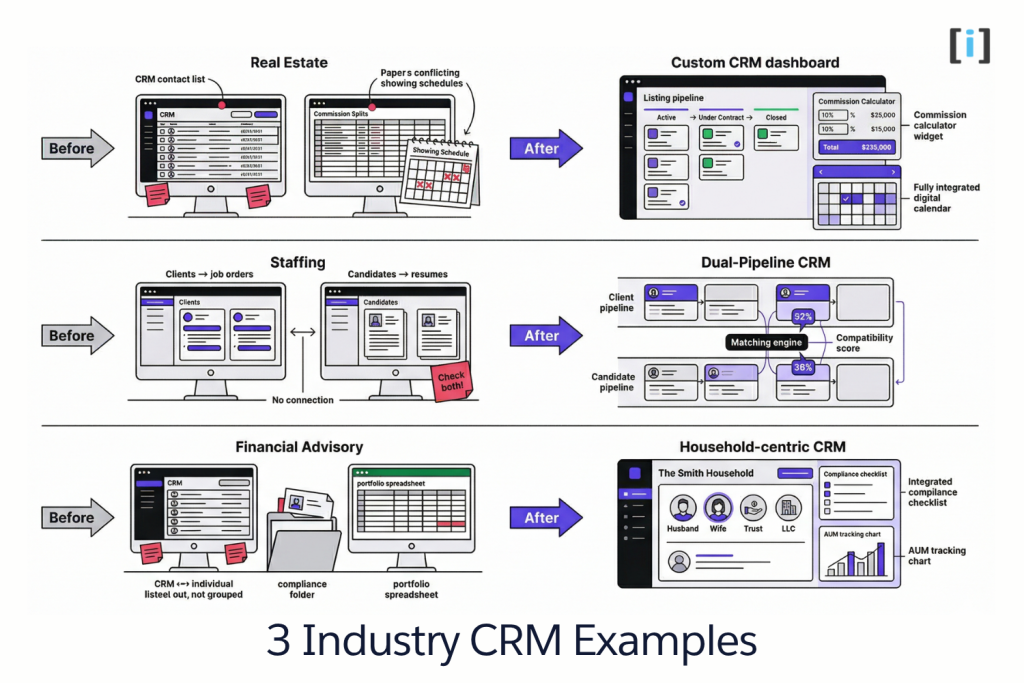
Not enterprise dashboards with fake data. Real scenarios at SMB scale.
Real Estate Team — Pipeline + Commission Tracking
The problem: The team used a generic CRM for lead management, but commission tracking lived in a spreadsheet. Listing status updates happened in a shared Google Doc. Showing schedules were on a paper calendar. Three sources of truth, none of them synced.
New agents took two weeks to learn the “system” — not because it was complex, but because nobody could explain which spreadsheet tab to use for what.
The custom solution: One system. Lead pipeline with stages that match how real estate actually works (inquiry → showing → offer → under contract → closing → closed). Listing lifecycle tracking (coming soon → active → pending → sold) tied to the agent managing the listing. Commission calculator with split rules — co-listing splits, referral fees, team splits — calculated automatically from the deal record. Calendar integration for showing schedules synced to agents’ Google Calendars.
The result: The spreadsheet got archived. Onboarding new agents went from two weeks to three days. Commission disputes dropped to near zero because the math was transparent and tied to actual deals.
Staffing Agency — Dual-Sided Relationship Management
The problem: Standard CRMs model one relationship direction — your company to theirs. Staffing needs two: client relationships (companies posting jobs) and candidate relationships (people looking for work). A “deal” in staffing is a placement — a match between a specific candidate and a specific job order, with its own lifecycle.
The agency was running two separate systems — one for clients, one for candidates — and matching happened in a project manager’s head. When that PM went on vacation, placements slowed to a crawl.
The custom solution: A CRM with dual pipelines. Client pipeline: prospecting → job order received → candidates submitted → interviews → placement → billing. Candidate pipeline: sourced → screened → available → submitted to client → interviewing → placed. A matching view that scores candidates against job requirements — skills, location, availability, rate — and surfaces the top matches automatically.
The result: Matching didn’t live in anyone’s head anymore. Placement rate increased because qualified candidates were surfaced faster. The PM who used to be the bottleneck could focus on relationship building instead of manual matching.
Financial Advisory Firm — Compliance-First CRM
The problem: Off-the-shelf CRMs track individual contacts. Financial advisors think in households — husband, wife, trust, LLC, IRA are all one “client.” AUM (assets under management) needed to be visible at the household level, not per-contact. And every client review meeting required compliance documentation that had to be completed in a specific order — something no generic CRM workflow enforced.
The firm was maintaining the CRM for contact info, a separate portfolio system for AUM, and a compliance checklist in Word documents. Audit prep took weeks of pulling data from three systems and reconciling.
The custom solution: CRM built around the household model. Every contact belongs to a household. Every interaction, document, meeting note, and asset view is organized by household, not individual. AUM tracking pulls from the portfolio system nightly and displays at both individual and household level. Client review workflows have compliance checklists baked in — the advisor can’t mark a review “complete” without the required documentation attached.
The result: Audit prep time cut in half. Advisors stopped maintaining parallel systems. The compliance workflow went from “hopefully the advisor remembers” to enforced by the system.
Key Takeaway: Custom CRMs aren’t about having more features — they’re about having the RIGHT features that match exactly how your business operates.
What Custom CRM Development Actually Costs (SMB Scale)
If you’ve read our custom software development cost guide, you know the ranges by project type. Here’s the CRM-specific breakdown.
Simple Custom CRM — $15K–$35K
What’s included: Contact and company management. A custom pipeline with stages that match your workflow. Basic reporting (pipeline value, activity metrics, win/loss). One integration — email or calendar sync. Mobile-responsive.
Timeline: 4–8 weeks.
Who this fits: A team that’s outgrown spreadsheets but doesn’t need the complexity of a full platform. You have a clear, linear sales process with industry-specific data you need to track that no off-the-shelf CRM handles.
Mid-Range Custom CRM — $35K–$70K
What’s included: Everything above, plus: multiple pipelines or entity types, role-based access and permissions, custom reporting dashboards, 2-3 integrations (email, calendar, accounting/billing), automation rules (trigger emails, task creation, status updates based on conditions).
Timeline: 2–4 months.
Who this fits: Teams with more complex relationship models — multiple pipeline types, different user roles with different views, and systems that need to connect and share data.
Complex Custom CRM — $70K–$120K
What’s included: Multi-entity data model (contacts, companies, deals, projects, and custom entities specific to your industry). Automation rules engine. Advanced reporting and analytics dashboards. 4+ integrations. Custom matching or scoring logic. Workflow enforcement (compliance checklists, approval chains).
Timeline: 3–6 months.
Who this fits: The staffing agency, the financial advisory firm, the healthcare practice. Businesses where the CRM IS the operating system for daily work, not just a sales tool.
What’s NOT in the Build Cost
Hosting: $50–$300/month depending on usage and data volume.
Third-party API fees: Email sending (SendGrid), SMS (Twilio), calendar sync, payment processing — each has usage-based pricing.
Maintenance: Budget 15–20% of build cost annually. A $50K CRM should budget $7,500–$10,000/year for updates, bug fixes, and security patches.
Future features: Your first build solves today’s problems. You’ll want additions as the business evolves. Building on your own platform means these additions cost development time, not a plan upgrade.
The Math That Matters
Consider this: a $60K custom CRM for a 20-person team has no per-seat licensing. An off-the-shelf CRM at $100/user/month for those same 20 people costs $24,000/year. In 2.5 years, the custom CRM has paid for itself — and you own it after that. At year 5, you’ve saved $60K in licensing alone.
This math doesn’t always work. If you have 3 users and a simple workflow, off-the-shelf at $30/user/month is $1,080/year. You’d wait 50 years to break even on a $50K custom build. Context matters.
How to Decide — A Framework
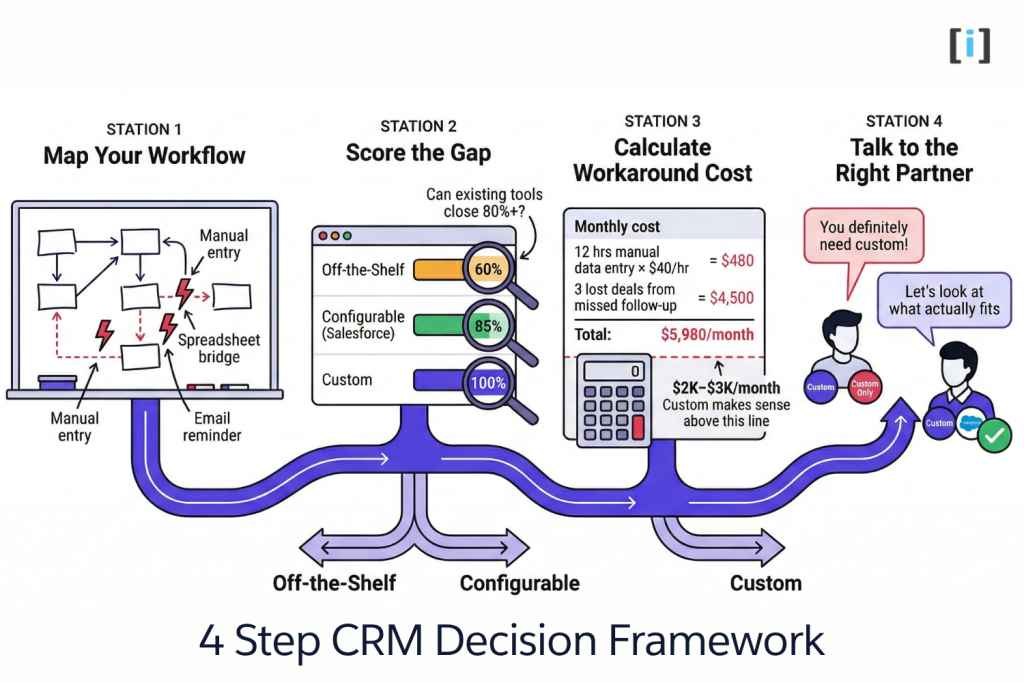
Don’t start with “should I build a custom CRM?” Start with “what’s my actual problem?”
Step 1: Map your current workflow. Not the CRM’s workflow — YOUR actual workflow. How does a lead enter your world? What happens at each stage? Where does data get entered manually? Where do things fall through cracks? Where do people switch to a spreadsheet or a different tool?
Draw it on a whiteboard or a doc. Every box is a step. Every arrow is a handoff. Circle the parts that break.
Step 2: Score the gap. Take that workflow map to an off-the-shelf CRM demo. How much of it can the CRM handle natively? If it covers 80%+ without painful workarounds, start there. If not, try a configurable platform like Salesforce. If a well-implemented Salesforce can cover 90%+, that’s probably better ROI than building from scratch.
Step 3: Calculate the cost of your workarounds. Hours your team spends on manual data entry between systems. Deals lost because follow-up fell through cracks between tools. Errors from maintaining duplicate data in a CRM and a spreadsheet. Revenue left on the table because onboarding new reps takes weeks instead of days.
Put a dollar amount on it. If it exceeds $2K–$3K per month, custom starts making financial sense. If it’s below that, the workaround might be worth living with.
Step 4: Talk to someone who builds both. A good partner will tell you when custom isn’t the answer. If a dev shop only sells custom, they’ll always recommend custom. If a SaaS vendor only sells their tool, they’ll always recommend their tool. Find someone who works across options and has no financial incentive to push you toward one.
The Litmus Test: If you can describe your CRM problem and a partner’s first response is “here’s what I’d build,” without asking about your workflow, budget, team size, and what you’ve already tried — keep looking.
FAQ
How much does a custom CRM cost?
For SMBs, most custom CRM projects range from $15K–$120K depending on complexity. Simple contact management and pipeline tracking starts around $15K–$35K. Multi-entity systems with automation and advanced integrations run $70K–$120K. Budget 15–20% of build cost annually for ongoing maintenance.
How long does it take to build a custom CRM?
Simple CRMs: 4–8 weeks. Mid-range with multiple pipelines and integrations: 2–4 months. Complex systems with custom data models and workflow enforcement: 3–6 months. The scoping phase (1–2 weeks) sets realistic timelines for everything that follows.
Is a custom CRM better than Salesforce?
Not necessarily. Salesforce is a platform, not just a CRM — when properly implemented, it handles complex data models, automation, and integrations extremely well. Custom makes sense when your workflow doesn’t fit any existing platform, or when you need integrations with systems that have no pre-built connectors. Many businesses are better served by a well-implemented Salesforce instance than a ground-up custom build.
Can I migrate data from my current CRM to a custom one?
Yes — data migration is a standard part of any CRM build. Complexity depends on data volume, data quality, and how many source systems you’re consolidating. Clean your data before migration. Deduplicating 10,000 contacts before the switch saves weeks of cleanup after.
Do I need a developer to maintain a custom CRM?
For daily use, no — a well-built custom CRM works without technical help. For changes, new features, and updates, you’ll need periodic dev support. Budget for a maintenance retainer rather than ad-hoc emergency fixes — it’s cheaper and keeps the system healthy long-term.