
You Googled “custom software development cost.” You got a range of $10,000 to $500,000. You closed the tab.
That range is useless. It’s the equivalent of asking “how much does a house cost?” and getting told “between $50K and $5 million.” Technically true. Practically worthless.
Here’s why every article does this: they don’t want to give you a number. They want you to “book a discovery call” so a sales team can qualify you before you know anything. The less you know about pricing, the easier it is to anchor you on their number.
We’re a 2-person dev team. We build custom software for small businesses — not enterprise platforms, not startup MVPs chasing VC money. The projects we see don’t cost $300K. Most land between $10K and $80K. Some go higher. Many could be solved with off-the-shelf tools, and we’ll tell you that.
This post does what the others won’t: give you real numbers by project type, show you how the process works when the team is small, tell you when custom software isn’t the answer, and arm you with the right questions to ask any developer you talk to.
What Custom Software Actually Costs (Real Numbers)
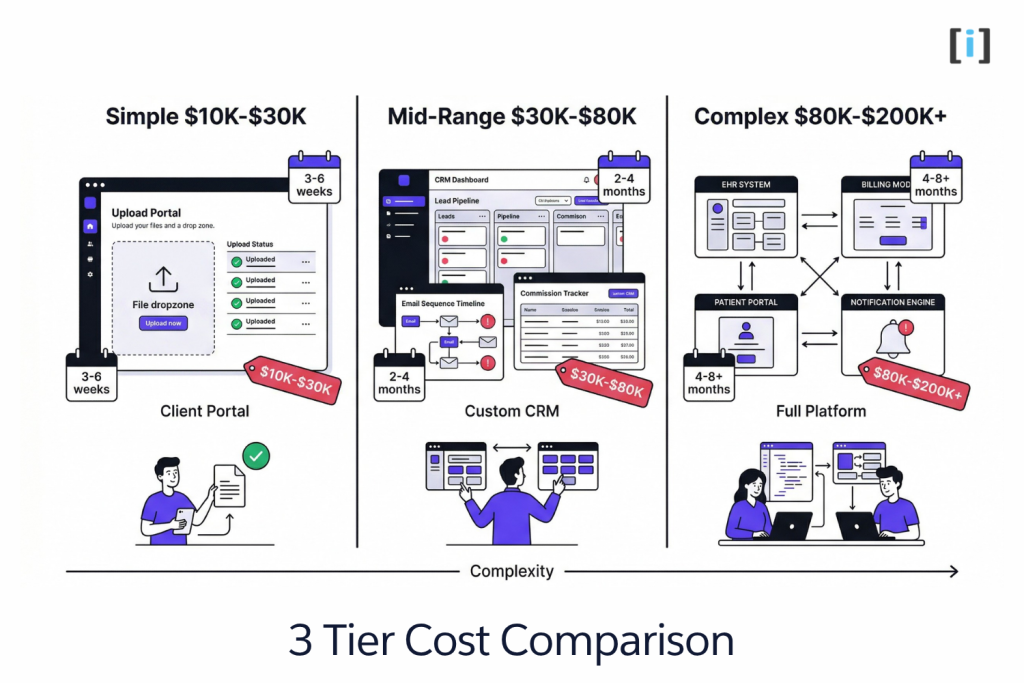
Forget “simple, medium, complex” tiers. Those mean nothing without context. Here’s what projects actually look like at each price point, with the kind of business that typically needs them.
Simple Tools & Internal Apps — $10K–$30K
What fits here: A custom intake form, an internal dashboard, a branded client upload portal, a data sync between two systems that refuse to talk to each other.
Timeline: 3–6 weeks.
Example: An accounting firm was emailing spreadsheets back and forth with clients during tax season. Clients would send the wrong documents, miss deadlines, and the firm’s staff spent hours sorting and re-requesting. They needed a simple branded portal — clients log in, upload their documents to the right category, see what’s missing, get automatic reminders. That’s it. No CRM, no AI, no mobile app. A focused tool that solves one specific problem.
What you get: Functional, focused software that does one thing well. Not a platform — a tool. These projects are the most common starting point for businesses that have never built custom before.
Multi-Feature Business Apps — $30K–$80K
What fits here: A custom CRM, a patient management system, multi-step workflow automation, a client portal with roles and permissions, or a system that replaces two or three SaaS subscriptions you’ve been duct-taping together.
Timeline: 2–4 months.
Example: A real estate team was using one tool for lead capture, another for email sequences, a spreadsheet for commission tracking, and a shared Google Drive for documents. None of them connected. Leads fell through cracks. Commission disputes happened monthly because nobody trusted the spreadsheet. They needed a single system — a custom lead pipeline connected to their website, automated email follow-ups triggered by lead behavior, commission tracking that pulled from closed deals automatically. Something no off-the-shelf CRM handled cleanly for their specific workflow.
What you get: A system that replaces multiple tools, fits your actual workflow instead of forcing you into someone else’s, and scales as your team grows — without per-seat pricing going up every quarter.
Key Takeaway: The $30K–$80K range is where most small businesses get the highest ROI — replacing 2-3 SaaS tools with one system built around how they actually work.
Complex Systems & Integrations — $80K–$200K+
What fits here: Full platform builds, multi-system integrations (like connecting an EHR to a billing system to a patient portal), AI-powered document processing, or replacing a legacy system that’s been held together with prayers and a part-time IT contractor.
Timeline: 4–8+ months.
Example: A healthcare group was running a legacy scheduling system from 2014. It didn’t connect to their EHR, patient intake was still on paper, and appointment reminders were manual phone calls. They needed a custom platform — scheduling that syncs with their EHR, digital intake forms that route to the right provider, automated reminders via text and email, and a patient portal where people could manage their own appointments. Multiple systems, multiple integrations, compliance requirements.
What you get: A competitive advantage. Software that’s built around your business instead of the other way around. At this level, you’re not just saving time — you’re operating in a way your competitors can’t replicate by buying off-the-shelf.
What’s NOT Included in Most Quotes
This is where projects go over budget. Not because the development costs more than quoted, but because nobody mentioned these line items upfront.
Ongoing maintenance. Software isn’t a one-time purchase. Budget 15–20% of the build cost annually for bug fixes, updates, security patches, and small improvements. A $50K build should budget $7,500–$10,000/year for maintenance.
Third-party fees. Payment processors (Stripe takes a percentage), SMS providers (Twilio charges per message), AI model API calls (OpenAI charges per token) — these are operational costs, not development costs.
Hosting and infrastructure. Cloud hosting (AWS, DigitalOcean, etc.) runs anywhere from $20/month for a simple app to $500+/month for complex systems with heavy traffic.
Scope creep. The biggest hidden cost. You start with a clear scope, then during build you add “just one more feature” four times. Each addition resets timelines and compounds complexity. A good developer will flag this. A bad one will let it happen and bill you for it.
Pro Tip: Ask any developer for a quote that separates build cost, estimated maintenance, and third-party fees. If they lump everything into one number or ignore maintenance entirely, that’s a red flag.
How the Process Actually Works (From a Small Team)
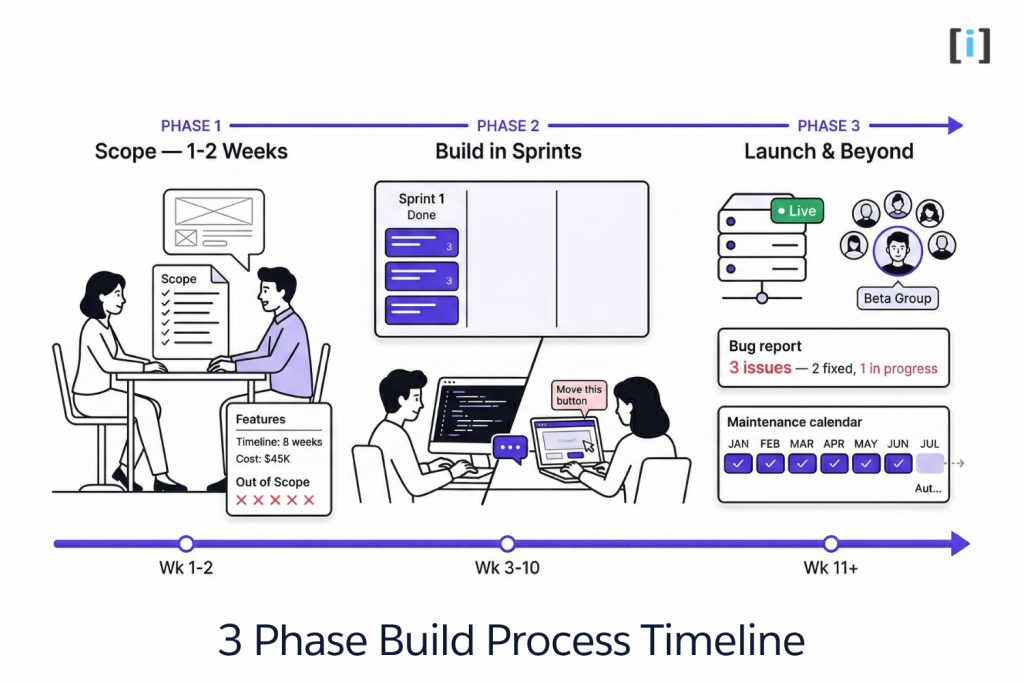
Most “software development process” articles give you a six-phase SDLC diagram that reads like a textbook. Discovery, design, development, testing, deployment, maintenance — neat boxes, clean arrows, no mention of what actually happens.
Here’s how it works when the team is small and the project is real.
Phase 1 — Scoping (1–2 Weeks)
This isn’t a 40-page requirements document that takes a month to write and nobody reads. It’s a series of conversations — sometimes three calls, sometimes five — where we figure out what your business actually needs.
The output is a scope document. It lists what’s being built, what’s explicitly not being built, the timeline, and the cost. Both sides agree before any code is written. No ambiguity, no “we’ll figure it out as we go.”
What a good scope document looks like:
- Features: exactly what the software will do, broken into phases if needed
- Out of scope: features you mentioned but agreed to defer (this prevents scope creep later)
- Timeline: week-by-week milestones, not a vague “3-4 months”
- Cost: fixed or capped, with clear conditions for what triggers additional cost
- Tech stack: what technologies are being used and why
If a developer wants to skip scoping and jump straight to building, walk away. If they charge you $10K for a “discovery phase” before they can tell you what the project will cost, also walk away. Scoping should be fast, focused, and part of the engagement — not a profit center.
Real Talk: The scope document protects you more than it protects the developer. Without one, “I thought that was included” becomes a recurring conversation that costs you money and goodwill.
Phase 2 — Build in Sprints (Weeks, Not Months)
Work happens in 1–2 week cycles. At the end of each sprint, you see working software — not mockups, not wireframes, not a slide deck with screenshots. A real, functioning piece of the system you can click through.
This matters because feedback on working software is infinitely more useful than feedback on a design file. You’ll catch things in a live prototype that you’d never notice in a PDF. “Oh, this button should be on the other screen” is a 2-hour fix in sprint 2 and a 2-week fix after launch.
With a small team, you talk directly to the people writing your code. No project manager relaying messages. No account manager interpreting your feedback through three layers of telephone. You say “move this,” it moves. You ask “why did you build it this way,” the developer who built it explains.
Changes happen fast because decisions don’t need committee approval. That’s the advantage of working with a small team — speed and directness. The tradeoff is capacity: a 2-person team can’t build five features in parallel. But for most SMB projects, that’s not what you need. You need focus.
Phase 3 — Testing, Launch, and What Comes After
Testing isn’t a separate 6-week phase that happens after development “ends.” It happens throughout. Every sprint includes testing. By the time you’re ready to launch, the software has been tested continuously for weeks or months.
Launch is a controlled rollout, not a switch flip. Start with a subset of users — maybe your team first, then a group of clients. Catch issues in a small blast radius before opening it up to everyone.
The first 2–4 weeks after launch are adjustment time. Bugs that only appear with real-world usage. Workflows that need minor tweaks once actual users touch them. This should be included in any good quote — if a developer considers the project “done” the day it goes live, you’ll be paying extra for every post-launch fix.
After that: ongoing maintenance. Monthly or quarterly check-ins, security updates, minor improvements, and a developer who already knows your codebase. The worst version of this is building software, launching it, and then having no one to call when something breaks six months later.
The Litmus Test: Ask your developer: “What does the first month after launch look like?” If they don’t have a clear answer, they haven’t thought past the build.
When Custom Software ISN’T the Answer
We build custom software for a living, and roughly one in five conversations we have ends with us recommending an off-the-shelf tool instead. Not because we don’t want the work — because building custom when you don’t need it wastes your money and our time.
Stick with off-the-shelf when:
- Your workflow is standard. If your process looks like most businesses in your industry, a SaaS tool designed for that industry will work fine.
- You have fewer than 5 users. The per-seat cost of SaaS tools is negligible at small scale. Custom makes financial sense when you’re scaling.
- You’re not integrating with other systems. If the tool works standalone, let it.
- A $50/month tool solves 90% of the problem. That last 10% rarely justifies a $30K build.
Go custom when:
- You’re paying for 3+ tools that don’t talk to each other, and you’ve tried Zapier or Make and hit their limits.
- Your workflow has industry-specific logic that no SaaS product supports — medical compliance rules, real estate commission structures, legal document classifications.
- You’ve outgrown spreadsheets. If your “system” is a shared Google Sheet with 47 tabs and a prayer, it’s time.
- Data ownership matters. Regulated industries (healthcare, finance, legal) often can’t have client data flowing through third-party SaaS servers.
The decision framework is simpler than most articles make it: calculate what your current tools cost you in monthly fees, hours of manual workarounds, and errors that slip through. If that number exceeds the cost of building, custom makes sense. If it doesn’t, keep what you have.
For a deeper dive on the build-vs-buy decision specifically around automation tools, read our Custom Automation vs Zapier breakdown.
Key Takeaway: Custom software is an investment, not a default. Build when your workflow is unique enough that off-the-shelf tools are costing you more in workarounds than custom would cost to build.
How to Evaluate a Custom Software Partner
You’ll probably talk to 2–3 dev shops before choosing one. Here’s how to filter quickly.
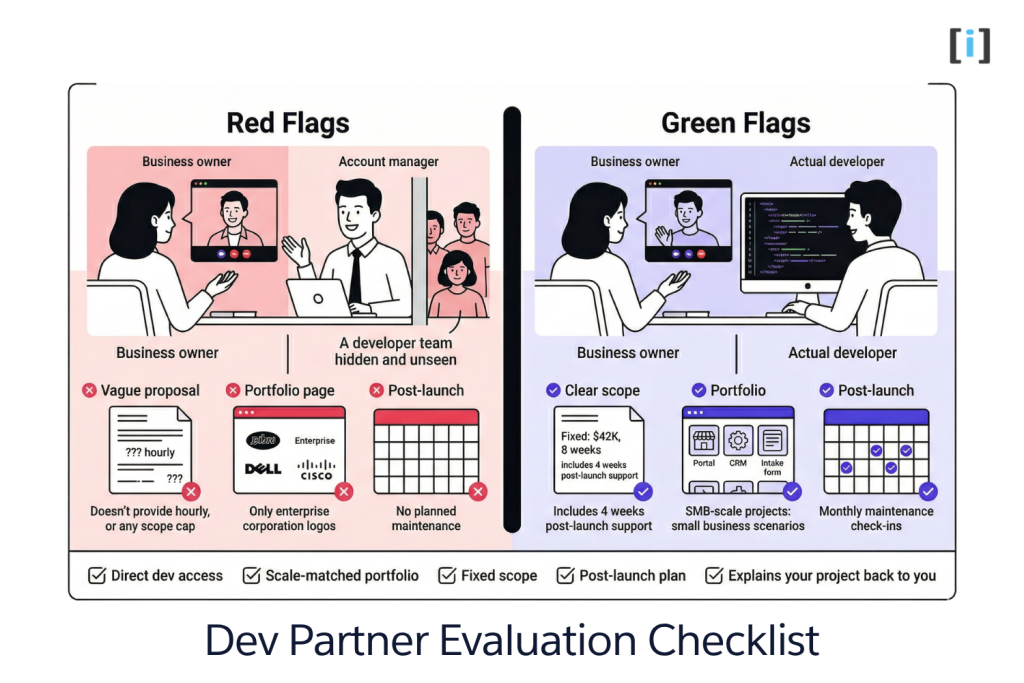
Ask for project examples at your scale. If their portfolio is all enterprise dashboards and fintech platforms, they’re probably not built for a $30K project. You want to see work that looks like yours — portals, CRMs, internal tools for small teams.
Ask who you’ll actually talk to. On a small project, you should be talking directly to the developer building your software. If the answer is “your dedicated project manager will relay feedback to the dev team,” that’s a layer of translation that slows everything down and introduces errors. For a $200K enterprise build, project management layers make sense. For a $40K SMB tool, they’re overhead.
Ask what happens after launch. If maintenance isn’t part of the conversation from day one, expect to be orphaned after delivery. Software needs ongoing care. A good partner includes post-launch support in their quote and offers a maintenance arrangement.
Ask for a fixed scope, not just hourly rates. “We charge $150/hour” tells you nothing about what the project will actually cost. Hourly billing without a scope cap is how $30K projects become $80K. You want a scope document with a fixed or capped price tied to specific deliverables.
Check their tech stack against your needs. A Salesforce shop and a WordPress shop solve different problems. A React team and a WordPress team build different things. Make sure their expertise matches what you need — not just that they’re willing to take the work.
The smallest red flag: After the scoping call, they can’t explain your project back to you in plain English. If they understood what you need, they should be able to describe it clearly. If they can’t, they’ll build the wrong thing.
FAQ
How much does custom software cost for a small business?
Most SMB projects range from $10K–$80K. Simple internal tools and portals start around $10K–$30K. Multi-feature apps with integrations and custom workflows run $30K–$80K. Complex systems with multiple integrations go $80K–$200K+. Get a scope document before committing to any number.
How long does custom software development take?
Simple tools: 3–6 weeks. Business apps: 2–4 months. Complex systems: 4–8+ months. The scoping phase is what sets realistic timelines — skip it and everything takes longer than it should.
Is custom software better than off-the-shelf?
Not always. Off-the-shelf works well for standard workflows with few users and no integration needs. Custom makes sense when you’re duct-taping multiple tools together, need industry-specific compliance, or your process simply doesn’t fit any existing product.
What should I ask a custom software development company?
Ask who you’ll communicate with directly, see project examples at your scale, get a fixed scope with capped pricing, and ask what post-launch support looks like. If they can’t explain your project back to you in plain English after the scoping call, keep looking.
Do I own the code when it’s done?
You should — full ownership of the codebase, documentation, and deployment. Any reputable development partner transfers complete ownership at delivery. If a contract says otherwise, or if your code lives exclusively on their infrastructure with no export option, that’s a deal-breaker.
