Every business reaches a point where spreadsheets, sticky notes, and scattered emails stop working. Customer data lives in ten different places, the sales team has no idea what the support team told a client last week, and marketing is guessing instead of targeting.
That is exactly the problem Salesforce was built to solve — and understanding it starts with a bigger idea: digital transformation.
What Is Digital Transformation?
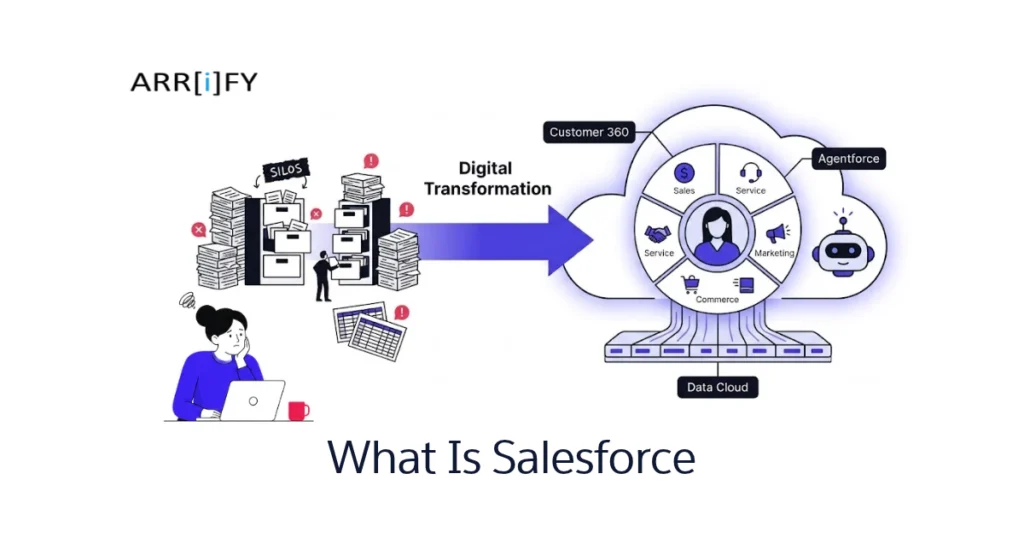
Digital transformation is the process of replacing manual, disconnected business workflows with digital tools that connect teams, automate tasks, and improve how you serve customers.
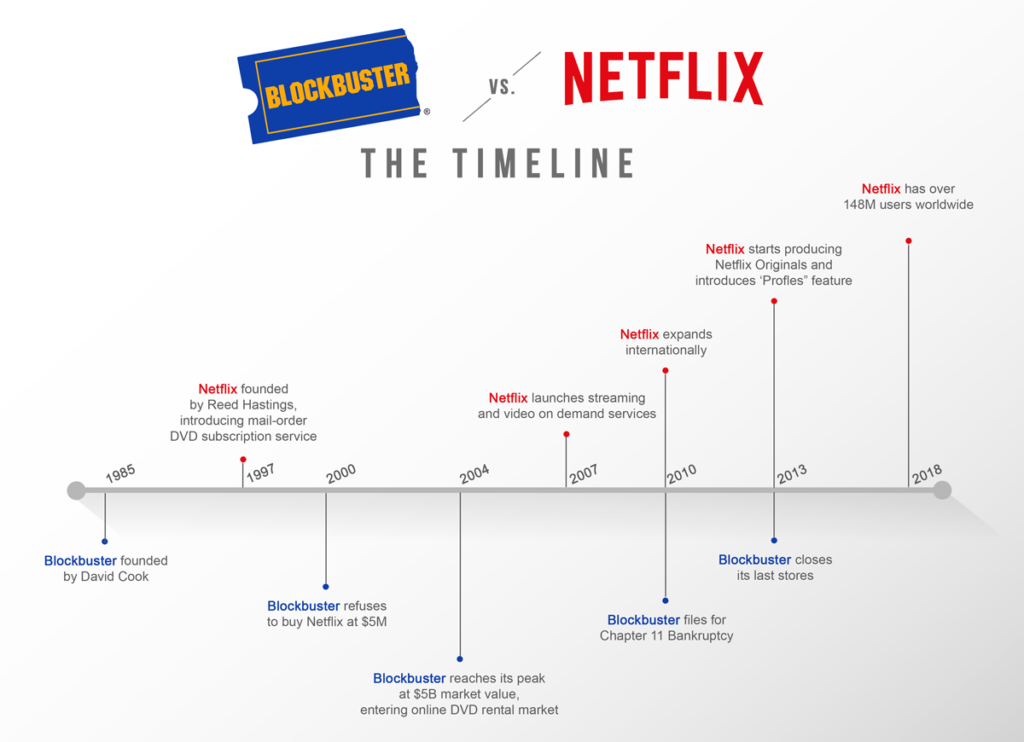
Think about how Netflix replaced the DVD rental store. Instead of browsing shelves, customers now get personalized recommendations delivered to their screen. The product didn’t change (entertainment), but the way it reaches people did — through technology.
The same shift is happening in every industry. Businesses that still rely on manual data entry, isolated departments, and reactive customer service are falling behind those that use connected digital systems.
That is where CRM comes in.
What Is CRM?
CRM stands for Customer Relationship Management. At its core, it is software that stores every interaction a customer has with your business — calls, emails, purchases, support tickets, website visits — in one place.
Without a CRM:
- Sales reps forget follow-ups.
- Support agents have no context when a customer calls.
- Marketing campaigns go out to the wrong people.
With a CRM, every team sees the same, up-to-date picture of every customer. Sales knows what support discussed. Marketing knows which products a customer already owns. No one is working blind.
What Is Salesforce?
Salesforce is the world’s leading cloud-based CRM platform. Founded in 1999, it was one of the first companies to deliver business software entirely over the internet — no installation, no servers, no IT headaches. You log in from a browser, and everything is there.
But Salesforce is more than just a CRM. It is a complete platform (called Customer 360) that connects your sales, service, marketing, commerce, and IT teams with a single, shared view of every customer.
Here is what makes Salesforce different from a basic CRM and the top reasons businesses choose Salesforce:
- Cloud-based — access it from anywhere, on any device.
- Customizable — tailor fields, workflows, dashboards, and automations to fit your exact business process.
- Extensible — thousands of apps on the AppExchange let you add functionality without building from scratch.
- Scalable — works for a 5-person startup and a 50,000-person enterprise.
AI and Agentforce
Salesforce is also leading the shift toward AI-powered business tools. Its Agentforce platform lets businesses deploy autonomous AI agents that handle tasks like qualifying leads, resolving routine support cases, and summarizing customer interactions — with human oversight built in. AI is woven across the entire Customer 360 platform through Einstein, Salesforce’s built-in AI layer.
Who Uses Salesforce?
Salesforce powers over 150,000 businesses worldwide — from startups to enterprises like Amazon Web Services, Toyota, Spotify, and American Express. It is used across every industry: healthcare, financial services, retail, manufacturing, nonprofits, and education.
What does Salesforce do?
At its simplest, Salesforce gives every team in your company the same real-time view of your customers. Here is how that plays out in practice:
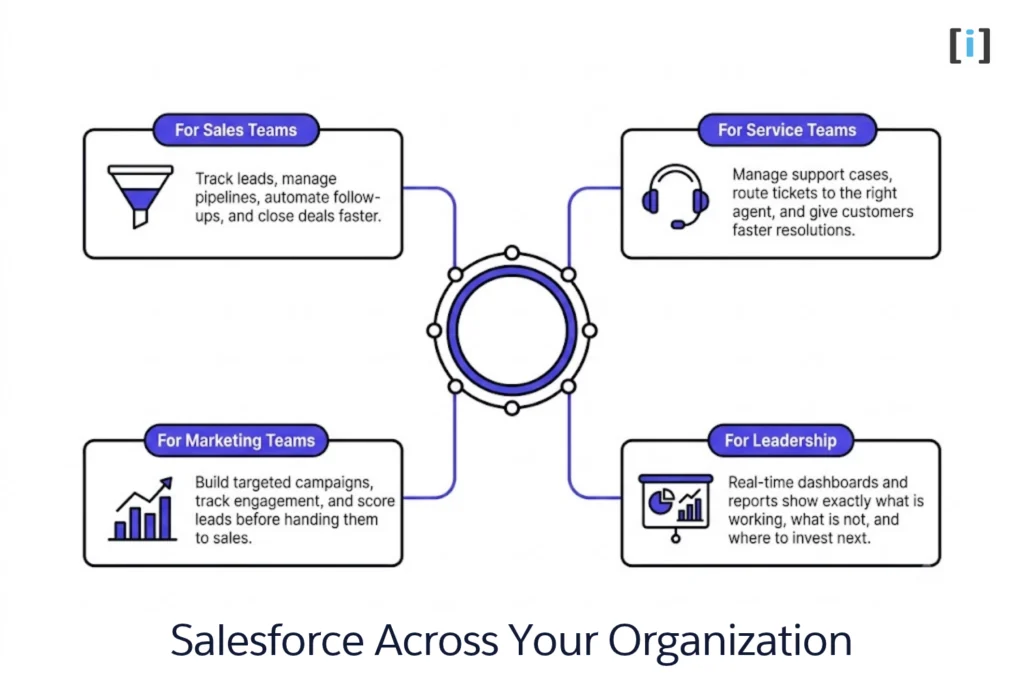
For Sales Teams
Track leads, manage pipelines (learn the difference between leads and opportunities), automate follow-ups, and close deals faster. Salesforce automates repetitive sales tasks so reps spend more time selling and less time on data entry.
For Service Teams
Manage support cases using tools like email-to-case automation, route tickets to the right agent, and give customers faster resolutions. Agents see the full history — no more asking customers to repeat themselves.
For Marketing Teams
Build targeted campaigns, track engagement, and score leads before handing them to sales. Marketing and sales finally work from the same data.
For Leadership
Real-time dashboards and reports show exactly what is working, what is not, and where to invest next. No more waiting for end-of-month spreadsheets.
When Salesforce is implemented well, the wall between departments disappears. Marketing, sales, service, and IT all share the same customer story.
Is Salesforce Right for Your Business?
Salesforce is powerful, but it is not for everyone. Here is a quick way to think about it:
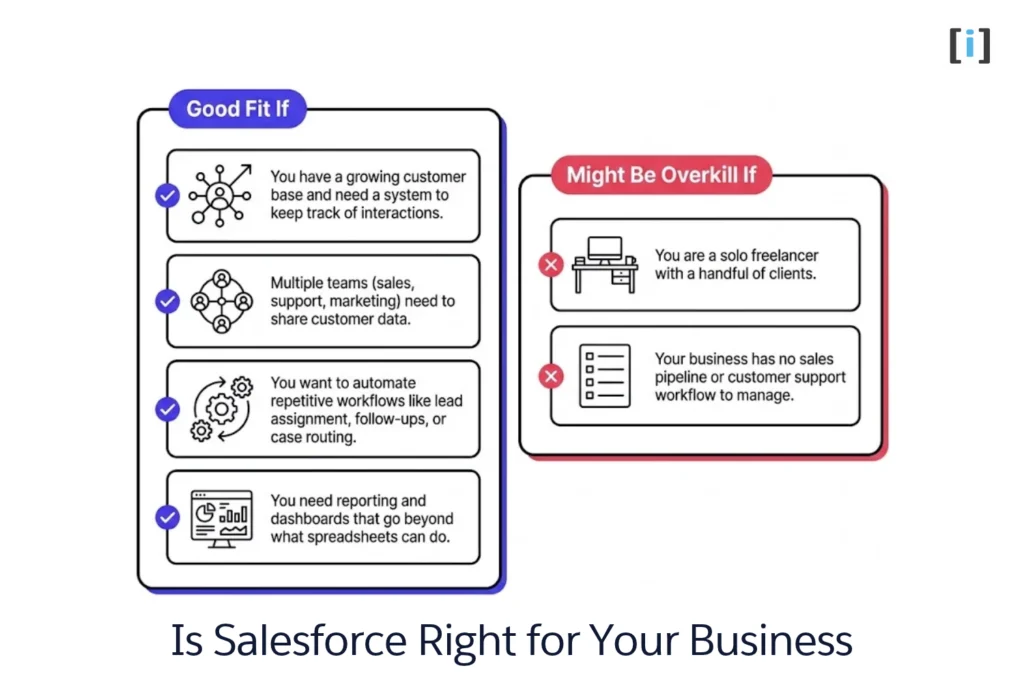
Salesforce is a good fit if:
- You have a growing customer base and need a system to keep track of interactions.
- Multiple teams (sales, support, marketing) need to share customer data.
- You want to automate repetitive workflows like lead assignment, follow-ups, or case routing.
- You need reporting and dashboards that go beyond what spreadsheets can do.
Salesforce might be overkill if:
- You are a solo freelancer with a handful of clients.
- Your business has no sales pipeline or customer support workflow to manage.
For most small-to-mid-size businesses and upward, Salesforce pays for itself by reducing manual work and improving how teams collaborate.
👉 Read our detailed breakdown: Is Salesforce suitable for small businesses?
Salesforce Products at a Glance
Salesforce is not a single tool — it is a suite of products (called “Clouds”) designed for specific business functions:
| Product | What It Does |
|---|---|
| Sales Cloud | Pipeline management, lead tracking, forecasting |
| Service Cloud | Customer support, case management, self-service portals |
| Marketing Cloud | Email campaigns, journey builders, audience segmentation |
| Commerce Cloud | Online storefronts for B2B and B2C |
| Experience Cloud | Customer portals, partner communities, self-service sites |
| Data Cloud | Unified customer data across all sources |
Each cloud can be purchased separately and works together through the Customer 360 platform.
👉 Want the full breakdown? Read our complete guide: The Complete Salesforce Products List Explained (2026 Guide)
Conclusion
Salesforce is not just another CRM — it is the platform that connects your entire business around the customer. Whether you are tracking leads, resolving support cases, or building targeted marketing campaigns, Salesforce gives every team the same real-time data so nothing falls through the cracks.
If your business has outgrown spreadsheets and disconnected tools, Salesforce is worth evaluating. Start with the product that solves your biggest pain point, and expand from there.
FAQs
Is Salesforce a CRM?
Yes. Salesforce started as a CRM and has grown into a full business platform, but CRM remains its core function — managing customer relationships across sales, service, and marketing.
Is Salesforce hard to learn?
The basics are straightforward. Most users get comfortable within a few weeks. Advanced customization (like building automations with Salesforce Flow or writing Apex code) has a steeper learning curve, but Salesforce offers free training through Trailhead.
How much does Salesforce cost?
Pricing depends on which product and edition you choose. Sales Cloud and Service Cloud start at $25/user/month (Starter Suite) and scale up through Pro Suite ($100), Enterprise ($175), and Unlimited ($350). For most businesses, the Enterprise edition offers the best balance of features and flexibility.
Can small businesses use Salesforce?
Absolutely. Salesforce offers a Starter edition designed for small teams. As your business grows, you can upgrade to more powerful editions without migrating to a new system.
What is the difference between Sales Cloud and Service Cloud?
Sales Cloud focuses on managing leads, opportunities, and the sales pipeline. Service Cloud focuses on customer support — cases, knowledge bases, and service-level agreements. Many businesses use both.
Is Salesforce free?
Salesforce does not offer a permanent free plan, but it does provide a 30-day free trial for most products. Nonprofits may qualify for free or discounted licenses through the Salesforce.org Power of Us program.
Next Steps
If you are evaluating Salesforce for your business, here is where to go from there:
- Plan your implementation → Step-by-step Salesforce implementation guide
- Explore the full product suite → The Complete Salesforce Products List Explained
- Learn about automation → The Ultimate Guide to Salesforce Automation
- Set up lead capture → Web to Lead in Salesforce
- Compare form options → Salesforce Forms: Every Option, Compared
Need help setting up Salesforce the right way? Let’s talk — we help businesses implement, customize, and automate Salesforce so it actually works for them.