The software still works.
That’s usually the argument for keeping it.
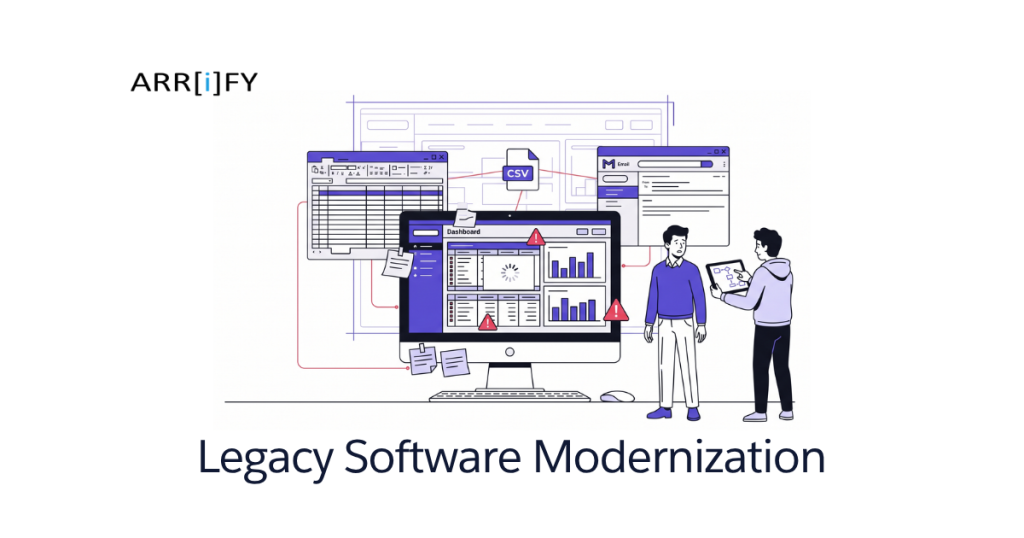
Never mind that your team exports CSVs three times a week, tracks exceptions in a spreadsheet, messages each other in Slack to confirm which status is “real,” and calls one specific employee when anything goes sideways. Technically, the system works. Practically, the business is carrying it.
This is how legacy software sticks around for years longer than it should. Nobody wants to touch it because it runs something important. Replacing it feels risky. So the workarounds grow. A second tool gets added. Then a third. Then someone builds a fragile process around the fragility.
At some point, the risk flips. The dangerous option is not modernizing. It’s continuing to rely on software that nobody trusts, nobody can change quickly, and nobody can integrate cleanly.
This guide is for businesses in that in-between state. Not “our servers are on fire.” More like: “every small change is weirdly hard,” “our reporting is never clean,” and “we know this setup is holding us back, but we don’t know whether to patch it, replace part of it, or rebuild the whole thing.”
We’ll walk through the warning signs, where a rebuild actually makes sense, when it doesn’t, what modernization costs at SMB scale, and how to do it without taking your operations down with it.
The Problem With “It Still Works” Software
Legacy software does not have to be ancient. It does not need to be COBOL, an on-prem server from 2009, or a desktop app that looks like a tax form.
Software becomes legacy when the business outgrows its assumptions.
Maybe the system was built for one office and now you have four. Maybe it was built around a linear process and now your team handles approvals, exceptions, handoffs, and client communication across multiple tools. Maybe the original vendor stopped improving it years ago, but you kept patching around the gaps because switching felt like a bigger problem.
That is the real issue with legacy systems. They preserve yesterday’s workflow while your business keeps changing.
The cost usually does not show up as one dramatic invoice. It shows up as friction:
- duplicate data entry
- manual follow-up steps
- people working outside the system because the system is too rigid
- slow reporting
- brittle integrations
- long onboarding for new hires
- “don’t touch that field or the whole thing breaks”
This is why businesses miss the moment when “old but usable” becomes “actively limiting.” They are not comparing the software to a better system. They are comparing it to the last broken version of itself.
Key Takeaway: Legacy software is a business problem before it is a technical one. The question is not how old it is. The question is how much drag it creates.
7 Signs Your Software Needs Modernization
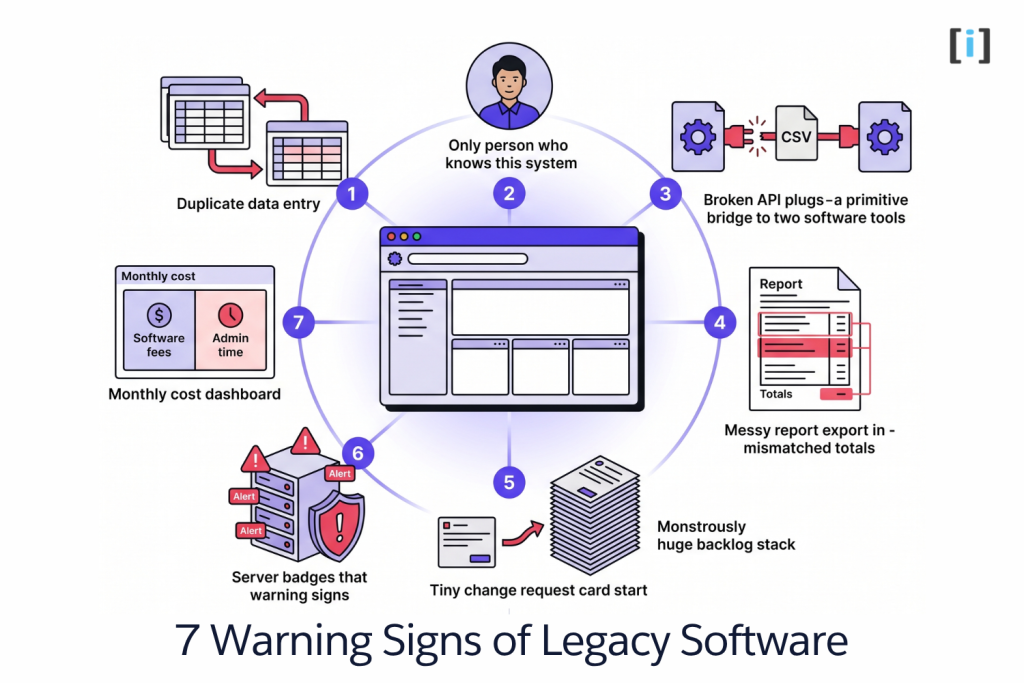
These are the patterns that show up before a business finally decides to modernize. One sign alone does not always mean rebuild. But if you see several at once, your software is probably costing more than you think.
1. Your Team Lives in Workarounds
The clearest sign is not inside the app. It is everything orbiting around it.
The spreadsheet that tracks what the system cannot. The Slack channel where people clarify record status. The email template someone keeps on their desktop because the system cannot trigger the right message. The manual checklist used before a record can be marked complete.
Workarounds are not harmless. They create shadow processes. Once the real workflow lives outside the system, the system stops being the source of truth.
You start seeing duplicate entry, missed updates, and “I changed it over here but not over there” problems. The more workarounds you need, the more fragile the business becomes when someone is out sick or leaves the company.
2. Only One Person Really Understands It
Every legacy system seems to come with a designated translator.
It might be the ops manager who has been there for 11 years. It might be the founder. It might be an outside contractor nobody loves but nobody can fire because they are the only one who knows how the system behaves.
This is not a personality quirk. It is operational concentration risk.
If new hires need oral history to use the software correctly, the software has already failed one of its jobs. Systems should reduce dependency on tribal knowledge, not deepen it.
When only one person understands the edge cases, field logic, report quirks, or recovery steps, you do not have a stable system. You have a tolerated dependency.
3. Every New Integration Becomes a Custom Headache
Modern businesses do not run on one tool. They need forms, billing, CRM, notifications, portals, calendars, dashboards, e-signature, and often industry-specific platforms on top of that.
Legacy systems usually were not built for this. No clean API. No webhooks. No reliable field mapping. No role-aware sync. So every integration request turns into manual export/import work, ugly middleware, or “we can do it, but someone has to check it every day.”
This matters because the business does not stop needing better tools just because the core system is old. It keeps adding layers around it. That is how tool sprawl happens.
If simple requests like “send this status to the client portal” or “sync signed forms into the record automatically” become mini-projects, the system is no longer supporting growth.
4. Reporting Is Slow, Manual, or Untrusted
When leadership asks for a number, how many systems have to be touched before anyone trusts the answer?
That question cuts straight through a lot of legacy environments.
Teams pull exports, clean up naming inconsistencies, merge data by hand, and still argue over whether the final report is right. Sometimes the software can technically produce reports, but nobody believes them because the workflow around data entry is so inconsistent.
The problem is not just inconvenience. Bad reporting slows decisions down. It makes staffing, forecasting, revenue planning, and quality control harder than they should be.
If the business cannot get clean answers without spreadsheet surgery, the software is failing at one of the most basic things it is supposed to do.
Real Talk: If your monthly reporting process feels like a ritual instead of a button, you are already paying the price of modernization. You are just paying it in labor instead of a project budget.
5. Small Changes Take Forever
One field change. One extra approval step. One new status. One dashboard tweak.
These should not become “we need to discuss this with three people and test it in staging for two weeks because nobody knows what it might break.”
When small changes are unusually expensive, it usually means one of three things:
- the code is brittle
- the business logic is poorly documented
- the software architecture no longer matches the process it is trying to support
This is where legacy systems quietly become growth blockers. The business adapts faster than the software can. So instead of improving the process, people create manual side routes around it.
That works for a while. Then those side routes become the process.
6. Reliability or Security Problems Keep Showing Up
Legacy systems often survive on “good enough” stability.
They mostly work until a plugin breaks, a hosting environment changes, a certificate expires, a vendor dependency disappears, or the one person who knows the recovery steps is on vacation.
Security risk is similar. Outdated dependencies, unsupported frameworks, weak permission models, and manual admin processes usually do not create one obvious emergency. They create a stack of low-grade risk that keeps getting deferred because there is always something more urgent.
The question is not whether the software runs today. The question is whether you trust it to keep running under normal business pressure without special handling.
7. You’re Paying Twice: Vendor Fees Plus Internal Drag
Many businesses assume they are saving money because the old system is already paid for or the subscription is relatively cheap.
That math is usually incomplete.
You need to count:
- staff time spent on manual workarounds
- time lost to training and clarification
- errors caused by duplicate entry
- third-party tools added just to patch gaps
- contractor time spent babysitting old logic
- delayed decisions because reporting is slow
A cheap system with expensive drag is not cheap.
This is also where old software starts to look a lot like the same problem we see with overextended no-code stacks. You keep layering fixes around a system that was not built for what the business needs anymore. If that sounds familiar, our guide on Custom Automation vs Zapier covers the same pattern from the automation side.
Pro Tip: Before talking to any developer, list every workaround around the system and estimate the hours each one costs per month. That number is usually more useful than the vendor subscription price.
Not Every Legacy System Needs a Full Rebuild
This is where most modernization articles lose credibility. They assume the old system is doomed and the answer is a big rewrite.
Sometimes it is. Often it is not.
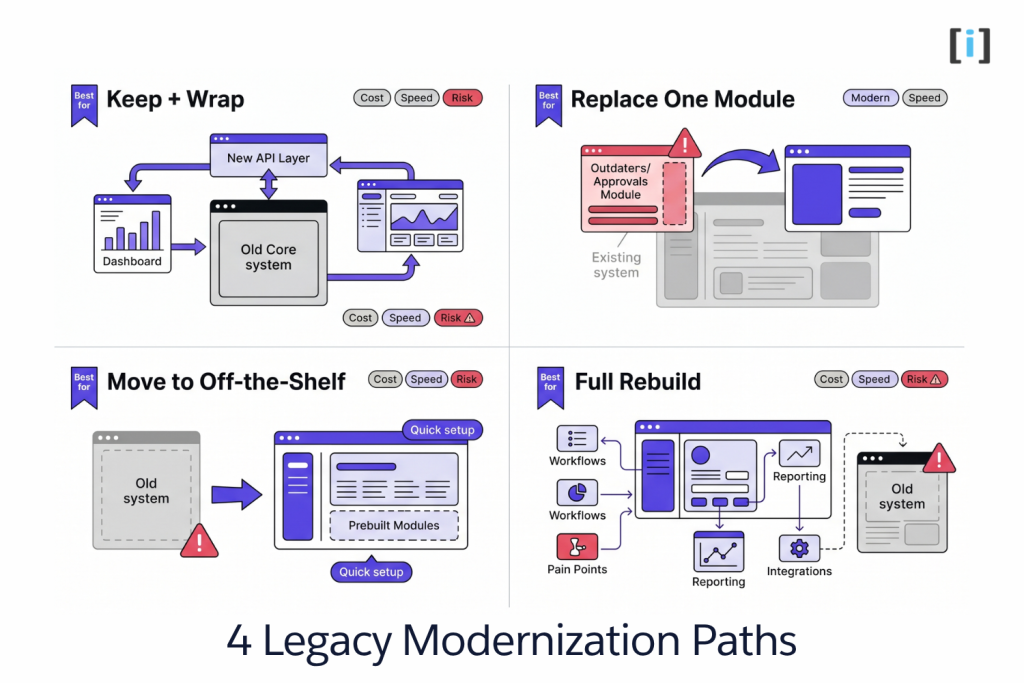
There are four common modernization paths:
1. Keep the core system and wrap it.
If the system still handles its main job well, you may only need an integration layer, better reporting, or a cleaner interface around it.
2. Replace one workflow or module.
This is often the smartest route. Leave the system of record in place for now, but replace the intake flow, approvals module, client portal, dashboard, or document workflow that hurts the most.
3. Move to an off-the-shelf platform.
If your process is more standard than it used to be, a modern SaaS product may now fit well enough. This is especially true when the old software was custom but your current needs are not.
4. Rebuild the whole thing.
This makes sense when the structure itself is the problem. Not the design. Not the reports. The actual underlying model of how the system stores data and supports workflows.
The point is not to defend the old software or to force a rebuild. The point is to choose the least painful path that solves the real bottleneck.
If your process is fairly standard and your biggest problem is just that the current tool is outdated, off-the-shelf may be faster and cheaper. If the workflow itself is what makes your business work, custom becomes more attractive.
The Litmus Test: Ask this: “If we cleaned up the interface and integrations, would the core system still fit how we operate?” If the answer is no, you are probably beyond patching.
When a Rebuild Actually Makes Sense
A rebuild should not happen because the old software is annoying. It should happen because the old software is structurally wrong for the business now.
Your Workflow Is Core to How You Compete
If the software is deeply tied to how you deliver work, serve clients, manage approvals, or move projects through the business, then system fit matters more.
This is common in industries with real operational nuance: healthcare, legal, financial services, real estate, field operations, and any business with layered approval or compliance logic.
If the process is part of your advantage, forcing that process into a generic tool usually creates more drag than it saves.
Patching Costs More Than Progress
Some businesses spend years avoiding a rebuild while paying for one in pieces.
They pay a contractor to keep an old module alive. They pay for extra SaaS tools to fill missing features. They pay their staff in time spent re-entering, checking, and reconciling. They pay in delay every time a small improvement stalls.
At some point, the business is not saving money by waiting. It is renting dysfunction.
The Old Data Model No Longer Matches Reality
This is a big one.
Maybe the software assumes one customer record per account, but now you work with households, multiple locations, or nested approval roles. Maybe the process used to be linear and now it branches by service type, priority, compliance level, or team. Maybe new reporting needs require relationships the old database was never built to support.
Changing labels does not fix structural mismatch. When the underlying data model is wrong, the system will keep producing awkward workflows no matter how many surface-level improvements you make.
You Need Modern Integrations and Clean Ownership
If the future state of the business depends on connected systems, reliable automation, and clean reporting, then rebuilding often makes sense because you are not just replacing software. You are creating a better operating layer.
This is also where businesses often need a mix of custom workflows, portals, and integrations rather than a single big monolith. That is usually the healthier direction.
For the broader cost and build-process side of this conversation, our custom software development guide breaks down what these projects actually look like in practice.
Key Takeaway: Rebuild when the current system’s structure is blocking the business, not just when the interface is ugly or the vendor is annoying.
What Legacy Modernization Usually Costs
There is no universal number because “modernization” can mean anything from a reporting layer on top of old software to a full replacement of the system of record.
At SMB scale, these are the rough buckets we see most often:
Light modernization: $8K-$20K
This usually covers one focused improvement: better reporting, a new intake flow, one clean integration, a dashboard layer, or a UI refresh on top of a system that still mostly works.
Partial replacement: $20K-$50K
This is where one major workflow gets replaced while the old system stays in place for everything else. Good fit when one part of the operation is causing most of the pain.
Full rebuild: $40K-$100K+
This covers replacing the core workflow, migrating data, rebuilding business rules, and connecting the surrounding tools that matter. The higher end usually shows up when the system has lots of edge cases, bad data, or multiple integrations.
What drives cost up:
- messy or inconsistent historical data
- undocumented business rules hidden in manual processes
- old reports nobody understands but everyone depends on
- lots of user roles and permissions
- third-party systems that also need to be integrated or replaced
The hidden multiplier is discovery. The older and less documented the system is, the more effort it takes to understand what the software is really doing versus what people think it is doing.
How to Modernize Without Breaking the Business
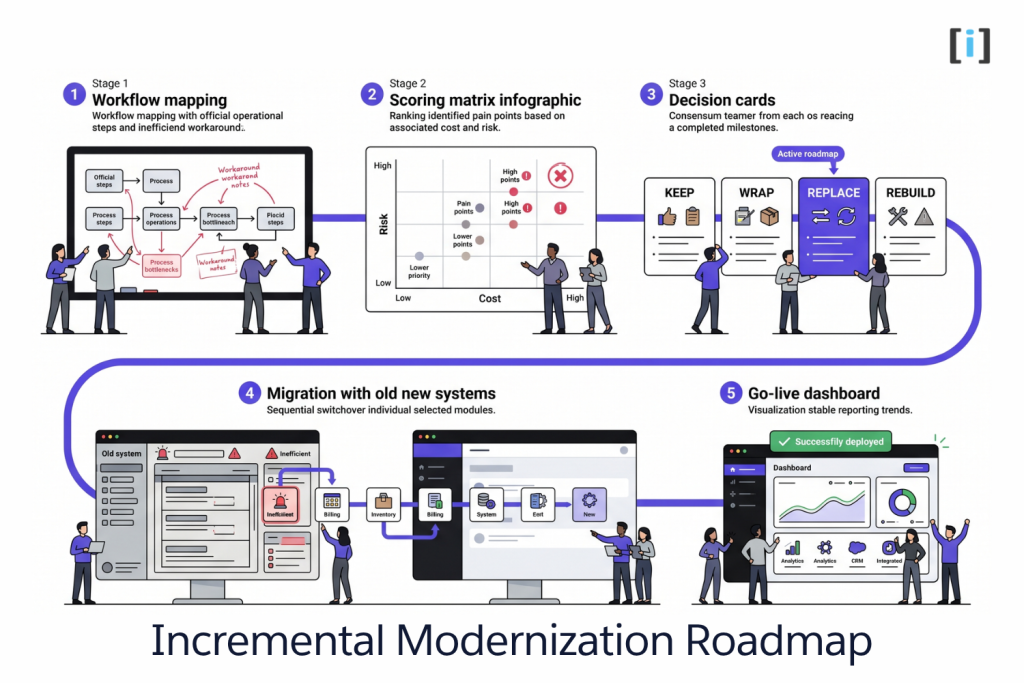
Most bad modernization projects fail for the same reason: they try to replace everything at once before they fully understand what the old system was quietly doing.
The safer path is usually incremental.
1. Map the Real Workflow
Not the documented workflow. The real one.
Where do people leave the system? Where do they use spreadsheets? What gets checked manually? Which records get fixed after the fact? What does the ops person know that the system does not?
You are not just mapping screens. You are mapping exceptions and hidden labor.
2. Rank Pain by Cost and Risk
Do not start with the most annoying issue. Start with the issue that costs the most time, creates the most errors, or blocks the most important work.
Sometimes the biggest win is not replacing the whole system. It is fixing the intake flow that feeds bad data into everything downstream.
3. Decide What to Keep, Wrap, Replace, or Retire
This is where good modernization planning gets practical.
Maybe the database can stay for now. Maybe the portal has to go. Maybe reporting needs to move first. Maybe one internal tool should be replaced before anything client-facing changes.
This step prevents expensive all-or-nothing thinking.
4. Migrate in Phases
Running old and new in parallel for a while is normal. Healthy, even.
You want a controlled handoff, not a heroic weekend cutover that everyone regrets on Monday morning.
Pilot with one team, one workflow, or one client segment first. Learn from that. Then widen the rollout.
5. Keep Clear Ownership on Both Sides
The client side needs a real owner for requirements and rollout. The development side needs someone accountable for scope and implementation.
Without that, decisions stall and edge cases stay undiscovered until late in the process.
The safest modernization plans reduce risk as they go. They give you better visibility before they ask you to take bigger steps.
FAQ
What is legacy software modernization?
Legacy software modernization means improving or replacing software that no longer meets current business needs. That can mean wrapping it with APIs, replacing one module, moving to a modern platform, or rebuilding it entirely.
How do I know if my software needs a rebuild?
If the system’s structure no longer fits your workflow, reporting is unreliable, integrations are painful, and your team depends on workarounds to operate, you are probably beyond minor fixes. A rebuild makes sense when the underlying model is the problem, not just the interface.
Can we modernize without replacing everything at once?
Yes. In fact, that is often the best approach. Replacing the most painful workflow first is usually safer and more cost-effective than trying to rip everything out in one shot.
How much does legacy software modernization cost?
Light modernization often starts around $8K-$20K. Partial replacements commonly land in the $20K-$50K range. Full rebuilds usually start around $40K and go up based on workflow complexity, data quality, and integrations.
Should we move to off-the-shelf software instead of rebuilding?
Sometimes. If your workflow is mostly standard and the real problem is that the current system is outdated, a modern off-the-shelf platform may be the smarter move. If your process is highly specific to how you operate, custom is usually the better fit.