Salesforce is a cloud-based software-as-a-service (SaaS) platform that helps organizations run their daily operations with ease. It began as a simple customer relationship management (CRM) tool, but over the years it has grown far beyond its original purpose.
Today, Salesforce offers a complete ecosystem that includes Sales Cloud, Service Cloud, Marketing Cloud, Experience Cloud, analytics, AI, powerful automation tools, and even industry-specific solutions for sectors like finance, healthcare, retail, manufacturing, and more.
As customer expectations rise and companies deal with larger volumes of data, the need for automation has become stronger than ever. Manual processes slow teams down, increase the chances of errors, and make it difficult to offer a consistent customer experience.
Automation helps to solve these challenges by simplifying work, improving accuracy, and creating smoother workflows across all departments.
This updated guide, gives you a complete look at Salesforce automation like what’s new, what has improved, and how your business can use these tools to get more done with less effort.
Overview of Salesforce Automation
Salesforce automation simply means using Salesforce tools to handle business tasks automatically instead of doing them manually. These tasks can be as simple as sending an email alert or as complex as guiding a multi-step business process. Common examples include:
- Multi-step business processes
- Lead assignment
- Email alerts and notifications
- Opportunity updates
- Data cleanup and validation
- Case routing
- Territory management
- Approval workflows
- Scheduled background jobs etc.
When these activities run on their own, your team can shift their time toward meaningful work like helping customers, closing deals, and improving internal processes.
In short, Salesforce automation helps you work smarter, not harder. It boosts accuracy, speeds up operations, reduces manual errors, and ensures your employees aren’t stuck handling repetitive tasks that technology can easily manage.
Who can use Salesforce Automation?
Salesforce automation is designed for everyone whether you are a Salesforce Admin or a Developer. Each role has its own set of tools and approaches, but the goal is the same: simplify work and improve efficiency.
Admins usually work with no-code or low-code tools. These tools let them build automation without writing code, making it easy to handle everyday business processes.
Developers, on the other hand, work with code-based solutions that offer deeper control and flexibility for more complex requirements.
For Admins (No-Code / Low-Code)
These tools allow Admins to create powerful automations visually:
- Flow Builder
- Einstein Automations
- Approval Processes
- Process Builder & Workflow Rules(legacy)
For Developers (Code-Based)
Developers can build advanced and highly customized automation using:
- Apex Triggers
- Batch Apex
- Apex Scheduler
- Custom integrations using Apex + APIs
The best part is that Salesforce provides tools for every skill level, so you can start small and scale up as your processes grow.
Salesforce now encourages everyone Admin or Developer to follow a Flow-first approach, as most classic automation tools are being retired or replaced.
Top Tools for Salesforce Automation
Salesforce offers several automation tools, but some are far more powerful and future-proof than others.
Below are the most important tools you should know, especially as Salesforce continues moving toward a Flow-first approach.

Flow Builder (Recommended)
Flow Builder is the most powerful and flexible automation tool in Salesforce today. It has essentially replaced older tools like Workflow Rules and Process Builder, and it can handle almost any automation scenario simple or complex.
With Flow Builder, you can:
- Build complex decision logic without writing code
- Update or create multiple records across different objects
- Guide users through step-by-step screen flows
- Send automated emails, notifications, and reminders
- Run scheduled automations in the background
- Call external systems through HTTP callouts
- Integrate with external data sources or APIs
Salesforce continues investing heavily in Flow, and every release brings new improvements that make it easier and more powerful.
Latest Flow Enhancements (2024–2025)
Recent releases introduced several helpful updates, including:
- Better error handling and debugging tools
- Reactive components in Screen Flows
- A more advanced and user-friendly formula builder
- Integration with Salesforce Data Cloud
- Improved trigger order management
- Enhanced Flow testing capabilities
- Flow actions that support AI-driven predictions
Because of its flexibility and ongoing enhancements, Flow Builder has become the backbone of Salesforce automation.
If you want to learn more about flow, The Complete Guide to Flow is a great resource.
Process Builder (Legacy – Not Recommended for New Projects)
Process Builder was once one of the most widely used automation tools in Salesforce. It allowed Admins to automate record updates, send emails, and run simple “If/Then” logic without writing any code. For many years, it played an important role in helping teams make their workflows more efficient.
However, Salesforce has now shifted fully toward Flow Builder. While your existing Process Builders will continue to work, Salesforce no longer recommends building new automation with this tool. Flow Builder is more powerful, faster, and offers better control over complex logic.
If You Still Have Process Builders Running
If your org still relies on older Process Builders, consider the following steps:
- Prioritize migrating them to Flow Builder
- Check for multiple Process Builders on the same object (this can cause slow performance)
- Consolidate logic where possible to avoid conflicts and improve system efficiency
To make this easier, Salesforce provides a Migration Assistant that helps you convert old Process Builders into Flows with minimal effort.
In short, Process Builder served its purpose, but it’s part of Salesforce’s legacy tools now. For long-term stability and better performance, Flow Builder should be your go-to option.
Approval Processes
Approval Processes are used when a record needs to be reviewed and approved by someone in the organization. They help ensure that decisions follow a clear and consistent path instead of relying on manual communication or email chains. Some common examples include:
- Discount approvals
- Contract approvals
- Marketing campaign approvals
- Loan or application reviews
- Employee onboarding steps
- Internal request approvals (such as equipment or budget requests)
An Approval Process outlines every step of the review from who needs to approve the record, to what happens after the approval or rejection. Once the process is set up, Salesforce automatically handles the routing, notifications, and any follow-up actions.
Modern Enhancements for Approvals
Approval automation in Salesforce is now more flexible and powerful thanks to integrations and newer tools such as:
- Slack Approvals -> Approvers can respond to requests directly in Slack.
- Flow Orchestration -> Useful for multi-step or multi-team approval chains.
- Einstein Recommendations -> Suggests actions or choices based on business logic or AI.
Salesforce is also making approvals faster and easier by supporting mobile push notifications, so users can review and approve items on the go.
Approval Processes remain an important automation tool, especially for organizations that require structured oversight or compliance.
Einstein Next Best Action (NBA)
Einstein Next Best Action (NBA) uses intelligence and business logic to guide users toward the most meaningful action at the right moment. It analyzes your rules and data, then displays personalized recommendations directly inside Salesforce. This helps teams make smarter decisions without guessing or searching for information.
You can design a strategy behind these recommendations like deciding when they appear, who should see them, and what conditions must be met. This ensures that users only receive relevant suggestions that support your business goals.
How NBA Can Be Used
- Suggesting the next step for a sales rep based on opportunity progress
- Showing customers the most relevant offer or product
- Helping service agents pick the best resolution for a case
- Guiding new employees through onboarding steps
- Recommending follow-up actions after a customer interaction
NBA combines business rules, filters, and optionally AI predictions to deliver these insights. This makes it useful for both simple logic and more advanced AI-driven scenarios.
Salesforce provides a monthly allowance of 5,000 NBA requests for free, which is usually enough for smaller orgs. If you go beyond that limit, Salesforce will reach out to review your usage and discuss pricing options.
Apex Triggers
Salesforce is a powerful CRM tool, but it can be even more powerful with the use of Apex triggers. Apex triggers are pieces of code that execute automatically when certain conditions are met. This makes them ideal for automating processes in Salesforce.
For example, let’s say you want to automatically send a thank-you email to a customer after they make a purchase. With an Apex trigger, you can do just that. The trigger would fire whenever a new purchase is made, and then it would send a thank-you email.
Apex triggers give you the ability to do custom actions before or after events to records in Salesforce, like insertions, updates, deletions, and more. With Apex triggers, you can keep your data clean and tidy, just like a well-managed database system.
Trailhead that can help Salesforce automation with trigger
Salesforce automation with Apex can help your business run more efficiently. By automating tasks that are typically done manually, you can free up time for your staff to focus on more important tasks. In addition, automating tasks can help to improve accuracy and eliminate errors.
The Apex scheduler can be used to automate a variety of tasks, including salesforce data entry, lead assignment, and follow-up tasks. By using the Apex scheduler, you can customize when and how often these tasks are performed. This can help you to optimize your workflow and ensure that tasks are completed in a timely manner.
Here is how you can generate PDF on a button click with Apex and visualforce.
Batch Apex
Batch Apex is a powerful automation tool designed for handling very large volumes of data, often thousands or even millions of records at a time. Because regular Apex must follow strict governor limits, it can’t process huge datasets in a single run. Batch Apex solves this by breaking the work into smaller, manageable chunks so the job stays within Salesforce limits.
When you run a Batch Apex class, Salesforce executes the logic once for each batch of records. This makes it efficient, scalable, and ideal for jobs that would otherwise time out or fail due to limits.
Batch Apex runs asynchronously, meaning it works in the background while users continue working in the system without interruption.
Common Use Cases
Batch Apex is useful for scenarios such as:
- Cleaning up or standardizing old data
- Mass updating large groups of records
- Archiving historical or unused information
- Recalculating complex roll-up summary values
- Handling data migration or data transformation projects
Because Batch Apex processes records in groups (commonly 200 at a time), it allows you to handle large operations safely and reliably.
Apex Scheduler
The Apex Scheduler allows you to run Apex classes automatically at a specific time or on a recurring schedule. To use it, you create a class that implements the Schedulable interface and then specify when you want it to run. Think of it as setting an alarm clock for your automation.
One of the biggest advantages of Apex Scheduler is the ability to control when your automation runs daily, weekly, monthly, or even at custom intervals. This gives you flexibility to manage system performance and ensure tasks run at the most efficient time.
Working With Batch Jobs
The Scheduler is also commonly used to trigger Batch Apex jobs. This is especially useful for long-running or resource-heavy tasks, since you can schedule them during off-peak hours to avoid slowing down the system for your users.
Practical Use Cases
Apex Scheduler can be used for a wide variety of tasks, such as:
- Generating weekly reports every Monday morning
- Cleaning up temporary or outdated data each night
- Sending reminder emails at the beginning of each month
- Refreshing dashboard or summary data every hour
- Running heavy batch jobs after business hours
Apex Scheduler is a reliable tool for keeping your system running smoothly and ensuring essential tasks happen exactly when they should.
Custom Integrations (Apex + APIs)
Custom integrations allow Salesforce to connect with external systems like accounting software, inventory tools, or custom applications. Using Apex and Salesforce APIs, developers can automate data movement between Salesforce and other systems.
What You Can Do
- Pull data into Salesforce (orders, customer info, shipping status, payments, etc.)
- Push data out of Salesforce (new leads, invoices, inventory updates, notifications)
Common Integration Methods
- REST API Callouts -> Most common for modern cloud apps
- SOAP Callouts -> For older enterprise systems
- Platform Events -> Real-time, event-driven integrations
- Middleware Tools -> MuleSoft, Boomi, Informatica for complex ecosystems
Salesforce Automation New Enhancements
Salesforce continues to release hundreds of improvements every year, especially around Flow.
Below are the most important updates, starting from the Winter ’23 transition and leading into the major enhancements released through 2024–2025.
Retirement of Workflow Rules & Process Builder
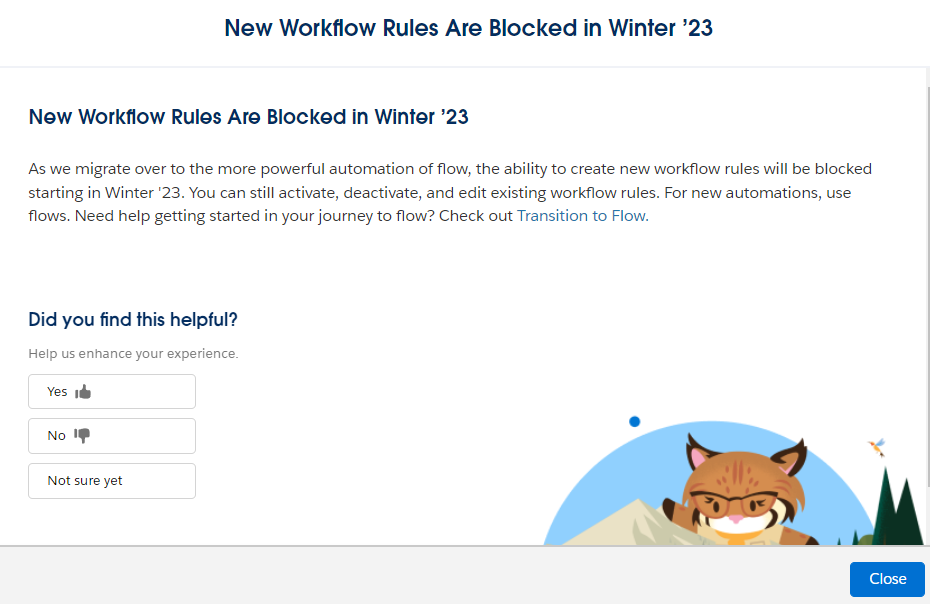
In Winter ’23, Salesforce officially blocked the creation of new Workflow Rules. This marked the beginning of a major shift toward Flow Builder as the main automation tool.
Key points:
Winter ’23
- Creation of new Workflow Rules is blocked in production.
- Existing Workflow Rules may still be edited, activated, or deactivated.
Summer ’23
- Creation of new Process Builder processes is blocked.
- Process Builder becomes a fully legacy automation tool.
December 31, 2025 – End of Support
- Salesforce ends support and maintenance for Workflow Rules and Process Builder.
- Old automations continue to run, but:
- No bug fixes
- No performance enhancements
- No guaranteed long-term stability
- No Salesforce assistance if issues arise
Salesforce provides a Migration Assistant to help move old automations into Flows.
Flow Builder Enhancements
Winter ’23 Release (Late 2022)
These updates were part of Salesforce’s major usability and capability enhancements:
- Cut and paste functionality for Flow elements.
- View incoming go-to connections in a dedicated panel.
- Enhanced Formula Builder for Flow formulas and Collection Filter.
- Record-triggered Flows now support ISCLONE.
- New condition operators: “In” and “Not In”.
- Generate Flow Choice options from external data sources.
- Launch Screen Flows using Lightning Web Components (LWC) and many more.
2023 Releases (Spring ’23 → Winter ’26)
These updates focused on usability, clarity, and advanced Flow capabilities:
- Improved navigation, layout, and element arrangement.
- More descriptive debugging and clearer system error messages.
- Expanded subflow flexibility.
- Formula Builder improvements and enhanced data operations.
Enterprise-Level Flow Automation
These updates brought modern, enterprise-level power into Flow:
- Reactive Screen Flow Components -> Real-time updates to components without clicks
- HTTP Callouts directly in Flow-> Create API integrations without Apex code.
- Data Cloud–Triggered Flows -> Trigger automation using real-time unified data from Data Cloud.
- Flow Version Comparison -> Compare two versions of a Flow to see what changed.
- Flow Testing Suite -> Create, run, and automate tests for record-triggered flows
Best Practices for Salesforce Automation

To build reliable, scalable, and easy-to-maintain automation in Salesforce, it’s important to follow a few core best practices. These will help keep your org clean, reduce errors, and ensure smooth performance.
Prefer Flow for Most Automation Needs
Flow Builder is now Salesforce’s primary automation tool. Use it for new automations instead of older tools like Workflow Rules or Process Builder. Flow offers more flexibility, better performance, and ongoing support from Salesforce.
Document Your Automation
Clear documentation helps your team understand what each automation does, why it exists, and how it works. This is essential for troubleshooting and future updates.
Test Thoroughly
Always test your automation in a sandbox before moving it to production. Run through multiple scenarios including edge cases to confirm everything works as expected. A Flow or Trigger might behave perfectly in one case but fail silently in another, so testing helps catch issues early.
Monitor Performance Regularly
Automation is not something you build once and forget. Review your flows, triggers, and scheduled jobs regularly to make sure they still meet business needs. Set up error notifications or fault paths so you get alerted if something breaks.
Plan for Scale
Automation that works for a small amount of data might struggle as your database grows. Consider how your logic behaves with thousands or millions of records. Keep governor limits, batch sizes, and data growth in mind to ensure your automations remain stable over time.
Conclusion
In summary, Salesforce is a powerful platform that enables organizations to streamline and automate their sales, marketing, and customer service operations. Its wide range of automation tools, such as Flow Builder, Process Builder, Einstein Next Best Action, and Approval Processes, allows businesses to manage customer data, automate workflows, and improve productivity and efficiency.
Salesforce Automation can bring many benefits to an organization such as saving time and money by automating repetitive and manual tasks, providing faster and more accurate responses to customer inquiries, and making better decisions by providing real-time data and analytics on customer interactions and sales performance.
In the Salesforce Winter ’23 Release, there are new updates such as the blocked workflow rules, updates on the Flow Builder, and other new features that will help the user to improve their processes even more.
As technology continues to evolve, Salesforce Automation will continue to be important for organizations looking to improve their sales, marketing, and customer service operations. As the world becomes more digital, the use of automation tools will become even more critical for businesses looking to remain competitive in today’s fast-paced market.
FAQs
What is Salesforce automation?
Salesforce automation refers to using Salesforce tools like Flow Builder, Apex, and Einstein to automate repetitive business processes.
Which Salesforce automation tool should I use?
Salesforce recommends a Flow-first approach.
Use Flow Builder for most automation.
Use Apex Triggers when logic is too complex for Flow.
Use Batch Apex for large data operations.
Use Approval Processes for structured reviews.
Use Apex Scheduler when something must run at a specific time.
Is Process Builder still supported?
Process Builder is now a legacy tool.
While existing processes still work, you cannot create new ones.
What is the easiest way to migrate Workflow Rules and Process Builder to Flow?
Salesforce offers the Migration Assistant tool to automatically convert legacy automations into Flows. You may still need manual clean-up afterward.