Improving Customer Experiences
Business User, Automating Salesforce, Improving Customer Experiences, Optimizing Salesforce, Salesforce Basic
Before we understood Salesforce Genie, we need to understand the Unified profile and its significance. What is a Unified Profile? The unified profile is one single source of truth that consists of data from various data sources and channels. It shows one clear picture of all interactions with the brand. Past service Interaction, Marketing engagements, … Read more
Uncategorized, Getting Started with Salesforce, Improving Customer Experiences, Salesforce Basic
There are many things you need to keep track of when running an event. You need to track your attendees, your speakers, your sponsors, your volunteers, and your supplies. You also need to track your finances, your marketing, and your overall event management. The best way to track all of this is to use a … Read more
Business User, Improving Customer Experiences, Optimizing Salesforce, Salesforce Basic, Salesforce Customization, Salesforce How-To Guides
Introduction to Salesforce site (Force.com) Companies are using Salesforce to keep all the business-specific data that include products, pricing, users, knowledge articles, testimonials, etc. This data can be accessed only by internal users who have Login credentials of Salesforce. What if any organization needs to share any of this data with the public and the … Read more
Salesforce Admin, Improving Customer Experiences, Optimizing Salesforce, Salesforce Basic, Salesforce Customization
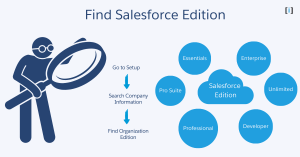
Salesforce is a powerful platform, but did you know there are different Salesforce editions? Each edition comes with different features, limits, and pricing. Knowing which edition you’re using is important because it affects what you can do with Salesforce and how much you pay. In this post, we’ll show you how to find your Salesforce … Read more
