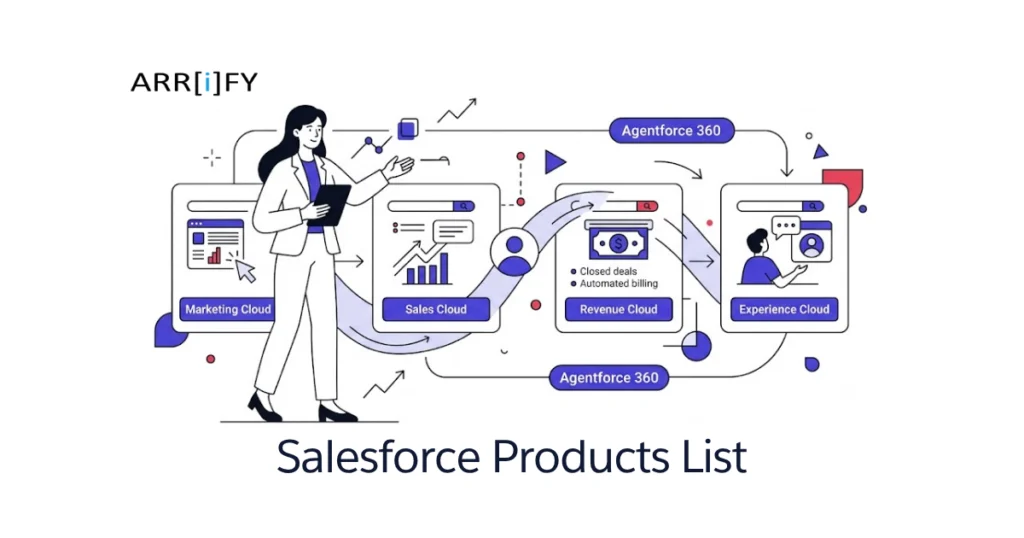
Salesforce is not a single product — it is a suite of cloud-based tools designed for specific business functions. Sales, service, marketing, commerce, data, AI agents, community portals — each has its own “Cloud” with dedicated features.
👉 If you are new to Salesforce, start with our beginner’s guide: What Is Salesforce? A Simple Guide for Beginners. If you need a refresher on core concepts, read our breakdown on What Is CRM.
This guide covers every major Salesforce product, what it does, who it is for, and how they all connect.
Quick Comparison: Salesforce Products at a Glance
| Product | Primary Use Case | Best For |
|---|---|---|
| Sales Cloud | Lead management, pipeline tracking, forecasting | Sales teams of any size |
| Service Cloud | Case management, customer support, self-service | Support and service teams |
| Marketing Cloud | Email journeys, audience segmentation, ad management | Marketing departments |
| Commerce Cloud | Online storefronts, order management | B2B and B2C e-commerce |
| Experience Cloud | Customer portals, partner communities | External-facing self-service |
| Data Cloud | Unified customer data, real-time profiles | Data teams, cross-cloud unification |
| Revenue Cloud | CPQ, billing, subscription management | Sales ops, finance, deal desk teams |
| Agentforce | Autonomous AI agents across all clouds | Organizations investing in AI automation |
| CRM Analytics | Dashboards, BI, predictive insights | Analysts, ops leaders, executives |
| Industry Clouds | Pre-built solutions for healthcare, finance, etc. | Regulated or specialized industries |
How to Choose Your First Salesforce Product
Not sure where to start? Here is a quick decision framework:
- Your biggest pain is sales pipeline visibility? → Start with Sales Cloud
- Your biggest pain is customer support? → Start with Service Cloud
- You need both? → Most businesses start with Sales Cloud + Service Cloud on Enterprise edition
- You sell online? → Add Commerce Cloud
- You run multi-channel marketing campaigns? → Add Marketing Cloud or Account Engagement (for B2B)
- Your data is scattered across 10+ systems? → Add Data Cloud
- You want AI to handle routine tasks? → Add Agentforce
- You need advanced reporting beyond standard dashboards? → Add CRM Analytics
You do not need to buy everything at once. Start with the cloud that solves your most urgent problem and expand from there.
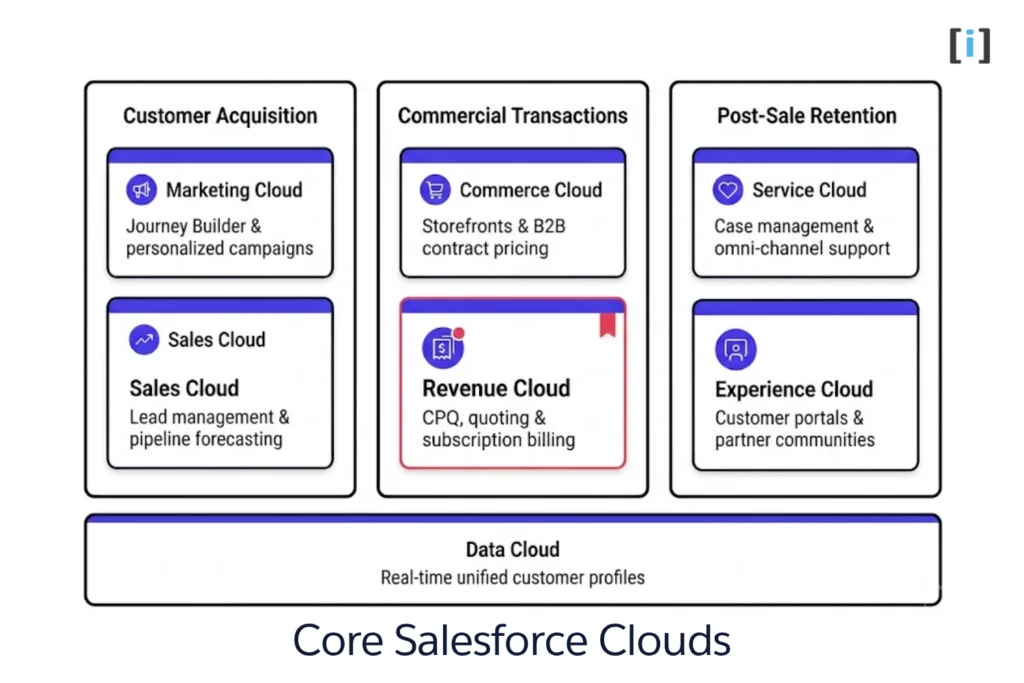
Core Salesforce Clouds
Sales Cloud
Sales Cloud is Salesforce’s flagship CRM product. It gives sales teams the tools to manage leads, track opportunities through a visual pipeline, forecast revenue, and automate repetitive tasks like follow-up emails and lead assignment.
Key features:
- Lead and contact management
- Opportunity tracking with stage-based pipelines
- Sales forecasting and quota management
- Workflow automation (assignment rules, auto-responses)
- Einstein AI for lead scoring and next-best-action recommendations
Who it is for: Any business with a sales team — from startups tracking their first deals to enterprises managing thousands of reps across regions.
Related: The Ultimate Guide to Salesforce Automation | Ultimate Guide on Opportunity in Salesforce | Salesforce Lead vs. Opportunity
Service Cloud
Service Cloud is Salesforce’s customer support platform. It helps service teams manage cases, resolve issues faster, and deliver consistent support across every channel — phone, email, chat, and social media.
Key features:
- Case management with automatic routing and escalation
- Omni-channel support (email, chat, phone, social, messaging)
- Knowledge base for agent and customer self-service
- Service Level Agreements (SLA) tracking
- Einstein AI for case classification and recommended responses
Who it is for: Businesses that handle customer support at scale — especially those needing multi-channel support and SLA tracking.
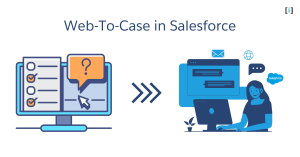
Related: Email to Case in Salesforce | Salesforce Web to Case
Marketing Cloud
Marketing Cloud is Salesforce’s digital marketing platform. It enables marketing teams to build customer journeys, send personalized email campaigns, and analyze campaign performance — all connected to CRM data.
Key features:
- Salesforce Journey Builder for multi-step automated campaigns
- Email Studio for personalized email marketing
- Social media management via third-party partners (Sprout Social, Hootsuite — Salesforce retired its native Social Studio in November 2024)
- Audience segmentation powered by CRM data
- Analytics and attribution dashboards
Who it is for: Marketing teams that need to move beyond basic email blasts and run data-driven, multi-channel campaigns tied directly to sales outcomes.
Note: Salesforce also offers Marketing Cloud Account Engagement (formerly Pardot) — a B2B-focused marketing automation tool that integrates tightly with Sales Cloud. If your marketing team primarily supports a B2B sales pipeline, Account Engagement may be a better fit than the full Marketing Cloud.
Commerce Cloud
Commerce Cloud powers online storefronts for both B2B and B2C businesses. It handles product catalogs, pricing, order management, and checkout — with built-in personalization powered by Salesforce AI.
Key features:
- Headless and storefront-based commerce options
- AI-driven product recommendations and personalized search
- Order management and fulfillment workflows
- B2B-specific features: contract pricing, bulk ordering, account hierarchies
- Native integration with Sales Cloud and Service Cloud
Who it is for: Retailers, D2C brands, and B2B companies that sell online and want their commerce data connected to their CRM.
Experience Cloud
Experience Cloud (formerly Community Cloud) lets you build branded portals, communities, and self-service sites for customers, partners, and employees — all connected to your Salesforce data.
Key features:
- Customer self-service portals (view cases, track orders, access knowledge articles)
- Partner portals for deal registration and lead sharing
- Employee intranets and help desks
- Drag-and-drop page builder with pre-built templates
- Full access control and data sharing rules
Who it is for: Businesses that want to give external users (customers or partners) controlled access to Salesforce data without giving them a full Salesforce license.
Related: Salesforce Experience Cloud Guide | Customer Community vs. Customer Community Plus
Data Cloud
Data Cloud (formerly Salesforce CDP and Salesforce Genie) is Salesforce’s real-time data platform. It unifies customer data from every source — CRM, websites, mobile apps, data warehouses, and third-party tools — into a single, live customer profile.
Key features:
- Real-time data ingestion from any source
- Identity resolution (matching records across systems to one customer profile)
- Calculated insights and segmentation
- Native integration with every Salesforce Cloud
- Activation — push unified segments to Marketing Cloud, Sales Cloud, or external ad platforms
Who it is for: Businesses that have customer data scattered across multiple systems and need a unified view to power personalization, analytics, and AI.
Revenue Cloud
Revenue Cloud brings together CPQ (Configure, Price, Quote), billing, and subscription management into one unified product. It automates the entire revenue lifecycle — from quoting to invoicing to revenue recognition.
Revenue Cloud replaces the legacy Salesforce CPQ managed package, which reached End of Sale in March 2025. New customers should use Revenue Cloud (now part of the Agentforce Revenue Management suite) for all quote-to-cash needs. Existing legacy CPQ customers retain full support but should plan their migration.
Key features:
- Product configuration with pricing rules and discount approvals
- Automated quote generation and e-signature workflows
- Subscription billing and renewal management
- Revenue recognition and forecasting
- Promotions engine for managing discounts without custom code
- Native integration with Sales Cloud pipelines
Who it is for: Businesses with complex pricing models — variable pricing, bundles, subscriptions, or multi-year contracts — that need to eliminate manual quoting errors and accelerate deal cycles.
Related: Generate Quote PDF in Salesforce | Salesforce Document Generation
Agentforce and Einstein AI
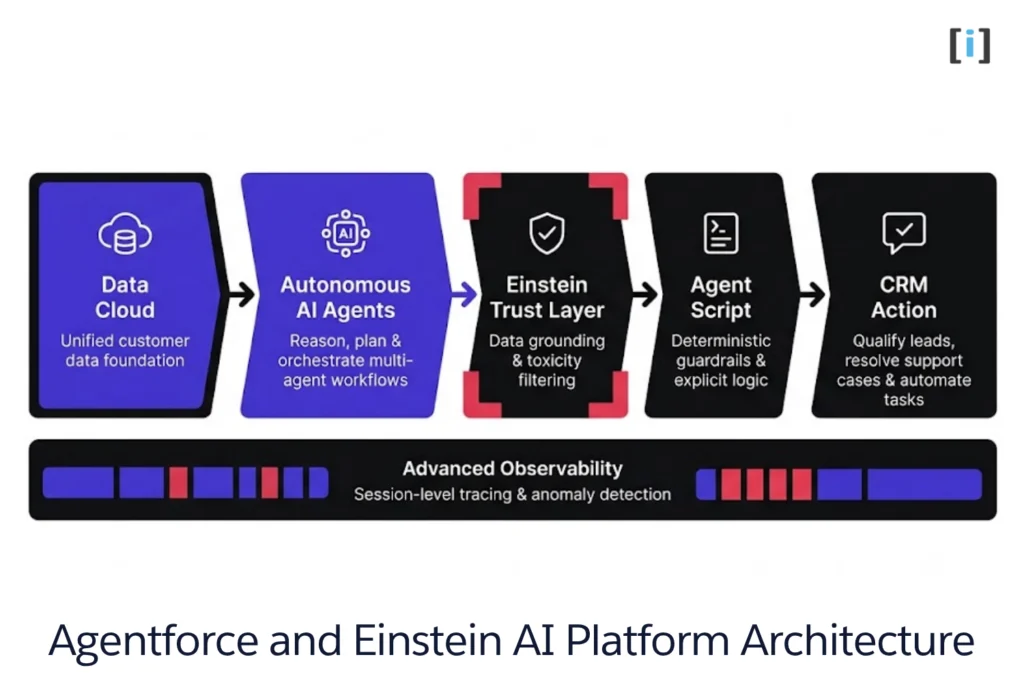
Agentforce is Salesforce’s autonomous AI platform — and it is the biggest development in the Salesforce ecosystem in 2025–2026. Unlike traditional chatbots that follow rigid scripts, Agentforce deploys AI agents that can reason, plan, and take real action across your CRM.
Key capabilities:
- Autonomous AI agents that qualify leads, resolve support cases, personalize marketing, and handle routine tasks — without human intervention for straightforward requests
- Multi-agent orchestration — multiple AI agents collaborating on complex, end-to-end workflows with shared context
- Einstein Trust Layer — data grounding, toxicity filtering, and audit trails built in for enterprise-grade safety
- Agent Script — deterministic guardrails that let you define explicit if/then logic for mission-critical workflows
- Advanced observability — session-level conversation tracing, intent categorization, and anomaly detection
- Available across all clouds — Sales, Service, Marketing, Commerce, and custom apps
Who it is for: Any Salesforce customer looking to automate repetitive work at scale. Agentforce is now enabled by default for organizations with access (as of August 2026).
Note: Agentforce is built on Data Cloud and the Einstein platform. The agents are most effective when they have access to unified, real-time customer data — which is why Salesforce positions Data Cloud and Agentforce as complementary products.
CRM Analytics (Tableau CRM)
CRM Analytics (formerly Tableau CRM and Einstein Analytics) is Salesforce’s embedded analytics and business intelligence tool. It delivers interactive dashboards, predictive insights, and AI-powered recommendations — all natively inside your Salesforce environment.
Key features:
- Pre-built dashboards for Sales, Service, and Marketing performance
- Predictive analytics and AI-driven insights
- Custom dataset creation and data exploration
- Embedded directly in Salesforce records, pages, and workflows
- Integration with Tableau for advanced data visualization
Who it is for: Teams that need deeper analytics than standard Salesforce reports and dashboards — including sales ops, service managers, and executive leadership.
Industry-Specific Clouds
Salesforce also offers pre-built solutions tailored to specific industries. These sit on top of the core platform and include industry-specific data models, workflows, and compliance features:
- Health Cloud — Patient management, care coordination, HIPAA-compliant workflows
- Financial Services Cloud — Client management, financial planning, regulatory compliance
- Manufacturing Cloud — Sales agreements, account-based forecasting, partner visibility
- Nonprofit Cloud — Donor management, grant tracking, program delivery
- Education Cloud — Student lifecycle management, recruitment, advising
- Net Zero Cloud — ESG tracking, carbon accounting, and sustainability reporting
These clouds reduce implementation time for businesses in regulated or specialized industries by providing pre-configured objects and automations.
Platform, Ecosystem, and Acquired Products
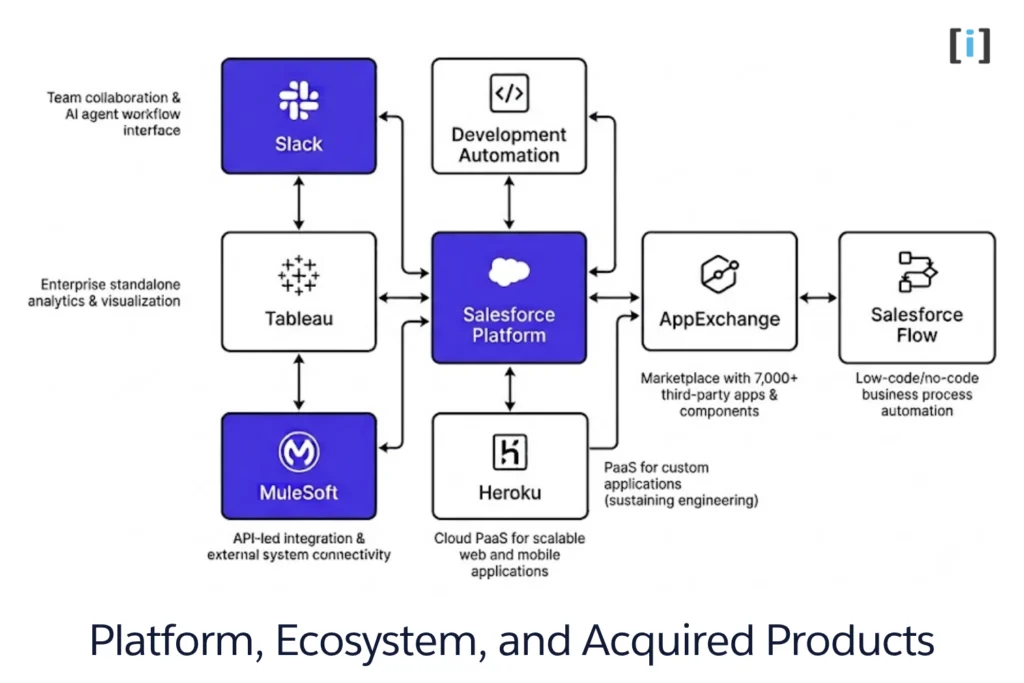
Beyond the core clouds, Salesforce’s ecosystem includes major platform tools and acquired products that serve as the connective tissue between Salesforce and the rest of your technology stack:
Slack
Team collaboration and workflow automation, deeply integrated with every Salesforce Cloud and Agentforce AI agents. Salesforce acquired Slack for $27.7 billion, and it now serves as the primary interface for cross-team communication and AI agent interactions. Slack is also replacing Quip as Salesforce’s collaboration tool.
Tableau
Enterprise data visualization and business intelligence. While CRM Analytics lives inside Salesforce, Tableau (acquired for $15.7 billion) provides standalone analytics for data from any source — including non-Salesforce systems.
MuleSoft
API-led integration platform for connecting Salesforce with external systems, databases, and third-party applications. Critical for enterprises with complex integration requirements.
Learn more about Salesforce Integration.
Heroku
Platform-as-a-service (PaaS) for building custom applications. Note: Heroku transitioned to a “sustaining engineering” model in February 2026 — it remains operational for existing customers but is no longer receiving new features or selling new enterprise contracts. Salesforce is directing investment toward the core platform and Agentforce.
Salesforce Platform (Lightning)
The underlying development platform for building custom apps, objects, automations, and interfaces using Lightning Web Components, Apex, and Flow.
Salesforce Flow
The primary no-code/low-code automation tool. Flow lets admins and developers build automated business processes — from simple field updates to complex multi-step workflows — without writing code. It is the backbone of Salesforce automation.
Read our Ultimate Guide on Salesforce Flow.
AppExchange
Salesforce’s official marketplace with 7,000+ third-party apps, components, and consulting services. It extends Salesforce functionality for virtually any use case — from document generation to e-signatures to advanced analytics.
These products are licensed separately from the core clouds.
Salesforce Editions
The two most common starting products — Sales Cloud and Service Cloud — are available in five editions. All editions except Starter Suite require annual billing.
| Edition | Price (per user/month) | Best For |
|---|---|---|
| Starter Suite | $25 | Small teams getting started with CRM (includes Sales, Service, Marketing, and Commerce basics in one package) |
| Pro Suite | $100 | Growing teams that need more automation, AppExchange apps, and custom reporting. |
| Enterprise | $175 | Mid-size to large businesses needing full customization, Apex code, and advanced integrations. |
| Unlimited | $350 | Large enterprises requiring maximum feature limits, full sandboxes, and 24/7 premier support. |
| Agentforce | $550+ | Organizations investing in autonomous AI agents, Data Cloud credits, and unmetered employee-facing AI. |
Prices are approximate and subject to change. Check Sales Cloud Pricing and Service Cloud Pricing for the latest. Actual costs will also depend on add-ons, implementation, storage, and support plans.
Our recommendation: For most businesses, Enterprise edition is the sweet spot. Below Enterprise, Salesforce restricts key customization and automation features (like Apex triggers, custom record types, and advanced workflow rules) that you will almost certainly need as your business grows. Starting on Pro Suite and migrating up later often costs more than starting on Enterprise from day one.
Salesforce Add-On Products
Beyond the core clouds, Salesforce offers add-on products that extend functionality. These are licensed separately:
Field Service
An extension of Service Cloud for managing mobile workforces — dispatching technicians, tracking work orders, managing inventory, and optimizing routes. Essential for businesses with field teams (installation, maintenance, inspections).
Digital Engagement
Connects Service Cloud to additional communication channels: WhatsApp, SMS, Facebook Messenger, and embedded web chat. Read our complete guide to Salesforce Digital Engagement to see how it works.
Marketing Cloud Account Engagement (formerly Pardot)
B2B marketing automation: lead scoring, drip campaigns, landing pages, and ROI reporting — tightly integrated with Sales Cloud. Designed for marketing teams that support a B2B sales pipeline rather than running large-scale consumer campaigns.
How the Salesforce Clouds Connect
One of Salesforce’s biggest strengths is that its products are not isolated tools — they share the same underlying platform (the Agentforce 360 platform, formerly Einstein 1 / Customer 360) and the same customer data.
Here is how they typically work together:
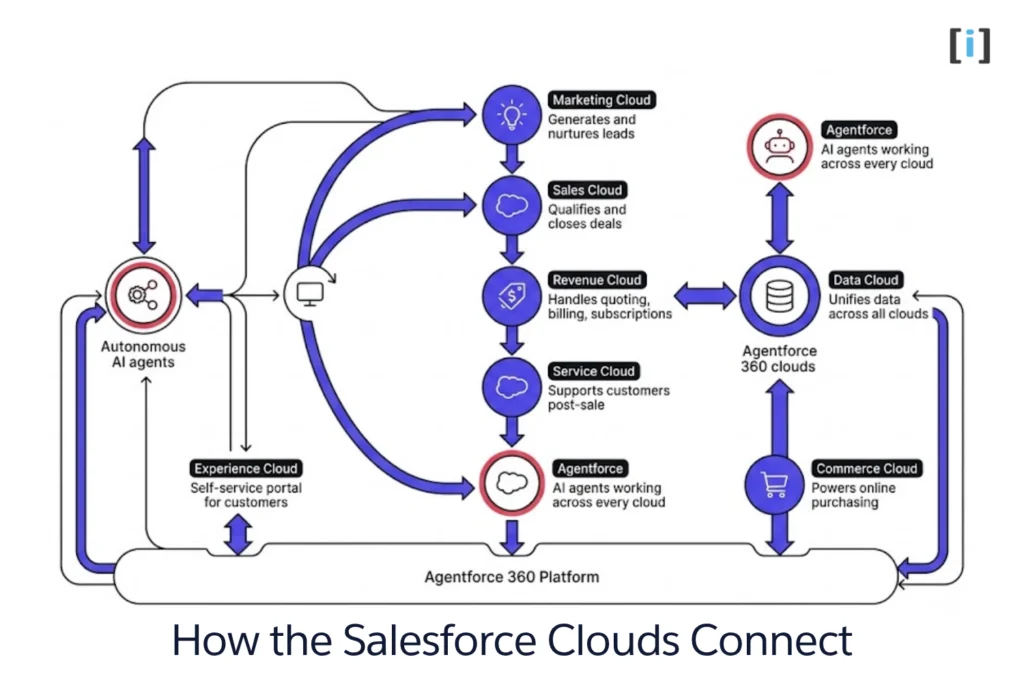
When a marketing campaign generates a lead, that lead flows into Sales Cloud. When the deal closes, Revenue Cloud handles quoting and billing, and the customer record is available in Service Cloud. If they log into a self-service portal (Experience Cloud), they see their own cases and orders. Data Cloud ties it all together with a single, real-time customer profile — and Agentforce AI agents work across every layer to automate routine tasks.
This interconnection is what separates Salesforce from using separate, disconnected tools for each function.
FAQs
What is the most popular Salesforce product?
Sales Cloud is the most widely used Salesforce product, followed by Service Cloud. Most businesses start with one or both of these before adding Marketing Cloud or other products.
Can I use just one Salesforce Cloud?
Yes. Each cloud is licensed independently. You can start with Sales Cloud alone and add Service Cloud, Marketing Cloud, or others later as your needs grow.
Do I need Data Cloud?
Not always. If your customer data lives primarily within Salesforce, the built-in reporting and dashboards may be enough. Data Cloud becomes valuable when you need to unify data from outside Salesforce (websites, apps, data warehouses) into a single customer profile.
What is Agentforce?
Agentforce is Salesforce’s autonomous AI platform. It deploys AI agents that can reason, plan, and take real actions — like qualifying leads, resolving support cases, or summarizing customer interactions — across every Salesforce Cloud. It is built on Data Cloud and the Einstein Trust Layer for enterprise safety.
What is the difference between Marketing Cloud and Account Engagement (Pardot)?
Marketing Cloud is designed for high-volume B2C marketing — email journeys, audience segmentation, social media, and advertising. Account Engagement (Pardot) is designed for B2B marketing — lead scoring, drip campaigns, and tight integration with Sales Cloud pipelines. Many B2B companies start with Account Engagement.
Which Salesforce edition should I start with?
For most businesses, Enterprise edition is the best starting point. It unlocks the customization and automation features (custom objects, Apex, advanced workflows) that you will need as you grow. Starting on a lower edition and upgrading later often costs more in the long run.
What happened to Community Cloud, Pardot, and Quip?
Community Cloud was renamed to Experience Cloud. Pardot was renamed to Marketing Cloud Account Engagement. Both products continue to function under their new names. Quip (Salesforce’s collaborative documents tool) is being retired — no new accounts since February 2026, with full shutdown by March 2027. Salesforce recommends Slack as the replacement for team collaboration.
What happened to Salesforce CPQ?
Legacy Salesforce CPQ (the managed package) reached End of Sale in March 2025. It is no longer available for new customers. CPQ functionality is now part of Revenue Cloud (Agentforce Revenue Management). Existing CPQ customers retain full support but should plan their migration to Revenue Cloud.
Next Steps
If you are evaluating Salesforce products for the first time, start with the cloud that solves your most urgent problem, choose Enterprise edition for the flexibility to grow, and build from there. You do not need to buy everything at once — every product you add connects natively.
- New to Salesforce? Start with our beginner’s guide → What Is Salesforce? A Simple Guide for Beginners
- Ready to automate? → The Ultimate Guide to Salesforce Automation
- Need lead capture? → Web to Lead in Salesforce — DIY in 4 Steps
- Comparing form tools? → Salesforce Forms: Every Option, Compared
Need help choosing the right Salesforce products for your business? Let’s talk — we help businesses implement, integrate, and automate Salesforce so every cloud works together.