
A bad Salesforce developer hire doesn’t just waste money — it sets your CRM back months. We’ve seen companies at Arrify spend 3–6 months undoing damage from a developer who looked great on paper but couldn’t handle real Salesforce projects.
The problem? Most hiring managers aren’t Salesforce specialists themselves. They don’t know what questions to ask, which certifications actually matter, or how to spot red flags before signing a contract. That’s how costly mistakes happen.
This guide covers the 10 most common mistakes companies make when hiring a Salesforce developer — and exactly how to avoid each one. Whether you’re hiring your first developer or replacing one who didn’t work out, these tips will save you time, budget, and frustration.
Quick Checklist: 10 Hiring Mistakes to Avoid
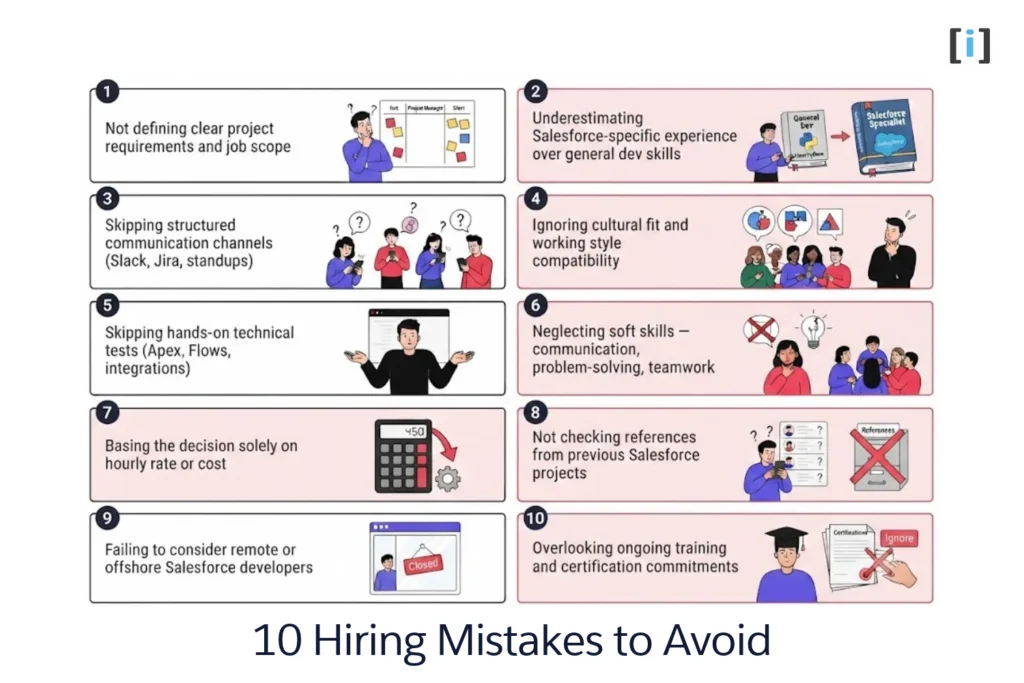
1. Not Defining Clear Requirements
Consequences of vague job descriptions: A poorly defined job description can lead to hiring someone not fit for the role. It can result in wasted resources and time, both for your company and potential candidates.
Tips for setting clear expectations: Be specific about the technical skills, Salesforce modules, and experience level you’re looking for. Detail the projects they will handle and any collaboration expected.
2. Not Establishing Clear Communication Channels
Importance of effective communication: Misunderstandings can derail projects.
Tools and strategies: Utilize tools like Slack, Trello, or Asana. Regular check-ins, both formal and informal, can keep everyone aligned.
3. Underestimating the Importance of Experience
Value of hands-on Salesforce experience: Just like any other platform, Salesforce has its intricacies. A developer with direct experience can navigate them efficiently.
Distinguishing between generalist developers and Salesforce specialists: While a general developer might be tech-savvy, a Salesforce specialist will have a nuanced understanding and insights that can be invaluable.
Not sure what to look for? Our guide on the skills required for a Salesforce developer job breaks down the must-have vs. nice-to-have competencies.
4. Ignoring Cultural Fit
Why compatibility with company culture matters: A developer who resonates with your company’s values and work ethic will be more motivated and productive.
Signs of a good cultural fit: Look for candidates who display enthusiasm for your company’s mission, ask thoughtful questions, and show adaptability.
5. Skipping Technical Tests
Importance of assessing technical skills: A resume only tells part of the story. A hands-on test can highlight a candidate’s practical skills.
Recommended tools and methods for testing: Consider using platforms like HackerRank, or give them a real Salesforce problem to solve during the interview.
A good practical test? Ask the candidate to build a simple Salesforce automation — a trigger with a test class, or a Flow that handles a real business scenario. Their approach tells you more than their resume.
6. Neglecting Soft Skills
Value of communication, teamwork, and problem-solving: Soft skills often determine how well a developer will work with your team and understand business needs.
Methods for evaluating soft skills: Behavioral interview questions, Ask how they handled difficult situations or worked with non-technical team members.
7. Basing Decisions Solely on Cost
Pitfalls of hiring based on rates alone: Opting for the cheapest candidate might lead to subpar work and more costs down the line.
Balancing cost with quality: Consider the long-term value a developer brings. Sometimes, paying a premium upfront can save costs in the long run.
If budget is tight, consider offshore Salesforce development — rates in India start at $25–$50/hr compared to $60–$90+/hr in the US. Just make sure the vendor has strong project management practices and clear communication protocols.
8. Not Checking References
Why previous employers’ feedback matters: Past behavior is often the best predictor of future behavior.
Tips for conducting effective reference checks: Ask specific questions, seek patterns in feedback, and ensure you’re speaking to direct supervisors when possible.
9. Overlooking Ongoing Training and Certification
The evolving nature of Salesforce: With frequent updates and new features, staying current is necessary.
Ensuring developers are up-to-date: Prioritize candidates who show a commitment to continuous learning through certifications and training.
10. Failing to Consider Remote Developers
The rise of remote work: Remote work has opened up access to talent worldwide. By only looking locally, you might miss out on great developers.
Benefits and challenges: Remote developers can bring different perspectives and skills. However, you need to ensure good communication and set clear expectations for availability and project updates.
Platforms like Upwork and Toptal are popular, but working with a vetted freelance Salesforce developer or a dedicated partner like Arrify gives you more accountability and project continuity.
Learn more about how to hire a Salesforce developer.
Conclusion
Avoiding these mistakes won’t guarantee a perfect hire — but it dramatically increases your odds of finding a Salesforce developer who delivers real results. The key takeaways: define your requirements upfront, test technical skills hands-on, check references thoroughly, and don’t let cost alone drive the decision.
If you’re not sure where to start, hire a Salesforce expert from a team that’s done this before. At Arrify, we’ve helped businesses across industries find, vet, and onboard Salesforce developers — whether for a single integration project or a full CRM buildout.
Need help with your Salesforce project? Check out our Salesforce services or get in touch to discuss your requirements.
FAQs
How much does it cost to hire a Salesforce developer?
Rates vary widely depending on the hiring model. In-house Salesforce developers in the US typically cost $60–$90+/hr (plus benefits and overhead). Freelancers range from $40–$150/hr depending on the platform and experience. Offshore Salesforce development teams in India charge $25–$50/hr, while nearshore teams in Latin America run $40–$85/hr. The right option depends on your project scope, timeline, and how much oversight you can provide.
What certifications should a Salesforce developer have?
At minimum, look for Salesforce Certified Platform Developer I (PD1) — it validates core Apex, SOQL, and Lightning Component skills. For senior roles, Platform Developer II (PD2) and Salesforce Certified Administrator are strong signals. If you’re hiring for specific clouds, certifications like Sales Cloud Consultant or Service Cloud Consultant show specialized expertise. Check the candidate’s Trailhead profile for recent activity — it shows whether they’re keeping their skills current.
Should I hire a freelance or full-time Salesforce developer?
It depends on the work. For a one-time implementation, data migration, or specific integration, a freelance Salesforce developer or agency is usually more cost-effective. For ongoing administration, feature development, and long-term CRM strategy, a full-time hire makes more sense. Many companies start with a freelancer or consultancy like Arrify and transition to in-house once the Salesforce org is stable.
How do I test a Salesforce developer’s skills before hiring?
Go beyond resume screening. Assign a practical task: ask them to build a simple trigger with a test class, design a Flow for a real business scenario, or troubleshoot a broken integration in a sandbox environment. Platforms like HackerRank offer Salesforce-specific assessments. Also ask them to walk through a past project — how they approached it, what tradeoffs they made, and how they handled scope changes. That tells you more than any certification badge.
What’s the difference between a Salesforce developer and a Salesforce admin?
A Salesforce admin manages the platform using declarative (clicks-not-code) tools — creating reports, managing users, building Flows, and configuring objects. A Salesforce developer writes custom code (Apex, LWC, Visualforce) for complex business logic, integrations, and features that go beyond what declarative tools can handle. Most growing orgs need both: an admin for day-to-day operations and a developer for custom builds and integrations.


